
kfbnoblaeffngbgfgijejmjdjdohnoib
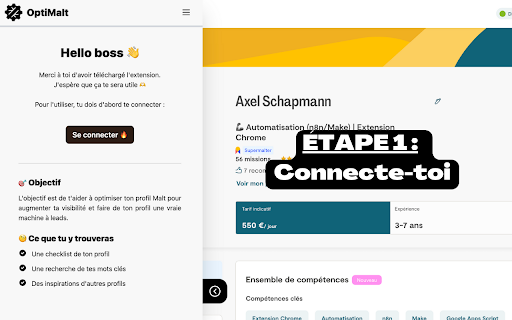


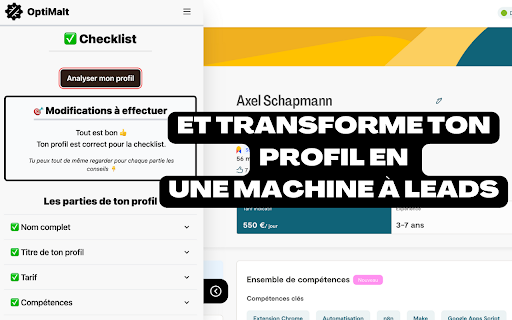
Turn your Malt profile into a lead-generating machine by optimizing it ARE YOU A FREELANCER ON MALT — BUT YOUR PROFILE DOESN'T SHOW UP IN SEARCH RESULTS? You spend hours crafting your bio, listing your experience, fine-tuning your skills… yet your competitors keep appearing before you in search. The problem isn't the quality of your profile. It's that you're optimizing for the wrong goal. On Malt, you have two challenges to tackle: 1️⃣ Appear in search results — satisfy the Malt algorithm 2️⃣ Convince your future client — turn profile visits into conversations Most freelancers focus only on the second goal. The result: a convincing Malt profile that nobody ever sees. No visibility, no leads, no missions. OptiMalt is a Chrome extension that analyzes your Malt profile in real time based on the algorithm's criteria. It gives you a visibility score, pinpoints your weak spots, and provides clear, prioritized actions to improve your ranking in Malt search results. ✅ Instant Malt profile audit — one click, directly from your browser ✅ Personalized visibility score — see exactly where you stand against Malt's algorithm criteria ✅ Concrete, prioritized recommendations — know what to fix first for the fastest impact ✅ Section-by-section analysis — title, skills, bio, availability, client reviews, daily rate ✅ Works for all Malt profiles — developer, designer, consultant, project manager… 🧠 WHY THE MALT ALGORITHM IS THE KEY Malt works like an internal search engine. Clients type in a skill or job title, and the algorithm decides which profiles to show first. If your profile doesn't meet the right criteria, you simply don't appear — no matter how well-written your profile is. OptiMalt helps you understand those criteria and meet them, without guessing or testing blindly. 🎯 WHO IS IT FOR? 👉 Freelancers new to Malt who want to start on the right foot 👉 Experienced freelancers whose profile has plateaued and stopped generating leads 👉 Any independent professional who wants to turn their Malt profile into a lead-generating machine 🤑

PhantomBuster
Retrieve session cookies and boost LinkedIn prospecting with contact saving and CRM sync via PhantomBuster. Use PhantomBuster seamlessly by installing our Chrome browser extension. The extension primarily enhances your LinkedIn prospecting workflow and simplifies your experience: Here's what the web extension allows you to do: 1. Automatically retrieve session cookies for websites you are connected to when logging into PhantomBuster.com. Simply click "Connect to [website name]" to fill the session cookies input field. 2. If the user opens the side panel and navigates to a LinkedIn profile page, the extension displays detailed contact information in the browser’s side panel. 3. If the user clicks ‘Get info’ in the side panel, verified emails and phone numbers can be requested through PhantomBuster’s integration with https://www.dropcontact.com/ and https://www.icypeas.com/. 4. If the user clicks “Save contact” in the side panel, the obtained LinkedIn contact information is saved directly to their PhantomBuster account. 5. If the user has connected their HubSpot account to PhantomBuster and clicks “Save contact” in the side panel, the same contact information is also synchronized with their HubSpot account via PhantomBuster’s servers. If you have any questions about this extension, feel free to contact our support team via email at support@phantombuster.com or through our live chat. - 1.3.9 update: - Added support for reddit.com. - 1.2.0 update: - Added new functionality for alpha users. - 1.1.16 update: - Added support for X - 1.1.7 update: - Remove the Shift+Click on the button to open a new session - 1.1.5 update: - Updated extension assets - 1.1.4 update: - Extension's button redirects to the dashboard - 1.1.3 update: - Added support for TikTok - 1.1.1 update: - Small css fix - Shift+Click on the button opens a new session - 1.1.0 update: - Added support for Quora and Pinterest - New UI - Better Zaps (Zapier) configuration page support - 1.0.10 update: - This version makes the extension working on the brand new PhantomBuster UI - 1.0.9 update: - This extension release handles correctly new PhantomBuster APIs configurations. Affected PhantomBuster APIs: Session Cookie Tester The session cookie button is now updated when you change the network select choice. 1.0.8 can only handle the very first choice of the select. - 1.0.8 update: - Support added for Zaps (Zapier) configuration page. - 1.0.7 update: - Added support for GitHub, Intercom and Uber APIs.

Scheduled Analytics
Get the stats of your LinkedIn posts into Notion Get your LinkedIn posts analytics into Notion. Scheduled is the chosen Notion integration tool used by soloproneurs, ghostwriters and social media teams to publish and track their LinkedIn posts from Notion. - Be organized by centralizing all your content in Notion - Be disciplined and efficient by building a content process creation in Notion - Never leave Notion to publish your LinkedIn posts - Get your LinkedIn posts analytics in Notion automatically (1) Use this extension to synchronize your Scheduled account with your LinkedIn profile. (2) Connect your Notion database with your Scheduled account. (3) Test and activate your reporting to get your stats automatically into Notion. Here is the data you'll have into Notion about your LinkedIn posts: - The content of the post - The publication date - The format - The link of the post - The number of impressions, reactions and comments Contact the developer if you have any questions. To use this extension you'll need to sign up (or sign in) to Scheduled. Scheduled will use your LinkedIn session to get only your LinkedIn posts.

Kaspr: B2B Phone Number and Email Finder
Get access to your prospects' phone numbers and emails, instantly for free With the Kaspr Chrome Extension you can access an accurate B2B database of over 500 million phone numbers and emails through LinkedIn and Sales Navigator. Kaspr fits seamlessly into your current workflow, integrating with CRM tools like Salesforce, HubSpot, and many more… ⚙️How Does Our Chrome Extension Work? Kaspr is your plug-and-play tool designed to turbocharge your LinkedIn prospecting and qualify leads in no time. Getting started is simple, and the best part? You can connect with the right buyers directly on LinkedIn or Sales Navigator - free to start! Here’s how it works: - Install the Chrome Extension and connect it with your LinkedIn account. - Browse LinkedIn or Sales Navigator to find your target accounts and dream leads. - Open the Kaspr Chrome Extension while on the LinkedIn profiles or search list, enrich your prospects' accurate contact data, and jumpstart your outreach! • Chrome Extension: Instantly reveal accurate B2B phone numbers and emails from LinkedIn profiles, groups, and events. • Data enrichment: Use our Sales Automation Workflows and Bulk Enrichment features to access a vast European-centric database in mass. • Integrations: Streamline exporting leads to your CRM or call them directly from the Kaspr dashboard via Aircall and Ringover. • API: Enrich your systems using Kaspr’s API, keep your database up-to-date, and bulk enrich incomplete or stale contact details. 🔒Your privacy We collect basic information about you, similar to what you’d hand out on a business card. For more details, please review our Privacy Policy: https://www.kaspr.io/privacy-policy.

Tarss
Filter your LinkedIn feed in just a few clicks
