
keomkegfndepkhgeeediaeemebnnjafc
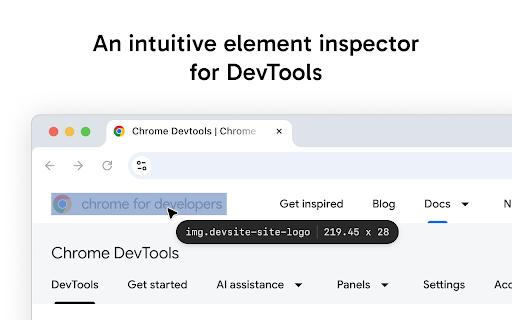


Enhanced element inspection with cursor-driven workflow. Visual highlighting, measurements, and DevTools integration. Pointer enhances Chrome's built-in element inspector with a persistent, intuitive DOM navigation tool that stays active while you work. Unlike the default DevTools inspector that turns off after selecting an element, Pointer keeps running so you can quickly inspect multiple elements without constantly reactivating the tool. — Always-On Element Selection - Navigate the DOM using arrow keys or click to select elements. The pointer stays active between selections. — Visual Box Model Display - See margin, padding, and content areas with color-coded overlays. — Element Information - Hover over any element to see its tag name, dimensions, CSS classes, and behavioral badges (flex, grid, media, scroll containers and event listeners). — Built-In Ruler - Hold Alt to see pixel distances between selected and hovered elements. — DevTools Integration - Selected elements automatically sync with Chrome DevTools Elements panel. The inspector scrolls elements into view and maintains selection state when DevTools is reopened. — Pass-Through Mode - Hold "`" (backtick) to temporarily interact with page elements normally while keeping the inspector active. — DOM Manipulation - Cut, copy, paste, delete, and duplicate (Cmd/Ctrl+D) elements directly in the page. Full undo/redo support. — Inline Attribute Editor - Press "/" to add attributes, classes, and properties to selected elements without switching to the DevTools elements panel. — JavaScript Console - Press ";" to execute JavaScript commands with the selected element as "this" context. Perfect for quick DOM modifications and debugging. — Selector Search - Press "f" to enter find mode and highlight all elements matching a CSS selector in real-time. Navigation — Arrow Keys - Navigate between elements (up/down for siblings, left for parent, right for children). Inspection Tools — Alt - Show measurement rulers between selected and hovered elements — ` (backtick) - Hold to enable pass-through mode so you can interact with the web page

Developer DOM Inspector
A powerful, Chrome DevTools-style DOM inspector that helps developers and QA engineers visually analyze, debug, and understand web page layouts with precision. 📦 VISUAL BOX MODEL INSPECTOR - Color-coded margin, padding, border, and content layers - Live overlay visualization while hovering - Instant box model calculations 🎨 SMART CSS FILTERING - Shows only non-default, meaningful CSS properties - Groups properties by category (Layout, Typography, Flexbox, Grid) - Toggle between filtered and complete CSS views - Hex color codes for easy copying - Syntax-highlighted, DevTools-style formatting 🔄 FLEXBOX & GRID VISUALIZATION - Visual direction indicators for flex containers - Grid line overlays for grid layouts - Auto-detection of layout types 📱 RESPONSIVE DESIGN TESTING - Test multiple device viewports (iPhone, iPad, Desktop) - Custom viewport dimensions - Zoom controls and rotation - Side-by-side comparison mode 📏 DISTANCE MEASUREMENT TOOL - Measure precise pixel distances between elements - Horizontal and vertical spacing calculations - Visual measurement lines with arrows - Overlap detection ⬚ ELEMENT OUTLINE MODE - Color-coded outlines for all page elements - Quick visual hierarchy understanding - Different colors for divs, semantic HTML, media, forms, etc. 🗂️ INTELLIGENT ELEMENT SELECTION - Multiple element tracking - Breadcrumb navigation through DOM tree - Click breadcrumbs to inspect parent elements - History navigation (undo/redo for inspected elements) 🚀 PERFECT FOR ✓ Front-end Developers - Debug layouts and CSS issues quickly ✓ QA Engineers - Verify design implementation accuracy ✓ UI/UX Designers - Inspect spacing, typography, and colors ✓ Web Developers - Learn from other websites' CSS ✓ Students - Understand how websites are built 1. Click the DOM Inspector icon in your toolbar 2. Choose from the floating menu: • 🔍 Inspect Element - Click any element to analyze • ⬚ Outline All - See page structure at a glance • 📏 Measure Distance - Calculate spacing between elements • 📱 Responsive Mode - Test different screen sizes 3. View detailed CSS information in the panel 4. Copy CSS with one click 5. Navigate element hierarchy via breadcrumbs - Lightweight and fast - No page reload required - Works on any website - Clean UI that doesn't interfere with your work - Easy cleanup with one click Perfect for learning CSS! See exactly how professional websites implement: - Flexbox and Grid layouts - Responsive designs - Typography systems - Spacing scales - Color schemes - Only activates when you click the icon - No data collection - No external requests - Works completely offline - Open source and transparent Unlike browser DevTools: ✓ Simpler, focused interface ✓ Visual box model overlays ✓ Smart CSS filtering (no noise) ✓ Built-in responsive testing ✓ Distance measurement tool ✓ Outline mode for quick understanding ✓ No learning curve Found a bug or have a suggestion? We'd love to hear from you! Visit our support page or leave a review. Made with ❤️ for web developers worldwide. Install now and start inspecting smarter!

ElemPick - A Selector XPath Element Picker
A simple element picker that can generate CSS Selectors and XPath expressions. Important I want you to be 100% happy with ElemPick! If something isn't working right, or if there's a feature you think is missing, please open an issue on GitHub and give me a chance to help before leaving a review: https://github.com/sixcious/elempick/issues About ElemPick is a simple element picker that can generate a path (Selector or XPath) to an HTML element on the page. Click on the toolbar icon, then click on the element you want on the page, and then click the Clipboard Button above the path in the small UI Window to copy it. Features • Generates a CSS Selector or XPath Expression for an element on the page • Can also generate JS Paths (JavaScript Paths) • Dual algorithm support: Use ElemPick's internal algorithm or Chromium's • Context Menu Option available so ElemPick can be one right click away • DOM Traversal Buttons to allow you to navigate to a nearby element • Limited support for elements inside Shadow DOM and Same-Origin Iframes • Options: Optimize paths and choose your preferred quote style • User Interface: A simple UI made with Material Design and Lit Privacy Policy ElemPick does not track you. It does not use analytic services. It does not collect any data from your device or computer. All your data is stored locally on your device. Your data is *your* data.

Element Inspector
Hover to inspect CSS properties of any element. Ideal for developers debugging and optimizing web styles. Element Inspector Hover to Instantly Reveal CSS Properties & Copy Styles Like a Pro! A must-have tool for front-end developers, designers, and debuggers. Effortlessly inspect element styles, copy full CSS rulesets, and optimize web layouts—no DevTools required. Perfect for analyzing complex sites, frameworks, and iframe-embedded content. Key Features: ✅ Real-Time CSS Inspection Hover over any element to instantly see its ID, classes, and computed styles. Visual highlight shows exact boundaries of hovered elements. ✅ One-Click CSS Code Export Copy an element’s full CSS ruleset (including inherited properties) with a single button. Paste directly into your code editor for rapid prototyping or debugging. ✅ Iframe & Dynamic Content Support Works seamlessly inside embedded iframes and AJAX-loaded components. ✅ Keyboard Shortcuts Toggle inspection mode instantly with Ctrl+Shift+S (customizable via Chrome settings). ✅ Persistent Preferences Remembers your activation state across sessions and pages. ✅ Zero Data Collection All processing happens locally—no tracking or external servers. Why Developers Love It: Speed Up Debugging: Identify layout issues faster than DevTools’ manual element picker. Simplify Collaboration: Share precise CSS rules with team members via clipboard. Lightweight: Uses minimal memory compared to full DevTools sessions. Install now and supercharge your CSS workflow! 🛠️

Focus: The Elements - DOM Inspector & Editor
DOM Inspector & Editor, inspect and edit HTML element styles directly on any page. It is a lightweight DOM Manipulation Tool and powerful browser extension that helps developers, designers, and curious learners inspect and edit any webpage in real time. With a simple hover or double-click, you can instantly view detailed information about HTML elements such as width, height, font size, font family, font weight, colors, margins, padding, and background. The inline editor lets you change styles directly on the page with live updates, making it easy to experiment, debug, and customize without touching the source code. Whether you’re testing layouts, fine-tuning typography, or exploring how websites are built, this extension gives you a fast and intuitive way to take full control of the DOM.
