
kefkbfddajfgbefelcndhkmafcejcgbc
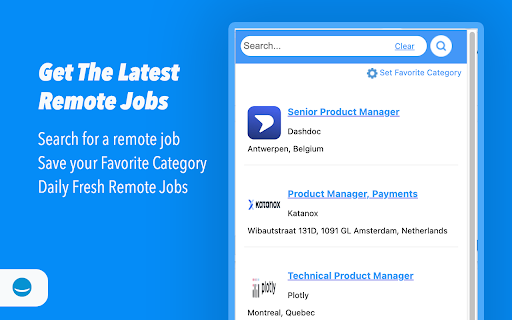
Fetches the latest job listings from happyremote.work Introducing the ultimate job search companion - our Google Chrome extension! With this lightweight and easy-to-use tool, you can access hundreds of remote jobs with just a few clicks. Whether you're searching for full-time or part-time opportunities, our extension provides you with a wide range of options to choose from. One of the key features of our extension is the ability to set your favorite job categories. This means you can easily filter the available jobs based on your preferred industry or skillset. You no longer need to spend hours scrolling through job boards or sifting through irrelevant listings - our extension does the hard work for you.

Remote Job Location Checker
Check if job postings have geographic restrictions for remote work. ### Why Did I Create This Chrome Extension? As I searched for remote jobs without location restrictions on LinkedIn, I found it time-consuming to scroll through each job post and check for location constraints. To save time and streamline the process, I developed the Remote Job Location Checker Chrome extension. This tool quickly identifies if a job is location-restricted, allowing for a more efficient job search. I decided to make it available online, hoping it would help others facing the same challenge. ### Steps to Use the Extension: 1. **Install the extension from the Chrome Web Store.** 2. **Search for jobs on LinkedIn's job search page.** The extension will automatically add a label to each job post: "Remote From Anywhere" or "Location Restricted". 3. **Click on any job in the job list on the left side.** The label will help you easily determine if the job allows remote work from any location.

Job Finder
Search for jobs across your favourite Job Portals with ease! Job Finder Chrome Extension: Your Gateway to Career Opportunities! Looking for your next job? The Job Finder Chrome Extension is here to simplify your job search! Designed for efficiency and ease of use, our extension allows you to quickly explore job opportunities across different countries and cities from top job platforms like LinkedIn, Seek, Indeed, and Naukri. Key Features: Global Job Search: Easily search for jobs in various countries and cities. Select your desired role, country, and city to discover relevant job listings tailored to your preferences. Save Your Searches: Keep track of your job search with Auto-saved queries for future reference. Quickly revisit your searches to stay organised and focused on your career goals. User-Friendly Interface: The intuitive design ensures a seamless experience. Select countries and cities with ease, and view your saved searches in a clean, accessible format. Instant Job Results: Get real-time job listings based on your input. Explore opportunities from multiple sources and click through to apply to relevant jobs. Why Choose Us? The Job Finder Chrome Extension is perfect for anyone seeking employment, from recent graduates to seasoned professionals. Whether you’re looking for a new role in a different country or just want to keep track of opportunities in your local area, our extension provides the tools you need to succeed. Start your journey to a new career today—install the Job Finder Chrome Extension and unlock a world of job opportunities!

Worksync.AI - Job Search Companion
The Job Search Companion 🚴♂️ aims to drastically reduce the time you spend on job applications by using AI automations. We believe you should spend your time preparing and smashing 💥 interviews not filling out repetitive forms 📑. - Apply To Dozens Of Relevant Jobs In Seconds With 1 Click 🚄 ApplyBot searches and applies to relevant LinkedIn EasyApply jobs with 1 click. It will continue applying until you stop it, or until it reaches the end of the search results. If you want to make sure its responses are correct, control the speed in the settings. Apply to the newest job opportunities efficiently and effortlessly. - Autofill Job Applications With Artificial Intelligence 📝 Avoid repetitive applications and burnout with A.I. autofill. Our autofill will write accurate, high quality responses in your application, increasing your chances of getting a job offer with next to no effort. - Send Standout Applications With A.I. Prompts 👏 Our chat interface comes with pre-made prompts that quickly creates or adapts a cover letter. Or, use it to get answers to any question. Simply choose a prompt that matches your goal, and our AI-powered tool will provide you with helpful responses based on your information and industry standards.

USAJobstimization
Helps with searching and applying for jobs! Helps search and apply for jobs on USAJobs. It allows you to minimize or remove job postings from the search list. I also allows for Infinity Scroll! All the jobs -- on one page! USA Jobs is actually a great website. But there were some minor quality of life issues that were vexing me. So I made a Chrome Extension to make the website more friendly. The Chrome extension saves everything locally and doesn't store or track any of your usage. USA Jobstimization adds some great features to the USA Jobs website. Here is a list of what it can do: 1. Adds Infinite Scroll. No more having to hit "next page" to see the next page of jobs. This loads all of the jobs for your search dynamically so you can just keep scrolling down to see them. 2. Adds plain text filtering!! No more IRS or FAA jobs if you don't want to see them! Just type in FAA, or any other word/phrase, and any job that has that word/phrase is instantly removed from all job searches! 3. Remove / Minimize Jobs. If there is a job that keeps appearing in your searches that you don't ever want to see again you can hit the "remove" button to block that job from showing up. Don't worry... you can click on the "view removed jobs" button to view all of the jobs you removed and you can unremove them with the click of a button. 4. Auto-minimize jobs! This feature cleans up the formatting of the job list to make the jobs more compact and easier to read. You can minimize individual jobs or hit the "Toggle Minimize Jobs" button to automatically minimize jobs!
