
keadilbdikcabnnhconaenobdikehgbm

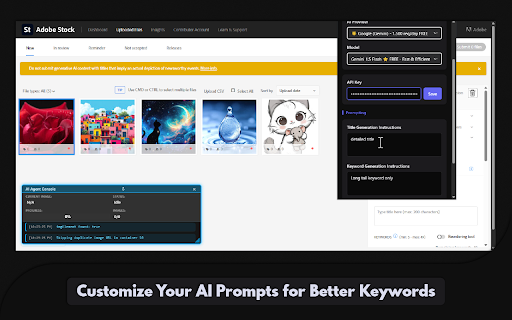


Automate image tagging and titling within the Adobe Stock contributor portal using AI Supercharge Your Adobe Stock Workflow with the AI Agent — Now Just $10 (Limited-Time Offer!) Eliminate the repetitive work of titling and keywording your Adobe Stock uploads. The Adobe Stock AI Agent is a powerful Chrome extension that streamlines your contributor workflow using advanced AI, saving you hours of manual work while improving your content's visibility. Designed with a sleek, Apple-inspired interface, the AI Agent combines smart automation with deep customization — helping both new and experienced contributors scale their portfolios with ease. 🔑 Key Features & Benefits 🚀 AI-Powered Metadata Generation Automatically generates accurate, relevant titles and keywords for your images using advanced image analysis. ✍️ Seamless Form Filling Instantly fills metadata fields within the Adobe Stock Contributor portal with a single click — no copy-pasting required. 🧠 Custom Prompt Support Guide the AI’s tone and vocabulary by writing your own instructions for title and keyword generation. 🔢 Control Keyword Quantity Choose the exact number of keywords you want — from 10 to 49 — for optimal metadata control. 🌐 Choose Your AI Provider Switch between major AI services in one click — the extension auto-adjusts model settings and fields for you. 🔧 Smart Automation Suite (Updates) Enhance your workflow with intelligent automation: ✅ Auto File Type Selection – Automatically sets your preferred default (Photo or Illustration) ✅ People/Property Selector – Auto-selects "No" when applicable for streamlined review ⚡ Performance & Stability Enhancements ⚡ Scan-Once Engine (NEW) Ultra-fast DOM scanning processes your entire upload queue instantly — no lag or freezing, even on large batches. 🔔 Completion Bell (NEW) Hear a gentle chime when your batch finishes — perfect for multitasking while the AI works. 🛠️ Improved Stability (NEW) Centralized state handling, improved message routing, and resilient error management ensure smooth operation at scale. 🧹 Clean, Efficient Backend Debug mode toggle, minimal console logging, and a single polling loop keep things fast and developer-friendly. 🎨 Modern, Intuitive Interface Clean, dark theme with neon blue highlights Built-in live console overlay displays real-time progress and feedback 🔒 Secure, Local-Only Key Handling Your API keys are stored securely on your device and never sent to third parties. ⏱️ Reliable Batch Processing Adaptive timing and built-in fail-safes ensure smooth handling of large image uploads. 🚀 How to Get Started Install the Adobe Stock AI Agent from the Chrome Web Store. Open the extension and go to the Advanced tab. Select your AI provider and enter your API key. Customize prompts and other automation settings. Upload your images to Adobe Stock. Click Start Processing and let the AI Agent do the rest. 💡 Why Use the AI Agent? ⏳ Save Time – Automate time-consuming metadata entry 🧠 Improve Quality – Get consistent, relevant, search-friendly tags and titles 📈 Boost Discoverability – Increase the chance your images are found 🔐 Your Privacy Matters All processing happens on your device. Your images are analyzed in real-time — nothing is stored or shared. API keys remain secure and local. Take your Adobe Stock submissions to the next level. Try the AI Agent today and experience the difference intelligent automation can make.

Whisk Automation for bulk image generation & Auto prompt for Whisk AI
Bulk AI image generation for Google Whisk AI. Auto prompt processing & local asset capture to scale your synthetic imagery workflow. Whisk Automation: Bulk Image Generation & AI Prompts Whisk Automation: Get 30 Days Free! Bulk generate images in Google Whisk, automate AI prompts, and export assets instantly. The ultimate tool for AI batch processing. Tired of manual, one-by-one image creation? Whisk Automation is the power user’s bridge to industrial-scale production. We fix the "slow generation" problem with an intelligent Google Whisk auto downloader and AI prompt generator, allowing you to create and export thousands of assets for Etsy, eCommerce, or Microstock sites with zero manual effort. 🎁 Exclusive Offer: 30 Days Risk-Free! Experience the full power of professional AI automation. Install today and get 30 days of unlimited access to our batch processing, auto-downloading, and file conversion features for free. 🛠️ Key Features for High-Volume Creators Whisk AI Batch Processing: Don't waste time on single clicks. Upload a CSV or a prompt list to generate multiple images at once in Google Whisk. Google Whisk Auto Downloader: Say goodbye to "Right-Click Save As." Our engine automatically detects every generation and initiates a bulk export directly to your drive. Automate Google Whisk Prompts: Our "Human-Mimic" timing patterns automate your workflow using natural delays to stay within rate limits and keep your account safe. Real-Time Queue Dashboard: Monitor your production line live. Track progress, remaining prompts, and success rates from a unified dashboard. Background Auto-Recovery: If your browser crashes or the page refreshes, Whisk Automation automatically resumes your batch right where you left off. Multi-Format Image Export: Instant conversion. Save your bulk exports as PNG, JPG, or WebP (optimized for web speed and SEO). Whisk AI for Power Users: Includes professional-grade smart compression and metadata tagging, perfect for studios and agencies. 🎨 Who is Whisk Automation Built For? Etsy Shop & eCommerce Owners: Create hundreds of high-quality vector designs, clip art, or product mockups in minutes. Microstock Site Contributors: Dominate Adobe Stock and Freepik by bulk generating and exporting assets in half the time. Marketers & Designers: Rapidly iterate on A/B test ad creatives and social media visuals. Developers & Founders: Speed up your MVP development by automating all UI assets and placeholders. ❓ Frequently Asked Questions (FAQ) Is the 30-day free trial really unlimited? Yes! For your first 30 days, you get full access to all premium features, including bulk image generation and the auto prompt generator, so you can experience the workflow before you commit. How do I generate 100 images at once? Simply open our extension, paste your list into the Whisk AI batch processor, and click start. The tool will handle the prompts and the bulk export automatically. Will this keep my account safe? Absolutely. We use a natural timing engine to automate Google Whisk prompts safely, ensuring your usage patterns remain human-like to avoid rate limits. Can I export to WebP format? Yes. You can choose your output format (PNG, JPG, or WebP) during the setup, making it easy to create lightweight images for your website. 📥 Get Started in Seconds Install Whisk Automation from the Chrome Web Store. Claim your 30-day free trial upon launch. Start your first batch and watch your library grow automatically.

AI Photo Editor
Use AI Photo Editor app as an AI picture editor and image changer with prompt to edit photo and change text in image 🥱 Are you tired of looking for an AI Photo Editor with prompt functionality in a vast variety of photo editing apps? Your quest is over, as this simple yet effective chrome extension will cover all of your needs: Quick, simple and precise ai editor allows you to swiftly make changes to your picture with a simple text prompt. Just type in what you expect and get the results in mere seconds! Nano banana image editing allows you to iterate and make several changes, one after another. Once you are happy with the result, just download the final version 🙌 🖼 Here’s how to get started in three simple steps: 1) Download the AI Image Editor extension and pin it in the extensions’ bar 2) Click on the app icon to open ai picture editor. Just upload your picture and start changing it with a prompt. 3) Right-click on a picture on any website to take it directly into the photo Ai editor! ⌨️ Make changes to a photo using a simple prompt, just type what you want to get and ai Image Changer will do it for you! 📝 With photo editor ai you can easily edit text from pictures, delete it or add new lines. 🔄 Take your last result and continue working with it. Set your imagination free with easy iterations! 🔙 History helps you go several steps back, just use Undo and Redo buttons in google ai photo editor. 🌐 Take pictures from the webpage with right click on an image to take it directly into the app. ✅ Final version is always available for you to download from AI Photo editor app. ❗ Why use Ai image editor? Create on the go. Iterate until satisfied. Change text in image. Improve the quality of your photos. Get your time back. 💎 The most impactful use cases for ai photo editor with prompt: ▶️ Content creation: whether creating videos or making infographics, this AI Photo editor app provides you with easy and quick results. 👍 SMM upgrade: making engaging posts has never been easier, since ai Photo Editor with prompt based functionality will help you iterate img to img changes and create a decent post. 📸 Improved photography: apply filters, crop image, make the lighting different, get rid of annoying artifacts and improve quality of your pictures with our AI auto photo editor for photography. 😎 Avatar generator: take your selfie, edit photo with ai and make a perfect portrait for your social media profiles and messengers by switching your clothes, posture, look and much more! 🔠 Copyrighting: you can change text on a picture, delete it completely or add some new lines to new places by asking the ai editor photo to do so. 🛒 E-commerce product placement: choose product background, add colors, edit the look of the model, make it appealing and believable, no limits for your brand with this photo editing app. 📢 Marketing buddy: Ai Photo Editor page will get your images for ads just right within minutes by simply describing what you want to see on them, artificial intelligence Image Editor will do the rest. 1️⃣ Click the extension button to navigate to the ai photo editor page; 2️⃣ Upload the picture you want to enhance, or just find the needed photo on the web, right-click it and select the Edit option; 3️⃣ Crop the picture to get the desired aspect ratio; 4️⃣ Type in your prompt and hit Apply; 5️⃣ Watch Photo Editor AI do its magic and relax; 6️⃣ Reiterate by clicking continue and writing a new prompt. Undo the result with a single click if needed; 7️⃣ Download the final result! ❓How to access ai photo editor page? 💡Just use the extension, or use right click on the picture in browser to take it directly into the app! ❓How to use the extension? 💡Sure, no problem with that. Upload the image, crop it and type what changes you want to achieve. Once happy with the result, simply download the file. ❓How do I install the extension? 💡Click Add to Chrome button and follow the instructions to get google ai photo editor. ❓How to make changes to the picture? 💡Just describe what you want to see and let AI edit photo for you! ❓Is prompt hard to write? 💡Not at all. Just let your imagination run wild and simply describe what you wh\ant to see. ❓Can I do a step back for the bad results? 💡Certainly, just use the undo button. ❓Why choose ai Photo Editor prompt extension? 💡A number of reasons: Easy Ai image to image changes; Quick Edit text from picture function; Control over changes with history and Undo Redo buttons; Cozy interface; Quick results. 🚀 Use new technologies to go to the next level. 👆🏻 Click Add to Chrome button to start implementing the power of Ai photo editors today!

Autokeyworder: AI Metadata for Stock Photos
Autokeyworder fills every form field on your upload page automatically. Titles, keywords, categories, and descriptions, generated by AI, typed into the right fields, and saved. Works inside Adobe Stock, Shutterstock, Zedge, Displate, and TeePublic. No CSV exports. No copy-paste. No tab switching. Try it free: 10 credits on signup (no credit card), plus 5 free Adobe Stock or Shutterstock analyses every single day inside the extension — forever, no expiry. The math: 100 images keyworded manually at 3 minutes each = 5 hours. 100 images with Autokeyworder at 5 seconds each = 8 minutes. HOW IT WORKS 1. Navigate to your upload page on any supported platform. 2. Click "Process All" in the extension popup. 3. Titles, keywords, categories, and descriptions fill themselves. 4. Move on. The next batch is already analyzed and waiting. WHAT SETS IT APART - End-to-end form automation: Every other keywording tool stops at a CSV file or your clipboard. Autokeyworder types metadata into every field and saves it, directly inside the upload portal. Zero manual steps. - Video keywording: The only tool that keywords stock video. 5 frames extracted across the timeline. Motion, camera movement, and scene progression detected automatically. Works on Adobe Stock and Shutterstock. - 5 platforms, platform-specific prompts: Adobe Stock (45 keywords), Shutterstock (50 keywords), Zedge wallpaper tags (10 tags), Displate keywording (tags + description), TeePublic (tags + title). Each platform gets its own AI prompt tuned to that marketplace's taxonomy. - Automatic category selection: Picks from each platform's full category tree without manual dropdown browsing. - Parallel prefetch: While one image fills, the next 10 analyze in the background. No idle time between files. PRICING Two ways to use Autokeyworder: subscribe for monthly credits, or buy credit packs whenever you need them. Mix both. REFERRAL PROGRAM Invite friends and earn credits. Friend Benefit Friends get 5% off their first paid credit pack. Discount applies automatically at Stripe checkout. Valid for 14 days. Recurring Rewards for Credit Purchases Earn credits when referred users purchase credit packs: Small pack: 45 credits Standard pack: 150 credits Pro pack: 750 credits Recurring credits for active subscriptions: Starter: 100 credits/month per referral Pro: 250 credits/month per referral Tier Multiplier 3+ paid referees: 1.25× multiplier 10+ paid referees: 1.5× multiplier Built for stock photographers, illustrators, and digital artists who submit across multiple marketplaces. Whether you need an Adobe Stock keyword tool, a Shutterstock keyword generator, stock photo category selection, a batch keyword tool, or a stock photo metadata automation solution, Autokeyworder replaces your entire manual workflow with one click.

AI Tab Organizer
Organizes tabs into groups using AI with one click AI Tab Organizer is a powerful Chrome extension that uses AI to intelligently categorize and group your open tabs. With just one click, it analyzes your tabs' content and organizes them into logical groups, helping you maintain a clutter-free browsing experience and improve your productivity. Key features: - AI-powered tab classification - Automatic creation of tab groups - Option to preserve existing tab groups - Custom grouping instructions support - Quick ungroup function for all tabs - Simple and intuitive user interface What's New: Updated to Claude Haiku 4.5 for improved performance and reliability. How it works: 1. Click the extension icon to open the interface 2. Click "Organize Tabs" to start the process 3. The AI analyzes your open tabs and creates logical groups The extension offers flexibility in how you organize your tabs: - Add custom instructions like "group by domain" or "group by topic" - Keep existing groups while organizing new tabs - Quickly remove all groups with one click - Monitor the organization progress with status updates
