
kdphjcfdcggjpkchdjghbpfaiheopmlk
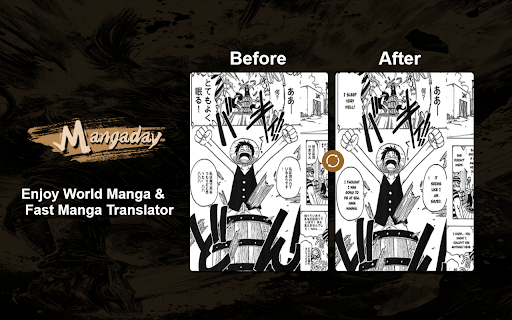

AI Translate Manga: An intelligent assistant for manga translation, providing a perfect solution for cross-language communication. Mangaday:Translate Raw Manga & Manga With One Click Mangaday Chrome Extension Introduction and Usage Guide The Mangaday Chrome extension provides users with a seamless way to translate manga and comics from various languages using advanced AI technology. It supports multiple languages and ensures the preservation of the original artwork while translating the text accurately. • Easy install: Quickly install the Extension. • Multiple Languages: Supports various languages for translation. • High Accuracy: Utilizes top AI translation engines like DeepL for precise translations. • Free Plan: Offers a free plan with a limited number of translations per day. 1.Install the Extension: Add the "Manga AI Translator - Mangaday" extension to your Chrome browser from the Chrome Web Store. 2.PIN extension: PIN the extension on Chrome browser. 3.Select Language: Open extension, choose the desired output language from the list of supported languages. 4.Translate: Click on the ‘Auto Translate’ button. The AI will process the image and provide the translated text. For troubleshooting or further assistance, contact the support team via email at service@mangaday.ai. For more details, visit the Mangaday website "https://mangaday.ai/" .

Manga Translator🍓
Manga translator for Japanese, Korean, and Chinese ✔️ Works on every manga site with the Unlocker or Panel Tool ✔️ Best-in-class manga translation and OCR quality ✔️ Supports PDF, ZIP, and image uploads ✔️ Uses full-context on PDFs and ZIPs for max accuracy Subscription service with a free trial—no registration required.

Manga Translator Extension
AI-Powered Translator for RAW Manga, Manhua & Manhwa Just open the raw, click “Translate,” and start reading. MIT – Manga Image Translator lifts the text off the artwork, translates it, and redraws each bubble right where it belongs. The extension understands manga, manhwa, and manhua layouts, so once translated everything looks exactly the way the artist intended. MIT is free, lightweight, ad‑free, and requires no registration. Download it to Chrome and use it right away.

Torii Image Translator — AI Manga Translator, Manhwa Translator ...
☆☆ Unlock the Power of Language with Torii Image Translator ☆☆ Ever stumbled upon a manga, manhwa, meme, infographic, or recipe in a language you can't read? Whether it's Japanese, Korean, Chinese, or something else entirely, Torii Image Translator removes the barrier between you and the content you love. Torii is one of the most powerful manga translation extensions available today, designed for accuracy, ease of use, and creative control. It’s also packed with tools that scanlators might find especially useful—the kind of editing and translation features you won’t find anywhere else in a browser extension. ➤ Why Choose Torii Image Translator? ✅ Instant In-Image Translation Just hover and click to translate text inside any image directly on the page. No screenshots or external tools needed. It works anywhere—on manga sites, news articles, or even memes on social media. ✅ Smart Screen Cropping Translate anything on screen by drawing a box around it. Great for translating video subtitles, UI elements, or text in games and apps. ✅ Full Creative Control with Powerful Editing Tools You can now fine-tune every part of your translation: Adjust font size, font family (with 10 fonts to choose from), color, position, and rotation. Use the paint brush tool, erase parts of the image, or clean it up with AI-powered inpainting. Undo any changes with a single click. Simple and powerful. ✅ Multiple AI Models to Choose From Torii supports GPT-5, Gemini, Claude, and Deepseek, letting you pick the model that works best for the type of content you’re translating. ✅ PDF Support Upload full manga or comic PDFs and translate every page with ease. ✅ Download as ZIP Export all your translated pages at once as a zipped image set, ready for archiving or sharing. ✅ User-Friendly Interface Torii is built to feel smooth, fast, and intuitive. Whether you're translating one panel or an entire book, it gets out of your way and lets you focus. ✅ Context-Aware, High-Quality Translations With advanced language models behind the scenes, Torii gives results that preserve tone, nuance, and meaning—not just literal word swaps. ✅ Useful for Scanlators While Torii isn’t a full replacement for dedicated editing software, it’s the only browser extension that lets you edit translated manga pages directly in place. Scanlators who want a fast, flexible tool might find it surprisingly helpful. ✅ Active Developer and Welcoming Community I'm a solo developer and always open to feedback. Whether you have a question, found a bug, or want to suggest a feature, feel free to join the Discord and message me directly. I reply to everyone and love hearing from users. ➤ How Does It Work? Check out the demo video or visit the website for FAQs and guides. Torii is more than a translator—it's a tool for exploring, learning, and even creating. Try the free trial, and if it clicks with you, the full version supports future development and continued updates. Add ☆Torii Image Translator☆ to Chrome and experience a world where every image, in any language, speaks your language. Torii offers a small free trial, and then it requires purchasing credits to keep using it.

KanFan - Manga Translator
An immersive web manga translator that lets you enjoy raw manga effortlessly. Supports Japanese manga, Korean webtoons, English comics, and more while preserving the best reading experience ✅ Automatically detects and translates manga on most websites ✅ Immersive reading with translations embedded directly into the original image ✅ Hover translation button for manually triggering image translation ✅ Pre-translates the next page in advance ✅ Upload local manga images for translation ✅ Customize fonts, font size, and line spacing ✅ Free usage quota that resets every week
