
kdikjggciggfjkhokimlfppmbdognbmo

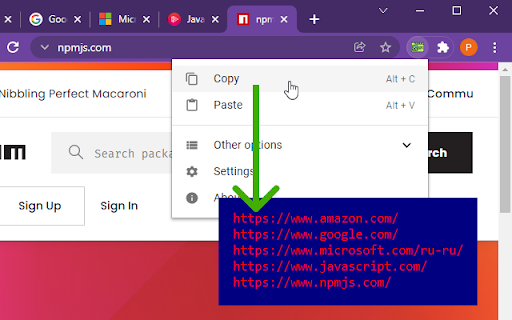


The fastest way to: - open all URLs in a text in the clipboard in new tabs

SpeedyApply: Job Application Autofill Tool
Applying to jobs just got easier. Automate job applications with a single click and track your progress over time. SpeedyApply is the ultimate solution for job seekers who want to take control of their job application process. With SpeedyApply, you can create a comprehensive job profile and apply to the most common job application portals such as Workday and Greenhouse with a single click. Our powerful autofill scripts ensure that your application is filled out accurately and quickly, saving you precious time and effort. SpeedyApply also tracks your job application progress, so you can stay on top of your job search. You'll be able to see when and which jobs you've applied to allowing you to easily follow up with potential employers and stay organized throughout your job search. Don't waste any more time filling out tedious job applications by hand – download SpeedyApply today and take the first step towards your dream job! For general inquiries or support, please contact me at: https://www.speedyapply.com/contact Join our Discord to be informed on our latest updates and connect with other job seekers: https://www.speedyapply.com/discord

Copy All URLs (Free)
A simple Chrome extension to copy URLs of all open tabs. Copy All Tabs is an intuitive and efficient Chrome extension designed to help you instantly copy the URLs of all open tabs in your browser window. With just a single click, the extension will gather the URLs and copy them to your clipboard, ready for you to paste wherever you need. Whether you're working on research, sharing resources with friends, or keeping track of your favorite websites, Copy All Tabs will streamline the process for you. - One-click URL copying: The simple and user-friendly interface of Copy All Tabs allows you to copy all open tab URLs with just a single click. - Automatic URL formatting: The extension automatically formats the copied URLs as a list, with each URL on a new line, making it easy to read, organize, and share. - Real-time notifications: Get instant notifications confirming that the URLs have been successfully copied to your clipboard, so you can be sure that the process has been completed. - Lightweight and efficient: Copy All Tabs is designed to be fast and lightweight, ensuring that your browsing experience is not impacted by the extension. - Privacy-focused: Your data is yours, and Copy All Tabs respects that. The extension does not collect or store any personal information or browsing data.

Copy URL of All Tabs
Copy all open tab URLs in various formats or Open all URLs in the clipboard at once. Copy all open tab URLs in various formats or Open all URLs in the clipboard at once. The following functions can be selected from the pop-up menu. 1. Copy Copy the URLs of all open tabs to the clipboard in any format (text, json, custom). 2. Paste Open all URLs in the clipboard at once. The URLs to be opened can be filtered. 1. Click on the icon of "Copy URL of All Tabs" on the right side of the address bar. 2. Action - To "Copy all tab URLs" - Click "Copy" in the Popup Menu. The URLs of all open tabs are copied to the clipboard. - To "Open the URL in the clipboard in a new tab" - Click "Paste" in the Popup Menu. The URLs in the clipboard are opened at once. - To "Open the Settings" - Click "Options" in the Popup Menu. - Alternatively, right-click on the "Copy URL of All Tabs" extension icon displayed to the right of the address bar and select "Options" from the menu. For more detailed instructions, please refer to one of the following: Vivaldi prioritizes browser-side settings (Settings >> Tabs >> New Tab Position) over extension settings. ### Links to pages opened with "Copy URL to all tabs" do not marked as "Visited" If opened links are not marked as “visited”, then that is a Google Chrome specification; the behavior specification changed in an update in early 2025/03. For more information on this change, see the following article. - Switch to a browser that is not affected by this change - Change Google Chrome settings to revert to the previous behavior On Reddit, there were instructions on how to change browser settings to address this issue. If you refer to this, please be aware that there are security risks and do so at your own risk. #### for Google Chrome or Chromium-based browsers #### for Microsoft Edge Fix for visited links not turning purple on Edge https://www.reddit.com/r/Enhancement/comments/1kecupw/fix_for_visited_links_not_turning_purple_on_edge/ Please note that as this is a free extension we are unable to provide personalized support. If you have issue or feature requests, please report them at issues (https://github.com/from-es/copy-url-of-all-tabs/issues).

Copy Tabs Title URL
Copy the title and URL from a Chrome tabs This extension allows you to copy the titles and URLs of multiple tabs selected in Chrome or Edge. You can also copy titles and URLs in markdown format. You can also paste multiple URLs copied to the clipboard to open them in a new tab. ### Copy Option 2 - Title: Replace Space Zenkaku to Hankaku (Japanese Space Char type) - Title: Remove Username On GitHub PR - Title: Remove Answer's On Quora (English and Japanese) - URL: Short Amazon (.com and .co.jp) - URL: No Encode Japanese
