
kdemgnhhckefogkmgjmaeeepfjdngonj
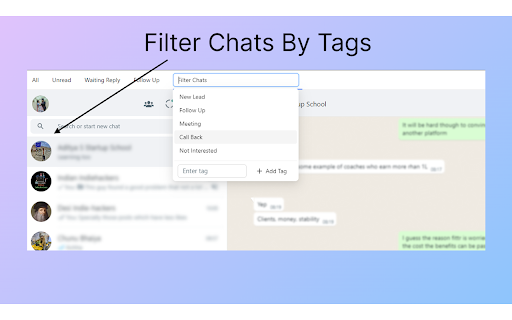

Easily track your leads on whatsapp Web Introducing Whats app CRM, Don't waste time managing customers on whats app. Easily add tags, notes for your contacts. We are building features to quickly add calendar invites, meets invites, and zoom invites to the chat. It's a lightweight utility on Whatsapp Web that helps you organize your chats. You can add labels to the chats and organize them based on the labels for quick access. The extension runs offline and does not internet connection to work.

WooNotif CRM
WooNotif CRM is an extension to turn your WhatsApp Web into powerful CRM tool. Manage and organize all chats easier than before. Turn your WhatsApp Web into a powerful CRM tool. Manage and organize all chats easier than before with WooNotif CRM ⚡ [NEW!] Now support sending messages & button to personal & group chat with API - Enjoy "WaBoxApp like" feature inside WooNotif CRM 💻 Organize all incoming messages, create funneling tabs to identify customers' chats, or filter chats into custom tabs on WhatsApp Web according to your needs. With the custom tabs feature, you can say goodbye to endless scrolling just to find a single chat 👋 WooNotif CRM extension helps organizations and small-medium businesses to boost productivity and achieve effective lead management on WhatsApp Web by providing amazing features such as Chat Management, Custom Tabs, Chat Reminders, Scheduled Events, Chat Campaign, Personal Notes, Quick Reply Integration, Contact Exporter, Follow-ups, Send Messages without Saving Number, Chat Link Generator, and many more. Try WooNotif CRM Extension. 💬 Never miss any leads. Reduce clutter. 🚀 Unlocks The Power of WhatsApp Web. 🥇 Boost productivity of your business. Unlike others, we helps you to get things done by: ✅ Set follow-ups on your important chat so you will never forget to talk to your clients ✅ Send scheduled automatic messages to specific contact ✅ Start conversation to any new contact without saving number first ✅ Reply message quickly with a single click from predefined chat library ✅ Add personal notes to a single chat and never miss any details again ✅ Organize chat into tabs so you can easily find chat and create funneling ✅ Create campaign so you can inform any important messages to your contact ✅ Schedule an event with your contact and add reminder to Google Calendar ✅ Export & backup important contacts to CSV file ✅ Connect & send order notification from your e-commerce site via WhatsApp Web ———————————————————————————————————————— 💡 FEATURES ———————————————————————————————————————— 1. Chat Tabs - Access pre-built tabs or create custom tabs for better workflow. 3. Personal Notes - add important information on the built-in notepad in every single chat. 4. Schedule an Event - make appointment to your contact and connect to your Google Calendar. 5. Create Campaign - inform your contacts about important messages in easy way. 6. Scheduled Messages - send messages automatically at the scheduled time. 8. Quick Reply - reply chat quickly with text & images from predefined chat library. 9. Chat Link Generator - generate a direct WhatsApp link to specific number with predefined message. 11. API Support - send messages & buttons from woocommerce, zapier, pabbly connect, and any website platform with API. 12. Many other features that will help you to manage WhatsApp Web like a PRO. ———————————————————————————————————————— 🔒 PRIVACY POLICY ———————————————————————————————————————— All messages are end-to-end encrypted. We do not collect your chat data. in any shape or form. Your chat data will never leave your computer. ———————————————————————————————————————— ⚖️ LEGAL ———————————————————————————————————————— WhatsApp is a trademark of WhatsApp Inc., registered in the U.S. and other countries. WooNotif CRM is an independent project and has no relationship to WhatsApp or WhatsApp Inc. ———————————————————————————————————————— ✉️ CONTACT US ———————————————————————————————————————— Do you have any queries, feature requests or feedback? Please feel free to email info@woonotif.com

Cooby: Best WhatsApp Extension for Work
Cooby is the world's most powerful WhatsApp experience. Are your business conversations happening on WhatsApp? Cooby can take your customer-facing teams to the next level, especially if you use HubSpot. It integrates WhatsApp with HubSpot seamlessly. Best suited for teams that use individual WhatsApp numbers and HubSpot. That includes, but is not limited to, sales, consulting, real estate, education, automotive, financial services, etc. Teams from SMBs to well-known companies such as Bytedance, WeWork, Aspire, and Spenmo rave about Cooby, the world’s most powerful WhatsApp experience. Hear what they say: 👉cooby.co/testimonial 👈 For managers: Record important WhatsApp conversations to gain visibility into what is being said between your representatives and customers. Use WhatsApp activities to measure members' performance. For members in Sales, Marketing and Customer Support: Save hours per day on administrative CRM work. No more going back and forth between WhatsApp and HubSpot. Make your work simpler, save time and be more productive. Here’s how you will achieve this ⭐: - View and edit your CRM contact right in your WhatsApp - Automatically log WhatsApp messages into HubSpot CRM - Generate Sales activity reports and HubSpot workflows based on WhatsApp activity - Create and update important CRM records -- like notes, tasks, tickets and deals -- right in your WhatsApp. Communicate at scale 📣 Cooby instills a high degree of organization and automation into your team’s WhatsApp. For example, ⭐Communication at Scale: Broadcast to multiple chats at once, send message templates, and import and export a large number of contacts. Start a chat with an unsaved number. You’ll communicate with more customers through automation. ⭐Inbox Productivity: Achieve Inbox Zero with Close/Snooze/Archive chats and Sort chats to Tabs. You can customize your inbox just like Legos and build workflows and message sequences. You’ll never miss a customer message, or feel lost in your messy inbox. Read more about features in the section below. Unlike WA Web Plus for WhatsApp™, WhatsWeb, WAToolkit, Promote Route, Eazybe, and other WhatsApp Chrome extensions, we focus on bringing you 3 pillars of product values: CRM Syncing, Inbox Productivity, and Communication at Scale that include, but are not limited to: ⭐ CRM Syncing 1. WhatsApp CRM syncing: sync conversational data from WhatsApp to HubSpot and more. 2. CRM contact cards: display CRM contact info and edit contact properties right within your WhatsApp. ⭐Inbox Productivity 1. System tabs: pre-built tabs that auto-update according to message’s status, such as: - Unread: messages that have not yet been opened. - Needs Reply: messages that have yet to be responded to. - Groups: chats with more than 2 contacts. - Awaiting Reply: messages that you have yet to receive a response from. 2. Custom tabs: create special tabs that suits your needs. 3. Share live chat: share live WhatsApp conversations with a link. New messages are shared in near real-time. 4. WhatsApp notes: create notes for specific chats. 5. WhatsApp reminders: set a reminder for a particular chat so you’ll never miss following up on a chat. 6. Schedule events: connect to your Google Calendar to schedule events right within WhatsApp. ⭐ Communication at Scale 1. Start a chat with unsaved numbers: send WhatsApp messages to unsaved numbers from the desktop. 2. Contact management: export and import contacts from your WhatsApp with just a few clicks. 3. Broadcasting: send messages to multiple chats at once. No pre-approved templates are needed. No additional surcharges. 4. Message templates: one-click to send pre-written templates. No pre-approval is required. WE DO NOT COLLECT YOUR CHAT DATA. YOUR CHAT DATA WILL NEVER LEAVE YOUR COMPUTER. WE DO NOT COLLECT PERSONAL IDENTIFIABLE INFORMATION EITHER. WE WILL ONLY CONTACT YOU WITH YOUR DIRECT CONSENT This extension is 100% privacy-safe 💯. We DO NOT collect your chat data or personal information. We will NEVER sell your data to any third-party companies in any shape or form. Cooby Inc. is a U.S.-based company that complies with U.S. laws. The permission requested on Google Chrome while installing Cooby might sound scary, but it's far from the real needs of the extension. The permissions are technically required for the following reasons: - Read and change your data on cooby.co and web.whatsapp.com: Required to add tabs to the top of WhatsApp Web. We don't collect any chat or contact data from your WhatsApp. - Read your browsing history: As scary as it sounds, we only need this permission strictly for the One-Click to WhatsApp Web (WAW) feature. We do not collect your browsing history at all. In fact, this is the "tab" permission from the Chrome Developer Guide, which DOES NOT allow us to read your browsing history. It only allows us to know what tabs are open right now. For any concerns or feedback, please feel free to email support@cooby.co. ———————————————————————————————————————— WhatsApp is a trademark of WhatsApp Inc., registered in the U.S. and other countries. Cooby is an independent product developed by Cooby Inc., and has no relationship to WhatsApp, WhatsApp Inc, or Facebook Inc. It is not an official WhatsApp or Facebook product.

Whatsapp Workspace
Enhance WhatsApp Web with features like contact saving, quick replies, chat filters and more—all with added security and privacy. Enhance Your WhatsApp Web Experience with Advanced Features, Organized Chats, and Enhanced Privacy! The only WhatsApp Chrome extension offering quick access to your contacts, chat organization, and more—all with complete privacy protection. Try WhatsApp Workspace Extension: ‣ Save Contacts Easily: Save WhatsApp contacts directly to Google Contacts without picking up your phone. ‣ Quick Replies: Set and send message templates or frequently sent messages with just one click. ‣ Organize with Labels: Filter chats by unread, group, enterprise, or assigned labels for a streamlined view. ‣ Freeze Chat Position: Keep your chats from jumping around after you send a message. ‣ Comment on Chats: Add notes to specific chats for future reference or summary. ‣ Enhanced Privacy Settings: Hide profile pictures, names, and last messages of all chats. ‣ New Chat Without Saving: Start a new chat directly from WhatsApp Web without needing to save a contact. ‣ Instant Copy of Numbers: Copy the phone number of the open chat with a single click. ‣ Assign Labels with Ease: Label chats quickly with one-click tagging. ‣ See Contact Numbers Directly: View the phone number of the current chat without opening the profile. Unlike other WhatsApp Chrome extensions, WhatsApp Workspace focuses on enhanced contact management, easy messaging workflows, and the privacy you need. 🔒 Privacy and Security All your data remains private. We DO NOT collect or store your chat data—it stays on your device, and all data is encrypted on the backend to ensure complete privacy.

WA Gear - WhatsApp Campaign and CRM
Enhance WhatsApp Web functionality for business (marketing and sales) and experience the ease of connecting with your customers WA Gear is a tools to enhance WhatsApp Web functionality for business purposes (whatsapp marketing). WhatsApp is one of the most popular messaging apps in the world, with over 2 billion active users. This makes it an attractive platform for businesses to reach out to potential customers and engage with their existing customer base. The WA Gear customers can use it for unlimited WhatsApp Numbers and Devices with no using limit. WA Gear user can create campaign to broadcast to contact or group with scheduling. With the CRM feature on WA Gear, you can increase engagement with your target audience directly. Features on WA Gear ✅ Campaign - Broadcast to Contact or Group with Scheduling ✅ CRM - Grouping Chats, Add Custom Fields, Schedules, Notes, Reminders ✅ Message Template and Quick Reply ✅ Chats Manager ✅ Export Contact ✅ More Settings - Blur for Privacy, Start New Chat, etc. ✅ Global Action (Schedules, Notes, and Reminders) ✅ Bots Manager (coming soon) For a detailed explanation of the features and how to use them, see the following documentation https://wa-gear.com/docs or for video https://s.id/wageardocs For get latest news and updates about WA Gear, join my channel https://whatsapp.com/channel/0029Vb2mOJtDjiOXYve76I11 FAQ’s Q: What is WA Gear? A: WA Gear is a WhatsApp Campaign and Customer Relationship Management application in the form of a Chrome browser extension that is integrated directly with your web.whatsapp to unleash superpowers in handling customers that don't exist in the original official web.whatsapp. Q: Is this service official from The Company Whatsapp (Meta)? A: No, we are an independent service provider that only enriches the original WhatsApp features. Q: Can I used several WhatsApp numbers and devices? A: Yes of course. Q: How to use, request trial, and order it? A: After installation, go to my subscription menu and you will be able to request a trial, order, or continue using the free version. You can use this extension without license for all the feature works but with limited number of each feature, such as campaign only one is active and limited to 50 contacts for blasting in one period. And you can request trial for 7 days to unlock the limitation before deciding to order it. For more details you can access this folder to watch all documentation. 👉 https://s.id/wageardocs Changelog: v 1.1.23 * Change WA Gear Navigation from Dropdown Menu to Side Panel for stability so that it is not easily affected when there is an update from WhatsApp UI (Click WA Gear icon to show Side Panel Navigation) * Improve WAGear engine * Fix bug for resend campaign and send message + Adding Files option in Backup Restore ============ v 1.1.22 * Bug fixing WA Gear Menu in WhatsApp Business to compatible with new whatsapp update * Improve WAGear engine ============ v 1.1.21 + Adding Menu Funnelling to view Chats Group in Kanban Board View * Bug fixing WA Gear Menu to compatible with new whatsapp update * Improve WAGear engine ============ v 1.1.20 * Bug fixing WA Gear Menu to compatible with new whatsapp UI * Improve WAGear engine ============ v 1.1.19 * Bug fixing error message sending to the new contact * Bug fixing export contact from group * Bug fixing WA Gear Menu to compatible with new whatsapp UI * Improve WAGear engine ============ v 1.1.18 * Bug fixing WA Gear Menu to compatible with new whatsapp UI * Improve WAGear engine ============ v 1.1.17 * Bug fixing error message sending to the group * Bug fixing WA Gear Menu to compatible with new whatsapp UI * Improve WAGear engine ============ v 1.1.16 * Bug fixing error message sending * Improve WAGear engine ============ v 1.1.15 * Bug fixing error message sending to the group * Improve WAGear engine ============ v 1.1.14 * Bug fixing WA Gear Menu to compatible with new whatsapp UI * Improve WAGear engine ============ v 1.1.13 * Bug fixing WA Gear Menu to compatible with new whatsapp UI * Improve WAGear engine ============ v 1.1.12 * Bug fixing WA Gear Menu to compatible with new whatsapp update * Improve WAGear engine ============ v 1.1.11 * Bug fixing WA Gear Menu to compatible with new whatsapp update * Improve WAGear engine ============ v 1.1.10 * Bug fixing in broadcast message * Bug fixing WA Gear Menu to compatible with new whatsapp UI for beta version * Improve WAGear engine ============ v 1.1.9 * Bug fixing WA Gear Menu to compatible with new whatsapp UI version * Improve WAGear engine ============ v 1.1.8 * Bug fixing WA Gear Menu to compatible with new whatsapp UI version * Improve WAGear engine ============ v 1.1.7 * Bug fixing WA Gear Menu to compatible with new whatsapp UI version ============ v 1.1.6 * Bug fixing WA Gear Menu to compatible with new whatsapp UI version ============ v 1.1.5 + Added functionality for your channel: campaign, schedule, and export contact/subscriber ============ v 1.1.4 * Improve loading WAGear engine * Bug fixing (chats manager after new update from whatsapp, caption in audio file) + Adding mkv and ogg format file + Adding new button "export chat contact" + Adding whatsapp label column when export contact (whatsapp business) + Adding new option "mention all group member" (when a message is sent to a group) in message template ============ v 1.1.3 * Improve loading WAGear engine * Bug fixing (profile crm when hidden phone field) + Adding integration with Chat GPT 4 Turbo and Mini model ============ v 1.1.2 * Update wa engine to compatible with new whatsapp version ============ v 1.1.1 * Bug fixing (save notes for group) * Update wa engine to compatible with new whatsapp version ============ v 1.1.0 * Update wa engine to compatible with new whatsapp version ============ v 1.0.9 * Bug fixing (backup-restore for campaign detail and data buttons) + Adding function for grab members of a community group that is restricted ============ v 1.0.8 * Update wa engine to compatible with old/previous web whatsapp version ============ v 1.0.7 + Adding menu Buttons Manager to manage buttons to be used in messages (Message with Button only works for mobile devices (button will not appear if opened on whatsapp web)) + Adding "Using button message?" option in message setting + Adding "Send as pre-recorded video (PTV)?" option in video message setting ============ v 1.0.6 + Adding menu Backup Restore for copying data and setting from one number/device to another number/device + Adding function Delete Recipients by Selection (All) in Campaign Setting + Adding Resend for Failed Message in Campaign List ============ v 1.0.5 * Update wa gear to compatible with new whatsapp UI version + Adding contact detail information (Address, Email, and Website) for business whatsapp account when Export Contact ============ v 1.0.4 * Update wa gear to compatible with new whatsapp UI version * Bug fixing (export contacts, import contacts from excel) ============ v 1.0.3 * Update wa engine to compatible with new whatsapp version 2.3x * Bug fixing (export contacts, send list message) ============ v 1.0.2 * Update wa engine to compatible with new whatsapp version * Minor bug fixing (export/import contact to/from excel file, error handling when adding contact from import method for invalid whatsapp number format) + Adding custom field information when export contact into "Others" column ============ v 1.0.1 + File manager: manage your files in WA Gear for faster file delivery. Many functions can be used to manage your files easily. Broadcast different image/document messages unique to each recipient. + Integrations: Open AI integration to help create campaign messages (A/B mode), create or paraphrase message, summarize conversations, etc. ============ v.1.0.0 * Initial release
