
kdcakfeidhfeilahlclgbnmpgebafjpm
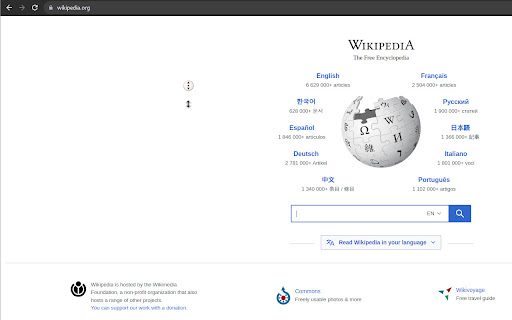
Enable auto scrolling with the mouse wheel button on Linux This extension allows you to scroll any web pages using the wheel button on your mouse. Click once with your middle button and start dragging around any scrollable area.

Classic Autoscroll
Classic Windows-style middle-click autoscroll with configurable speed. This extension delivers the native Windows middle-click autoscroll experience to Chrome, addressing the gap left by outdated or unsupported predecessors. If you rely on autoscroll for efficient browsing on macOS or Linux, this is designed for you. Core Functionality: ✅ Activation: Middle-click to place a scroll origin icon. 🔄 Scrolling: Move your mouse relative to the icon to scroll in any direction. Speed is proportional to distance. Customization: ⚙️ Toggle Mode: A single middle-click activates persistent scrolling. Stop with another middle-click, left/right click, or Esc. 👆 Drag Mode: Hold the middle mouse button to scroll; release to stop. 🚀 Adjust maximum scroll speed and cursor sensitivity via the extension's popup. Built as a reliable, modern replacement, this extension ensures consistent autoscroll performance. Per Chrome's security policy, extensions cannot operate on chrome:// pages or the Chrome Web Store. Please refresh active pages after installing to use.

Middle Button Scroll
Enable enhanced middle button scrolling in your browser - click the middle button once to enter scroll mode, move your mouse to scroll, click again to exit.

Roller Coaster Sim Unblocked Game - Launcher
Alright, pal, get ready for a wild ride! Buckle up, 'cause we're about to take this Chrome Extension description for Roller Coaster Sim and blast it into pure, hilarious, SEO-fueled awesomeness! 🚀😜 Imagine this: the wind in your hair, the butterflies fluttering in your stomach, and the sheer exhilaration of plummeting down near-vertical drops while soaring to unbelievable heights! That's what Roller Coaster Sim online is all about – an adrenaline-pumping, giggle-inducing adventure that'll have you screaming with laughter. 🎢😆 But hold on tight! This ain't no stroll through a kiddie park, folks. Controlling this bad boy is harder than wrangling a greased-up weasel! One wrong throttle on a hairpin turn, and you're sending your passengers on a surprise skydiving trip without a parachute. Yikes! 😬 Talk about a theme park disaster…and a lawsuit waiting to happen! Yet, there's something so addictive about conquering the twists, turns, and insane loops of a roller coaster, all from the safety of your computer screen. Let's just say, if you survive Roller Coaster Sim, you'll never fear a real-life thrill ride again. 💪😎 Mastering those stomach-churning drops and insane speeds gives you a feeling of invincibility. Roller Coaster Sim is way more than just a casual cruise, too. It's the ultimate entry into the world of simulation games unblocked. We're talking immersive 3D graphics that drop you straight into the heart of a wild and wacky amusement park. Get ready for electrifying atmospheres, gut-wrenching maneuvers, and the kind of white-knuckle excitement that'll leave you craving more. Just try not to lose your virtual lunch. 😉 Now, here's the thing about free online games like this hilarious roller coaster game... finding them without your web browser turning into a pop-up ad battle royale can be tough. That's where our special Chrome Extension launcher comes in! Think of it as your VIP pass to Roller Coaster Sim on Magbei.com. One click and boom! You're hurtling down those crazy tracks, no fuss, no muss. It's the fast-track to unblocked, instant entertainment – kinda like the way those rich folks sneak on to rides without waiting in line. So, what exactly is a launcher/shortcut extension? Simple! It's like a special bookmark in your browser that teleports you straight to the best roller coaster simulator games with a single click. You can blast off on your next hilarious Roller Coaster Sim adventure faster than you can say "Hold on to your hats!"

Simple Autoscroll
An extension that adds the ability to automatically scroll through long pages. Ever want to read through an article without even touching a mouse or keyboard? Simple Autoscroll will help you with just that! With Simple Autoscroll, you simply set how many pixels to scroll at set intervals, press "Go", and start reading! To stop the scrolling, simply click on the extension icon and the scrolling will cease. Tips: - Want to scroll from the bottom to the top? Simply add a negative value into the "Scroll X Pixels" field. - For a smooth scrolling experience, simple input lower values for both pixels and milliseconds. For example scrolling 1 pixel every 30 milliseconds provides a nice, smooth scrolling experience. increasing the millisecond count makes it slower. Simple Autoscroll has not and never will never read any of your data and will only modify a page as needed to make autoscrolling work properly. Simple Autoscroll also does not make any network requests. Simple Autoscroll is an open-source extension. The source code is available on our GitHub page: https://github.com/danman113/simple-autoscrollv2 UPDATE Version 2.0: Simple Autoscroll V2 is now released! * Extension Manifest V3 is now supported * Your default settings are now synced to all of your devices! * When selected, the new "Loop" option will make the page scroll back to the top once it reaches the bottom. Version 2.2: * Fixed an issue where many sites would not autoscroll Version 2.3: * Added a hotkey (Alt+J) to pause/resume scrolling. You can configure the hotkey on chrome://extensions/shortcuts
