
kdbanokgcfphmjmnoaifhmoejcgdnnia

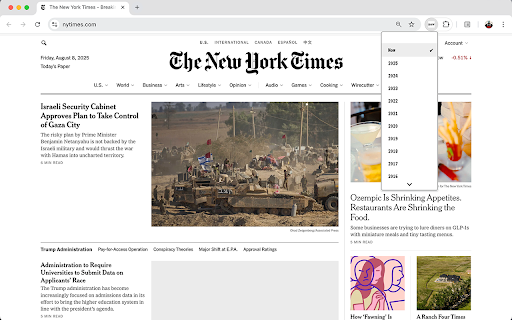
一键获取网页的历史快照 Wayback Machine。 一个简洁的 Chrome 扩展,用于快速访问网页的历史快照。 inspired by ryo.lu(https://os.ryo.lu/) ## 功能特性 - 🕰️ 动态图标显示 - 扩展图标会根据当前页面显示年份或"now" - 📅 年份选择器 - 弹出窗口显示所有可用的历史快照年份 - 🚀 一键跳转 - 点击年份即可跳转到对应的历史快照 - 🧹 自动清理 - 自动移除 Wayback Machine 的工具栏 - ⚡ 缓存优化 - 智能缓存 API 请求,提升响应速度 ## 使用方法 1. 在任何网页上点击扩展图标 2. 在弹出的年份列表中选择想要查看的历史版本 3. 扩展会自动跳转到对应的 Wayback Machine 快照页面

小红搜
Smartly split your screen to search Xiaohongshu for the current page content. --- **English Version** # XiaoHongSou - Your Browsing Companion XiaoHongSou enhances your browsing experience by allowing you to search Xiaohongshu instantly without leaving your current page. ## 🌟 Key Features * **🚀 Smart Split-Screen** Click the extension icon to open a dedicated search window on the right side of your screen. It automatically aligns with your browser, creating a seamless split-screen experience. * **🔍 Context-Aware Search** No need to type. * **Selection Search**: Highlight any text on a webpage and click to search. * **Auto Extraction**: Automatically extracts keywords from the page title if no text is selected. * **AI Powered (Optional)**: Integrate with DeepSeek API to intelligently analyze page content for precise search keywords. * **📐 Customizable Layouts** Choose the layout that fits your workflow: * **Fixed**: A standard floating window on the right. * **Snap**: Automatically resizes browser and search windows to fill the screen (75% : 25%). * **Overlay**: Overlays the search window on the right side. * **Full Width**: Optimized for ultra-wide monitors.

Time machine
Erase browser history and cookies with one click, retro style Retro styled Erase browser history and cookies for the pst hour with one click win 3.1 style

Web Archive
Save and open webpages using the Wayback Machine. ✅ Save webpages or access previously archived versions in Web.Archive.org just with a single click! Ensure valuable digital information remains accessible and reliable over time ✅ No user information is stored or transmitted to the developer Easily archive and retrieve webpages to/from the Internet Archive's Wayback Machine. Just with a single click, you can save webpages or access previously archived versions, ensuring that valuable digital information remains accessible and reliable over time. Importantly, the Web Archive plugin is committed to respecting user privacy and does not gather or store any user information, allowing individuals to preserve and access web content with confidence in the protection of their personal data. The Web Archive plugin for Firefox enables users to easily save and retrieve webpages on the Internet Archive's Wayback Machine. The plugin addresses the challenges of impermanence in online content, ensuring valuable information is preserved and accessible. Its user-friendly interface encourages the widespread adoption of archiving practices. The plugin is particularly valuable for maintaining reliable archives in scientific works citations, upholding the credibility of the research. By preserving digital information, the Web Archive plugin promotes the democratization of knowledge and fosters information sharing. Credits for the extension's icon: https://www.flaticon.com/free-icon/cloud_4548504

YouTube Time Travel
Tired of YouTube shoving Shorts and clutter in your face? YouTube Time Travel lets you rewind and filter your feed — exactly the way you want it. Travel through time: Filter videos by the year they were uploaded (e.g., “Only show me 2020 content”). Declutter instantly: Hide Shorts, Playlists, and everything that doesn’t interest you. Focus fast: Skip the noise and discover high-quality videos from your chosen time period. 🧹 It’s like cleaning your room... but for YouTube.
