
kcoachoplcbgpllpicplccmknpilllbb
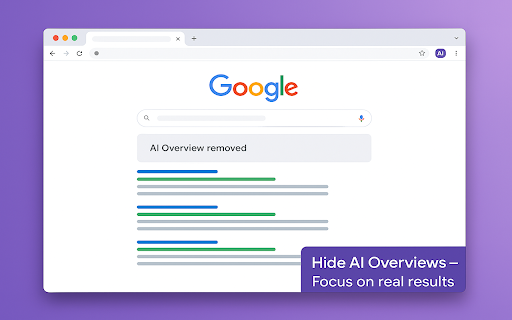
Removes Google's AI Overview so you can focus on classic search results. Google’s new “AI Overview” boxes promise instant answers powered by large-language models, yet for many users they add clutter, bias, and scroll friction to the familiar list of blue links we have relied on for years. Hide AI Overviews restores the clean results page you remember—no pop-up panels, no algorithmically summarised paragraphs, only the information you asked for. Why the AI Overview needs taming AI summaries can be helpful when accurate, but they frequently hallucinate facts, cite partial sources, or push organic results below the fold. They also break the eye-tracking habits professionals develop when scanning dozens of SERPs per hour. If you verify medical guidance, audit financial data, or simply prefer primary sources, these blocks become a distraction—and sometimes a liability. Hide AI Overviews removes the noise before the page finishes loading, so you stay focused on the results that matter. Concrete benefits for everyday workflows Speed and focus — Search pages render faster without the AI overhead, and the first organic result appears above the fold. Accuracy — You rely on primary sources instead of potentially hallucinated summaries. Consistency — Behaviour is identical on desktop, laptop, or Chromebook, and the toggle setting stays active until you close the browser. Accessibility — Screen-reader users avoid extra landmarks, and keyboard navigators jump directly to results. One-click reversibility — Need the AI panel for a casual query? Toggle it back on, refresh, and carry on—no reinstall required. Who gains the most? Researchers and academics who must cite original sources for peer review. Journalists and fact-checkers who cannot risk quoting hallucinated text. Developers, SEOs, and power users who analyse SERP structure and ranking shifts. Privacy-conscious individuals uneasy with opaque AI pipelines blending personalisation with generative text. Non-native English speakers who prefer results in their own language and find English-centric AI answers unhelpful. Accessibility advocates who need predictable heading structures and fewer dynamic elements on the page. Generative AI may be part of the web’s future, but it should never be forced upon you. Hide AI Overviews combines surgical precision, transparent code, and multilingual readiness to give you the final say in how your search results look—and how you use them.

Clean Search - No AI Results in Google
Chrome extension to hide Google's AI results and overview. Clean up search results, remove summaries, and browse distraction-free Clean Search - No AI is a minimalist Chrome extension that automatically hides AI-generated answers in Google search results, including the new AI Overview box 🧠❌. If you're frustrated by cluttered search pages, auto-generated summaries, or irrelevant AI responses, this extension helps restore your search to what it used to be: fast, clean, and focused on real websites 🔍✨. With no setup required ⚙️🚫, the extension works instantly after installation. It detects and hides the AI Overview element across all versions of Google Search, letting you focus on organic results from real sources — not machine-generated blurbs. Whether you're doing technical research, searching for factual information, or just want to skip AI-injected noise, this extension improves usability and clarity in your daily browsing 🧾🧹. Key features: - 🧽 Removes AI-generated answers and the AI Overview box - 🌐 Works across all Google search interfaces - ⚡ One-click install — no settings, no toggles - 🧘 Keeps your results clean, minimal, and distraction-free - 🔒 Lightweight and private — no tracking or background activity Ideal for researchers, developers, students, and anyone who prefers traditional search experiences without artificial noise. Reclaim your search. Stay focused. Skip the AI. 🚫🤖

Hide Google AI Overviews and Mode
Remove AI Overviews and Mode from search results for a cleaner, traditional search page. Take back your search results. This extension instantly removes Google’s AI Overviews, "People Also Ask" AI suggestions, and AI mode buttons. It's a lightweight extension that simply sets those areas of the page to be hidden. Note that if Google makes changes to its CSS, the extension needs to be updated to keep up with it.

Hide Google AI-Overviews
**Hide AI Overview”** is a privacy-focused Chrome extension that enhances user experience by removing Google AI-generated content (AI Overviews) from search results. It delivers a cleaner, distraction-free browsing environment by showing only traditional results. The user enters a secure token once through a simple popup, and it is saved using Chrome's secure storage. The extension runs silently in the background and only activates on supported Google Search pages.

Disable AI Mode & AI Overview
Remove AI Mode and AI Overview from Google Search. Disable AI Mode & AI Overview removes Google's AI features from search results and restores the classic Google search experience. If you prefer traditional search results without the AI Mode tab or AI-generated summaries, this extension helps you keep Google Search clean, simple, and distraction-free. Features • Hide or move the AI Mode tab • Hide Google AI Overview from search results • Instant changes after refresh • Lightweight and fast The extension works automatically when you open Google Search and applies your selected settings immediately. Why use this extension? This extension allows you to remove or control these AI elements and browse Google the way you prefer. Privacy This extension does not collect, store, or transmit any personal data. All modifications are applied locally in your browser.
