
kclhacbgejlcdldgjknfkleaplknfdem
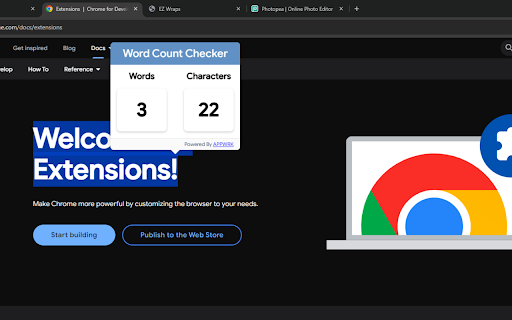
Use Word Count Checker Extension to access the count of Characters and words while selecting the text. Download Free Word Counter. Use Word Count Checker Extension to easily access the count of Characters and words while selecting the text on the webpage. Download Free Word Counter here. Use Word Count Checker Extension to access the count of Characters and words while selecting the text. Download Free Word Counter. Overview: Word Count Checker 2024 allows users to effortlessly count words and characters while browsing the web. Tired of copy-pasting your text to check the word and character count? No worries! Our word counter can be activated with just a single click. With a simple on/off switch Button on the Word Count Extension Bar, this tool displays real-time word and character counts in a convenient popup. Want to see the count change as you select more text? As you slide your cursor, the count dynamically updates, giving you the exact word and character count instantly. Word Count Checker 2024 Extension Features: ✅Effortlessly control word counting with an on/off switch in the extension bar. ✅Handy pop-up shows word count without disrupting your browsing. ✅Instant calculating word and character count as you select text—no delays or extra clicks. ✅Count updates instantly while moving your cursor. ✅Quick, accurate, and efficient—simplify content analysis and editing. Writers & Bloggers: Whether you're drafting a blog post, writing an article, or creating content for a social site, this tool helps you keep track of your word count as you write. Students & Academics: Ideal for students working on essays, research papers, or assignments, our Word Count Checker Extension assists in adhering to word count requirements. Editors & Proofreaders: Our word count checker can be very helpful for professionals involved in editing or proofreading content to assess the length of articles, documents, or manuscripts. Freelancers & Professionals: Freelancers working on various projects, from copywriting to translation, can utilize this extension to accurately measure the length of their work. General Users: Even everyday web surfers can find value in this extension when needing to gauge the length of articles, emails, or any text they encounter online. Word Count Checker 2024 is undoubtedly your go-to tool for counting words and characters as you browse the web. Use our Word Counter Checker tool today for enhanced user experience. Just switch on the button, highlight the text, and check the word and character count simultaneously.

AI Grammar Checker
Use AI Grammar Checker for flawless writing. Enjoy punctuation and grammar corrector, spell checker and AI grammar check in one tool 🎉 Welcome to our innovative AI Grammar Checker extension, designed to transform your editing workflow. Enjoy seamless corrections and refined text quality as every sentence is enhanced with clarity and precision. Regular updates keep your documents error‐free and professional. 🌟 Key Features: 1. Fast processing with ai grammar check for swift revisions. 2. Intuitive design adapts to multiple formats for smooth editing. 3. Robust error detection boosts confidence and content quality. 4. Show Changes toggle lets you turn correction highlights on or off. 🚀 Experience the speed and precision of our checker, engineered to elevate document quality. Each correction enhances clarity and style while reducing manual edits. Let the extension guide you through efficient, error‐free revisions. Easily enable or disable highlighted corrections using the Show Changes toggle. 📌 Why choose our extension? 🔹 Fast error spotting 🔹 Seamless text edits 🔹 Instant style fix 🔹 Clear punctuation view 🔹 Quick syntax check 📚 How It Works: ➤ Install the extension from the Chrome Web Store. ➤ Activate grammar check ai for thorough text review. ➤ Use grammar checker ai for targeted suggestions. ➤ Enjoy a streamlined process that simplifies editing. ✨ Discover smart functionality as grammar ai checker analyzes your writing in real time. Nuances are inspected to ensure punctuation, structure, and style meet professional standards. The tool adapts efficiently to your unique editing needs. 🚀 Additional Capabilities: 1️⃣ Benefit from grammer check ai that detects subtle errors. 2️⃣ Rely on grammar checker for consistent tone. 3️⃣ Use effective grammar check tools to perfect drafts. 🔥 Enhance communication with punctuation check that reviews every mark for accuracy. The extension ensures commas, periods, and symbols are correctly placed, contributing to coherent text. Enjoy improved readability and polished documents. 🧩 Advanced Corrections: • Use corrector to refine complex sentences. • Benefit from efficient grammar correction for quick fixes. • Rely on spelling check to catch typos. • Access online check for dynamic, cloud support. ⚡ Punctuation Perfection: 💎 Rely on punctuation checker for immediate corrections. 💎 Use grammar and punctuation checker for holistic editing. 💎 Achieve impeccable sentence structure with ease. 💎 Optimize content by following clear punctuation rules. 💡 Designed for all writers, our extension offers a user‐friendly interface and smooth navigation. The built‐in spell checker works to ensure every word is accurate, reducing typos. Enjoy a streamlined editing experience that fuels creativity. 💼 The sleek design and smart layout facilitate effortless editing. With real‐time updates, AI Grammar Checker integrates with your favorite tools. Enjoy balanced functionality and modern aesthetics for superior editing performance. 💡 Seamless Integration: 💠 Compatible with various text editors and platforms. 💠 Supports multi‐language documents with smooth transitions. 💠 Sync settings across devices for consistent performance. 💠 Automatic updates keep the tool cutting‐edge. 🚨 Trusted by professionals, our AI Grammar Checker delivers unmatched accuracy. Every feature is optimized to correct errors and improve readability. Benefit from proactive alerts and detailed suggestions that enhance every writing piece. ⭐ Performance Highlights: ▸ Enjoy rapid response times for real‐time evaluations. ▸ A streamlined interface minimizes distractions. ▸ Consistent results empower your creative process. ▸ Regular updates maintain state‐of‐the‐art performance. ❓ Does punctuation check cover marks? 💡 Reviews commas and periods. ⚡ Join a community of writers who rely on AI Grammar Checker for pristine content. The extension evolves with user feedback and expert insights, staying ahead of trends. Embrace a future of flawless writing with precision and professionalism. 🎨 Key Benefits: 🔑 Enhanced accuracy via ai grammar check and comprehensive reviews. 🔑 User‐friendly operation with grammar check ai integration. 🔑 Reliable support from grammar check ai in every document. 🔑 Comprehensive tools address all aspects of editing. 🎯 Optimize your workflow with features that simplify revisions and boost productivity. The extension transforms editing into an efficient experience, letting you focus on creative expression. AI Grammar Checker is your robust solution for flawless text.

Word Counter
Count words and characters with the word counter tool. Get word and character count in any text. The word counter chrome extension specializes in counting words, characters, and characters without spaces on any webpages, text documents, articles, assignments, or even Google Search. It's more than just a word counter tool! All you need to do is select the text you want to identify the word count and let the word counter extension provide the number of words, characters, and characters without spaces. The word counter tool provides the following key features (and more below): ✅ Precision in Counting: Provides a precise number of words, characters, and characters without spaces. Hence, you don't need to worry about accuracy in real-time while writing. ✅ Versatile Input Options: The extension is not limited to counting words and characters on text documents, but you can also count text within any text input on a webpage (Google search). ✅ Paste text from clipboard: If you want to check the word count for some text from your clipboard, paste the text into the extension window. ✅ Offline and maintain Privacy: One standout feature of the "Word Counter" extension is it can be used offline. Hence, you don't need an internet connection always to use as an "online word count tool". 📜 How to Use the word counter extension. 1️⃣ Install the Word Counter extension from the Chrome Web Store initially. 2️⃣ After you install it, please enable it to be used through the Chrome menu bar. 3️⃣ Now, it is time to test the functions of the word count tool you use four key ways as follows: ▸ Select text: Select all the words or paragraphs to which you want to analyze how many words and characters there are, including without spaces among the selected words. ▸ Use text input fields: When you type the words in text input fields, it will show you the word count and characters within a text input field in real-time. For example, typing the word "online word processor" will show you a detailed count of words in real-time. ▸ Use text from the clipboard: Paste the copied text from the clipboard and get the analysis of the word count of text or total number of words immediately. ▸ Type in the extension: Click the Word Counter extension icon from the extension toolbar and start typing your text. Instantly, the word count and character counts will update in real-time when you type. 🖱️ Real-time Counts When you select text on any webpage while enabling the Word Counter extension, it will instantly calculate and display the count of words, characters, and characters, excluding spaces, in real-time. Thus, it helps to meet instant specific text length requirements effectively. 💬 Text Input Field Checking This extension allows you to instantly analyze static webpage text, including text input fields. For example, you can type some text in a Google search while enabling the extension, and it will show you its text analysis on a different basis effectively. 🌟 Free Online character checker You can use this extension to effectively identify the number of words and characters, including and excluding spaces. Thus, you can effectively tailor your entire document or writing style based on your requirements. 🔀 Clipboard text integration Do you want to paste some text from the clipboard to check the word count? No worries, we've got you covered! The extension allows you to paste text from the clipboard directly into the extension window to display word count via the word count tool. 💻 Direct typing into the extension window Alternatively, you can proceed by typing directly into the extension’s interface of the online word counter to check the word count and character count instantly in real-time. Thus, you can quickly identify the text length and make real-time adjustments. 👀 Offline availability One of the critical advantages of the Word Counter extension is that it can be used without an internet connection. Thus, the word count tool works perfectly whether you are in environments with limited or no internet access (not limited to an online word counter or an online tool like other word counters). 🔒 Privacy assurance When using these extensions, your text data’s privacy is crucial. However, we ensure we don't send text data to external servers or store them online or anywhere. Hence, all the text processing activities and word count performed happen locally on your device, and your text is ensured to be confidential and secure. 👷 Upcoming Features We are continuously improving the word counter extension to meet your diverse requirements. Here are some of the exciting features coming soon: ▸ Google Documents compatibility: In the future, the extension will be compatible with Google Docs. Thus, you can get the word count and characters from your Google Docs documents and track your word counts. ▸ Advanced Analytics: Our future improvements will show advanced analytics features, including average word count, word length, sentence count, sentence length, number of lines, speaking time, paragraph count, reading time, reading level, and readability scores. These advanced analytics would be helpful for SEO purposes, analyzing each pages, assignments, essay, and more! ▸ Customizable settings: The extension will provide customizable settings such as notifications when it reaches a specific word limit, set writing goals, strict word limits, sentence counter, identify writing mistakes (including grammar) or character limits, and more. ▸ Export options: We plan to integrate to export your text analysis, including advanced analytics, an auto-save feature, speaking time, and reading time, which would be helpful for future reference, to edit, or reporting purposes. FAQs What is the function of the word counter? The function of a word counter is to accurately give the word count, characters, and characters without spaces. ❓ Is Word Counter safe? Yes, Word Counter is safe as it does not store your text information, which you check to analyze the word count. ❓ Does word count count spaces? Whether the word count spaces depends on the extension, but the “Word Counter” extension provides character analysis without counting spaces. ❓ Can the online word counter be used offline? Yes, you can use the word counter extension in offline as a word frequency counter to identify how many words and further format your text based on your word count requirements. So, what are you waiting for? Integrate the Word Counter Chrome extension and actively count words even through a text box and character counts efficiently. Thus, you can streamline your writing process effectively by handling the words, characters, and paragraphs to meet ideal word counts at your fingertips!

Word Counter
Word counter online tool checker to find number of words and characters Efficient Word & Character Counter for Content Creation in 2025. The Word Counter Chrome extension helps you quickly calculate the total number of words and characters in any selected text or document. In 2025, where content precision and efficiency are key,, this extension is ideal for writers, students, and marketers. This text analyzer for Chrome offers a fast, accurate way to manage content length with a single click. With an easy-to-use interface and 100% accurate results, the Word Counter extension is the perfect addition to streamline your writing tasks. It's an ideal SEO word counter for anyone optimizing their content. Simple Interface: Designed for ease of use, so you can focus on your content, not the tool. Instant Word & Character Count: Provides accurate word and character counts in real-time with the accurate word counting tool. Secure & Private: Counts words and characters without collecting data, ensuring privacy. Free & Accurate: Completely free with accurate counting, whether for short posts or lengthy assignments, making it the perfect free word counter. Content creators rely on word limits for accuracy in articles, blog posts, and SEO elements. This tool helps maintain target word counts for blogs and calculates character limits for meta titles and descriptions. It's a great word count tool for anyone in content marketing. Marketers and ad copywriters must stay within strict character and word limits for social media and advertising platforms. The Ad copy word counter helps maintain these guidelines to enhance engagement and reach. Whether it’s for essays, assignments, or other academic writing, students can keep their submissions within required limits, ensuring conciseness and clarity in their work. Install: Add the Word Counter extension from the Chrome Web Store. Select Text: Highlight any text or document section to calculate words and characters. View Results: Instantly see word, character, and stop word counts displayed in an easy-to-read format. 1. What is Word Counter used for? Word Counter is a tool to calculate words and characters, helpful for writers, SEO experts, students, and marketers who need accurate word counts for various writing tasks. 2. Does Word Counter store my data? No, Word Counter doesn’t collect or store any personal data. It simply calculates word and character counts based on selected text. 3. How do I calculate the number of stop words in my text? Simply select the text you want to analyze, and Word Counter will display the count of common stop words, helping you streamline and improve your content. 4. Is Word Counter free to use? Yes, Word Counter is entirely free to use with no hidden fees or charges.

Word counter - character count
Word Counter - Character Count helps track metrics. Use this word count checker and sentence counter for quick, accurate results. The Word Counter - character count Chrome extension is the ultimate solution for writers, editors, and anyone who needs to keep track of text metrics. Whether you're working on an essay, a blog post, or a tweet, this powerful resource makes it easy to track important data like word count, character count, sentence, paragraph, and spaces — all in real-time. 🔍 How It Works: 1️⃣ Visit any webpage 2️⃣ Highlight what you need 3️⃣ Click on the icon 4️⃣ See the result! ❗️Or just paste in ready text or type directly into the pop-up. One of the key features is the character count tool, which allows users to monitor the length of their text easily. You can also check how your text will appear on different platforms, ensuring that you don't exceed the limits for social media posts, essays, or other writing formats. 📌Features: 👉 User-Friendly: With just one click, this service is ready to go! 👉 Flexible Options: Highlight any text on a site, paste in pre-written content, or work directly in the pop-up to quickly count words. 👉 Instant Analysis: Get results instantly while keeping all your data 100% private. 📦 How to Install: ▶ Click the "Add to Chrome" button on the right side of your browser window. ▶ A pop-up will appear. Click "Add Extension" to confirm and complete the installation. ▶ Once installed, you'll find it in your Chrome toolbar. ▶ Pin the feature for quick and easy access. 🎉 That's it! The installation is complete, and you're ready to start using the service! ✨ This platform offers a simple and effective way to check word count. Whether you’re drafting a short email or a lengthy article, just paste your text or highlight it on a website, click the icon, and instantly see the tally in the pop-up. This is ideal for: 📹 bloggers, 📚 students, 💼 SEO specialists, SMM managers, copywriters, writers, and other professionals. Here are some ways the service can be used: 1️⃣ Track characters 2️⃣ Easily monitor the number of words counter 3️⃣ For social media posts 4️⃣ Count highlighted characters word accurately 🚀 This Chrome-based resource is a powerful assistant for anyone who regularly works with text. Whether you're a writer, student, editor, or SEO specialist, it helps you track essential metrics like word count, character count, sentences, paragraphs, and even spaces. This ensures that your content meets specific requirements, helping you deliver polished and professional work. 🧮One key feature is its ability to count the characters in this text alongside words, sentences, and paragraphs. This versatility makes it perfect for tasks like writing essays, reports, or preparing social media content. For instance, the twitter character counter is essential when creating posts with strict limits. You can also highlight specific sections for analysis, giving you greater control over your work. 📝 Writers will appreciate the ability to monitor word and sentence limits for essays, articles, or stories. Knowing how much text you've written helps you check word count guidelines for assignments or submissions. This simplifies the writing process and ensures you don’t exceed or fall short of the required length. 📈For SEO professionals, this assistant is invaluable. Counting words, characters, and paragraphs is crucial for optimizing content for search engines. Accurate metrics help manage keyword density and improve rankings. Whether you're creating blog posts or landing pages, this assistant ensures your content is structured and optimized. 📚Students benefit from the ability to track precise metrics for school assignments. Whether writing a research paper, thesis, or short essay, the essay word counter keeps you on track with your writing goals. With real-time data on the number of words counter, you can confidently meet assignment requirements without worrying about length. This feature ensures your assignment meets specified guidelines. One major advantage is its privacy-focused design. All data remains private, with no information shared or stored on external servers. Everything happens within your browser, maintaining security and protecting sensitive documents. 🤝 The interface is user-friendly, making it accessible for anyone. It has a simple, intuitive design, ensuring users of all skill levels can get quick and accurate results. This makes it ideal for those who need an efficient way to get text metrics without a steep learning curve. 🎯 Flexibility is another strong feature. You can easily check the length of an entire document or focus on specific sections by highlighting text. This flexibility is especially useful for long documents or when editing smaller portions of a larger project. The ability to count highlighted characters word gives you more control over your content, providing detailed data that allows for more effective editing. 🐦 For social media users, particularly those on Twitter, tracking character limits is essential. This service provides quick and accurate twitter character counter, ensuring your posts meet platform requirements without any last-minute adjustments. It saves time for anyone managing social media content. Professionals across industries will find this resource helpful for improving content planning and structure. Whether you're drafting a business report, creating marketing copy, or preparing presentations, having accurate count characters is crucial. It allows for better organization and adherence to required standards without manual counting. The letter counter feature is incredibly useful for anyone needing to monitor the precise length of their text. Keeping track of your letter count ensures that you maintain accuracy and consistency throughout your writing, making it easier to meet specific requirements. 🎨 Content creators, digital marketers, and copywriters will find this platform indispensable for streamlining their workflow. Offering precise metrics for different sections of text, it helps maintain consistency, improves readability, and ensures compliance with SEO guidelines. In collaborative projects, this service provides a reliable way to ensure content length consistency across contributions. Whether working on a group report or digital campaign, having access to accurate text metrics keeps projects on track and organized. ⭐️ In conclusion, The Word Counter - character count Chrome extension offers a comprehensive set of features for anyone working with text. It counts words, characters, sentences, paragraphs, and spaces, providing accurate results to enhance productivity and improve content quality. Its flexibility, privacy features, and ease of use make it an indispensable assistant for writers, students, professionals, and SEO experts alike.
