
kcekmgedcdnjjfcklokfidemgjdanjpp
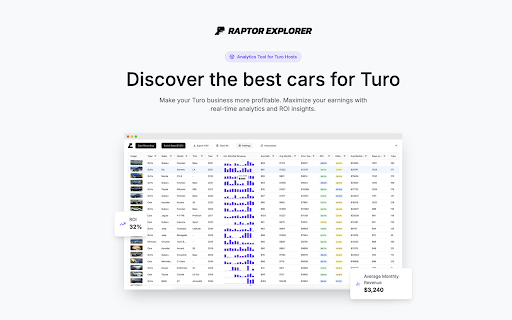


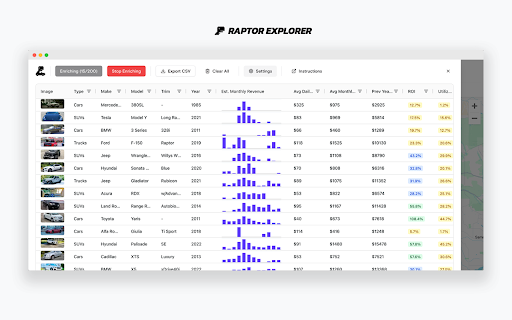
Discover the ROI of the most profitable cars on Turo. Go beyond a Turo calculator with pro analytics for hosts. 🚀 Raptor Explorer: Advanced Analytics for Turo Hosts Maximize your Turo earnings with data-driven insights. Whether you're a seasoned host, just starting out, or planning your Turo business, Raptor Explorer delivers the key metrics you need to make smarter decisions and increase profitability. Get real-time numbers to power your calculations! 📊 Market Research Tools 🔹 Discover the most profitable cars in your area 🔹 Find the best vehicles to list on Turo 🔹 Track competitor pricing and performance 🔹 Identify market gaps and opportunities 💰 Revenue & ROI Analysis 🔹 Get average monthly earnings and ROI for any car 🔹 Track monthly revenue trends and utilization rates 🔹 Analyze protection plan rates and pricing strategies 🔹 Compare earnings across different car models 🎯 Host Success Tools 🔹 Monitor vehicle utilization rates 🔹 Track booking patterns and seasonal trends 🔹 Export data for detailed analysis ✨ Key Features ✅ One-click data collection ✅ Revenue calculator for Turo hosts ✅ Market value estimates ✅ Booking history analysis ✅ CSV export functionality ✅ User-friendly interface 💡 Make Smarter Business Decisions 🚗 Find the most rented cars on Turo 📊 Calculate potential ROI before buying 📈 Optimize your pricing strategy 📌 Understand market demand 🏆 Perfect for: 🔹 New Turo hosts starting their business 🔹 Experienced hosts expanding their fleet 🔹 Investors analyzing market opportunities 🔹 Hosts optimizing their existing listings ❓ Common Questions 🤔 Is Turo profitable? 💰 Many successful hosts earn $500–$4,000 monthly per car 📊 Analytics help you identify the most profitable opportunities 📈 Track ROI and performance metrics 🚘 What are the best cars for Turo? 🔎 Use analytics to find top-performing vehicles 📊 Compare revenue potential across different models 📌 Identify the most rented cars in your market 💵 How much can you make on Turo? 🔹 Calculate potential earnings before investing 🔹 Track actual performance metrics 🔹 Analyze market-specific revenue data 🌐 Turo is available in the United States, Australia, Canada, France, and the United Kingdom. Step 1: Search & Collect Data 🔎 Open Turo.com and search for vehicles in your area 🖱️ Click the Raptor Explorer button above search results 🔐 Sign in with Google to start collecting data 🗺️ Move the map to gather listings from different areas 📊 Watch as vehicles are automatically added to your table Step 2: Analyze Performance 📌 Click "Enrich vehicle data" to gather detailed metrics 📈 View monthly revenue trends and booking patterns 📊 Compare vehicle performance and market values 🚗 Track utilization rates and guest reviews 🔎 Identify top-performing cars in your market Step 3: Make Data-Driven Decisions 📄 Export comprehensive data to CSV for analysis 💰 Calculate potential ROI before investing 📊 Optimize your pricing strategy using market data 🚀 Choose the most profitable cars for your fleet 📈 Scale your Turo business with confidence Raptor Explorer is not affiliated with Turo Inc. "Turo" is a registered trademark of Turo Inc. Use of this name is solely for reference and does not imply any affiliation, endorsement, or partnership with Turo Inc.

Turostats - Turo Analytics
Turostats is a browser extension that provides analytics for Turo market and listings in your area. Unlock the power of data with TuroStats, a powerful browser extension designed to provide in-depth analytics for Turo listings. Whether you're a host looking to optimize your offerings or a user interested in the market trends, TuroStats has got you covered. 📊 Market Analysis: Gain insights into the Turo market with detailed analytics. Understand demand patterns, seasonal trends, and pricing strategies to stay ahead of the competition. 🚘 Popular Cars: Discover the most popular cars in your area. See which models are in high demand and adjust your fleet accordingly. 🧙 Host Insights: Get comprehensive data on hosts, including their ratings, reviews, and listing performance. Learn from the best and improve your hosting strategy. 👥 User Behavior: Analyze user behavior in your area. Understand what users are looking for, their booking patterns, and preferences to tailor your offerings. With TuroStats, make data-driven decisions to maximize your earnings and enhance your Turo experience. Install now and take your Turo game to the next level!

Trixy
Trixy adds a quantitative intelligence layer to Polymarket. Open the side panel on any market and get a full read in seconds — what the math says, where the smart money sits, and a structured AI thesis you can actually use. THE INTEL PANEL Every market scored. Action card with direction, Kelly-sized entry, take-profit ladder, and risk-management triggers. Entry zones tell you where to buy. Exit triggers tell you when to bail. LIVE EDGES FEED Trixy reruns its scoring engine every minute and surfaces the highest-EV markets across Polymarket. Click any card to open the full intel. PORTFOLIO TRACKING Every position labeled live: On Track, Doing Well, At Risk, Losing. The thumb ring + corner badge + status chip flip color the moment the holders move against you. AI THESIS Direction, body, catalyst, steel-man for both YES and NO, verdict, assumptions. Every claim sourced. Read it once, trade with conviction. 128 SIGNALS, ONE READ Price momentum, volume, smart money, edge, liquidity, risk and timing — distilled into a single panel instead of buried across five tabs. SAFETY Read-only. Trixy never signs a transaction or moves funds. Research tool, not financial advice. EV, conviction, and entry zones are model estimates — markets can resolve against you. Size with the Kelly slider, never bet money you can't afford to lose. Currently invite-only. Open the extension, paste your Polymarket proxy address, and apply for access. Tweet about Trixy to jump the queue. Learn more: trixy.ai

RentScout - Turo Market Analyzer
Find the most profitable cars for your Turo business with RentScout! RentScout is the ultimate car research tool designed specifically for Turo hosts. Whether you’re an experienced host or just starting out, RentScout helps you save time and maximize profits by analyzing every car on Turo. Key Features: • Income Analysis: View monthly and annual income projections for any car in any market. • Market Insights: Discover demand, market value, and ROI for cars in your location. • Competitor Data: Access details on cars listed by competitors in your area. • In-Depth Analytics: See depreciation rates, maintenance costs, repair probabilities, and more. • Interactive Charts: Compare trends like monthly income and utilization to find the best options. • CSV Export: Download all analyzed data with one click for further review. How It Works: 1. Install RentScout from the Chrome Store or our website. 2. Choose your market location. 3. Click the RentScout button to analyze car listings in seconds. 4. Access detailed data in an intuitive table format, or dive deeper with individual car insights. Start with a free trial that allows you to analyze 5 cars per day. Upgrade to the Pro Plan for unlimited access and unlock the full potential of RentScout. Why RentScout? Gain a competitive edge with actionable insights to make smarter investments. Whether you’re looking for your next car to list or analyzing your competitors, RentScout is your go-to tool for Turo success

Drivert - Price Checker for Turo
Shows Turo true total price (fees, taxes, protection) and finds the cheapest pickup options instantly for free 1) Install the extension by clicking “Add to Chrome” 2) Open Turo.com and search for cars in your destination 3) Scroll through the search results and instantly compare the real total prices and the cheapest delivery locations! Here are 🔟 reasons to install Drivert 1️⃣ Instantly reveal the real total cost of a car rental - including trip fees, taxes, and protection plans 2️⃣ Automatically scrape all available delivery locations to find the cheapest pickup options 3️⃣ Compare real prices side-by-side without needing to click through to the checkout page for every car 4️⃣ Adjust your desired protection plan tier (No protection, Minimum, or Standard) for accurate pricing 5️⃣ Save your precious time by comparing dozens of cars in seconds 6️⃣ Avoid surprise hidden fees at checkout that blow up your travel budget 7️⃣ Completely free to use! 8️⃣ Seamlessly integrated into the Turo search page for effortless browsing 🔟 Fast and lightweight, works perfectly without slowing down your Turo search experience 📝 Save Your Time & Money ➤ As a traveler or Turo renter, time and budget are precious. Drivert streamlines your booking workflow by calculating the exact total price upfront. Stop wasting hours manually opening dozens of tabs just to see the real checkout price. Use our automated price checker and ensure your travel budget is on point. ➤ Drivert is perfect for anyone who rents from Turo regularly or wants the best deal on their next trip. Whether you're a vacationer or business traveler, this extension will save you effort by instantly showing which car actually costs less after fees. ➤ The process of finding the cheapest vehicle is simple. Search for cars as you normally would, set your dates, and watch as our extension brings the real prices right to the search results page! 📈 Maximize Your Savings with Delivery Options ➤ Custom delivery and airport fees can be incredibly expensive. By automatically checking all available pickup locations for a specific vehicle, Drivert lets you discover a different pickup spot that will save you money. Reach the best pricing deals hiding in plain sight! 📖 Full Transparency Pricing ➤ With Drivert, you gain complete visibility into Turo's fee structures. Turo trip fees and taxes can dramatically increase the base daily rate. Drivert pulls this hidden data and displays the bottom line immediately. 🖥️ Seamless & Fast Integration ➤ Did you know that checking prices manually requires navigating to a new page for every single car? Drivert eliminates this frustration. By fetching the data in the background and injecting the complete price table directly into the vehicle cards, you maximize your visibility while minimizing clicks. ❓ Frequently Asked Questions: 📌 How does it work? 💡 Drivert is a Chrome extension that automatically fetches the true checkout price (with all fees, taxes, and chosen protection plans) and compares different delivery options for vehicles directly on Turo's search page. 📌 Can I use it for free? 💡 Yes! Drivert is completely free to use. 📌 How do I install it? 💡 To install Drivert, go to the Chrome Web Store and select "Add to Chrome". It will be added to your browser, and you can start using it on Turo.com immediately. 📌 Does it show protection plan costs? 💡 Absolutely. Drivert automatically includes the Minimum protection plan by default. You can easily adjust this to Standard or No protection in the extension settings. 📌 Is my privacy protected when using the extension? 💡 Absolutely! Drivert operates locally within your browser, ensuring the privacy and security of your personal information. It does not collect or store any user data. 📌 Does it slow down my search? 💡 Not at all! Drivert queries Turo's systems directly in the background without the lag of opening dozens of tabs. 🚀 Drivert may come with additional features and capabilities, so be sure to explore all the exciting possibilities to save money on your next rental. If you have any questions or need assistance, reach out to us. Embrace the ultimate Turo experience, and let your budget-friendly adventures begin!
