
kcceflnmljlefienlljlndciijmpcpnf
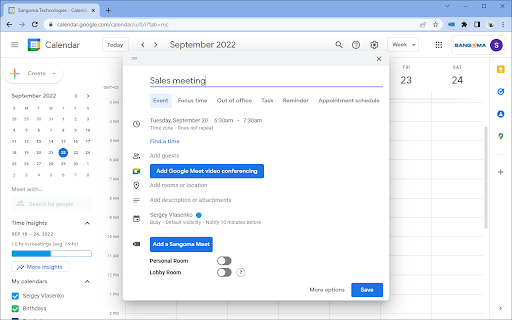

This extension adds Sangoma Meet button to Google Calendar UI to simplify adding Sangoma meeting details into a calendar invite. Sangoma Meet is a multi-platform video conferencing service, based on WebRTC, which provides the best in video conferencing security and experience, whether on a mobile device or desktop computer. Sangoma Meet enables anyone to start a video conference on any device they want. Collaborate with co-workers on projects, keep in touch with your whole family, share some screen-time with your team or meet their family and pets and feel like you’re there with them. Extension supports several ways to create a new meeting in Google Calendar and share Sangoma Meet connection info with participants 1. Clicking Sangoma Meet button on Chrome toolbar will open a new Google Calendar event form and will insert Sangoma Meet connection info automatically. 2. While in Google Calendar UI, click a free spot to show a Quick meeting add panel. Use Add a Sangoma Meet button to insert Sangoma Meet connection info. 3. While in Google Calendar event editor, use Add a Sangoma Meet button to insert Sangoma Meet connection info. Once Sangoma meeting details are inserted, add the meeting title, participants, set the time to meet and send invite. You are now ready to host your video conference. Simple!

Meet Chat Transcribe
Transcribe Google Meet Chats to a Google Doc. When engaged, chats will be saved to a Google doc in the Meet Chat Transcripts folder of your Google Drive.

Star2Star Contact Center Click to Dial
This Chrome extension detects phone numbers on web pages and enables click to dial via Star2Star Contact Center Agent Panel. You must have Star2Star Service Insight or Contact Center service in order to use this browser extension.

Meet Chat Notifier
The extension generates a notification of Google Meet chat messages. You can browse other screens, and if you receive a chat message, it will appear as a notification on your operating system. Are you a teacher? see students' questions while teaching!. While using Google Meet, you can disable notifications and re-enable them at any time. * Extension tested on Windows 10, macOS, PopOS. * Make sure notifications are enabled on your computer. * In Windows 10 for notifications to appear in full screen, turn off the focus assistant. Tutorial: https://sites.google.com/view/meet-chat-notifier/perguntas-frequentes (Beta extension translation)

Click2AI
AI Chrome Extension for Sales Automation and Lead Generation Built for sales, recruiting, and marketing teams, Click2.ai is the all-in-one AI tool that helps you find and enrich leads, automate outreach, and close more deals with less manual effort. Are you struggling to keep up with cold outreach or scale your B2B prospecting? Need an easy way to get verified contact data from social and professional platforms? Click2.ai is the solution, a smart email finder, AI sales assistant, and outreach engine built into your browser. This AI-powered Chrome extension helps you automate follow-ups, extract verified contact details, and streamline your workflow—without losing the human touch. Key Features AI Lead Generation Search by role, industry, company, and location to find qualified B2B prospects in seconds. Email Finder & Contact Enrichment Extract verified emails, phone numbers, and company data from public profiles and directories. AI Outreach Automation Automatically send personalized connection requests, messages, and follow-up sequences at scale. Human-Like Engagement Generate contextual replies and comments that sound real, professional, and personalized—no fluff. Lead List Management & CRM Sync Organize, export/import leads, and integrate with your favorite sales tools. Keep your outreach organized and targeted. Built For Click2.ai is built to support a range of professionals looking to scale their outreach efforts: Sales Teams – Accelerate your sales cycle, find decision-makers, and boost your close rate Recruiters – Source and engage candidates faster than ever Marketers – Increase engagement and visibility with targeted B2B content Business Owners – Grow your pipeline with smart, AI-backed prospecting Why Click2.ai? Click2.ai combines the power of: AI assistant for productivity and sales automation AI tool for prospecting B2B lead generation and enrichment engine Email extractor and contact finder Sales automation Chrome extension for outreach at scale Smart Chrome tool for automating workflows across professional and social platforms AI-powered productivity booster for lead management and engagement AI extension for time-saving automation Use it as your CRM shortcut, your messaging AI, your enrichment assistant—all in one lightweight extension. Integrates With Click2.ai works natively on platforms like X (Twitter), Facebook, and other sales environments, and plays well with your existing workflow: Use it alongside tools like HubSpot, Salesforce, Pipedrive, or your favorite CRM Compatible with Gmail, Notion, and spreadsheet-based workflows Easily export and import leads via CSV—no complicated setup required Ideal for teams managing outreach across multiple platforms No deep integrations needed. Just install the extension, log in, and start scaling your productivity with AI Try It Free Test all features with a 15-day free trial. After that, continue with limited features or upgrade to unlock full automation, unlimited email finding, and more. Log in to your preferred professional platform Start searching, connecting, and enriching leads instantly Customize tone, length, and outreach preferences from your toolbar
