
kbpnojigbmopjjhokfbdeejefhniedlo
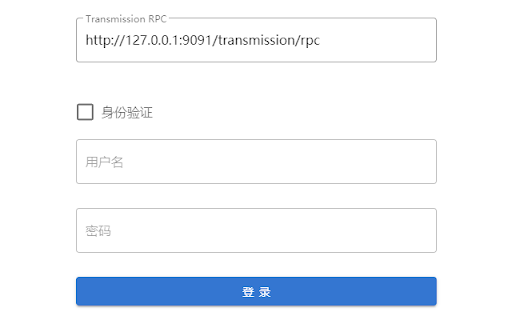

A Web UI For Transmission Transmission modern UI interface needs to be used with Transmission RPC how to use: You will enter the login interface when you use it for the first time Set the URL of Transmission RPC in the login interface Check Authentication if there is authentication and fill in username and password If the torrent information cannot be obtained for a long time, log out in the upper right corner and log in again The configuration is correct, the next time you open it, it will automatically enter the seed management interface by default The main function: Add/remove torrents View/manage torrent lists View/manage file list Manage file priority Manage Trackers Control download/upload speed Select the magnet link and right click to download it quickly

CookieCloud
CookieCloud is a tool for syncing browser cookies to a self-hosted server. CookieCloud is a small tool for syncing cookies to a self-hosted server, which can synchronize the browser's login state to mobile devices and the cloud. It supports end-to-end encryption and allows setting the synchronization interval. The latest version supports local storage synchronization with domain name keyword matching, with a synchronization time of twice the interval time. It requires refreshing the target website page to take effect.

Remote Torrent Adder
This extension allows you to send torrent files from your browser to your remote or local Bittorrent client's web interface. It doesn't just send the urls to the WebUIs, but downloads the torrent and uses the file upload function of the UIs to add the torrent. Thus, it even works on private trackers that require cookies. Currently, it supports several web interfaces, a full list can be viewed on the project page. Per default, this extension scans any open page for links that match given filters and overwrites the download-action, but its functionality can also be accessed via a context menu. Its filters are easily extensible using regular expressions via the options page, but a basic set of filters should work for most sites. For faq, support (issues) or the latest changes, please visit the GitHub page that is linked in the "DETAILS" tab of this page.

.torrent to Transmission
Automagically add, access and control torrents with Chrome. Automagically integrates the Transmission BitTorrent client with the Chrome browser in the least intrusive way possible. - Right click to add any link to Transmission - Including magnet links - Now works with private trackers - check the options page - Provides a user interface built right into Chrome that allows you to manage your torrents - See your current torrents - divided up into all, downloading, seeding and paused - Manage your torrents: - Pause, remove and move individual torrents up and down the queue - Pause and remove groups of torrents - Enable/disable turtle mode - Provides a quick link to the Transmission built in web interface *** Setup *** - Enable the Transmission Web UI - Open up Transmission - Goto Edit -> Preference and select the Web tab - Make sure the Enable web client box is checked - Enter .torrent to Transmission settings - Open up the .torrent to Transmission options page - Enter the correct RPC address and correct WebUI address - RPC address will take the format of http://:9091/transmission/rpc - WebUI address will take the format of http://:9091 - Make sure to replce with the IP address running the Transmission client Massive update for manifest v3 and changes to Chrome Extension APIs. Please report any bugs encountered. 1.0.0 - Popup will show an error page if unable to communicate with Transmission RPC - Added support for private torrent files/trackers. There is now an item in the options page for downloading the .torrent file and sending the data to Transmission 0.5.9 - Fixed 'Error: undefined' issue in options page when detecting RPC version.

Transmission Torrent Sender
Send and manage torrents in Chrome on the Transmission server. Seamlessly add, access, and control torrents with Chrome. Effortlessly integrates the Transmission BitTorrent client with your Chrome browser, staying out of the way until you need it. Right-click to send any link to Transmission Magnet links fully supported Compatible with private trackers — configure in the options page Built-in UI for managing torrents directly in Chrome View your torrents: Downloading, Seeding, and Paused Dark mode theme (see in the options) Manage them with ease: Pause, remove individual or multiple torrents at once Quick access to the full Transmission web interface
