
kbkaecpbbnacnjecgecmfopgojdcomfn
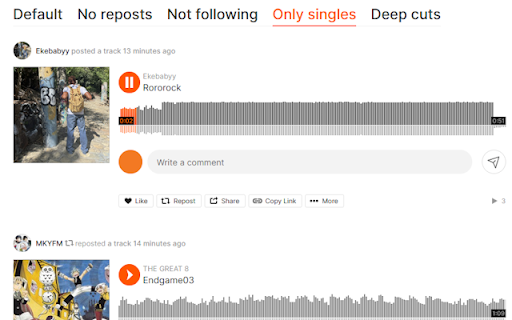
Adds multiple filtering options to your SoundCloud feed This addon gives you 5 extra tabs on your SoundCloud feed: - Default: no filtering - No reposts: don’t show reposts - Not following: don’t show tracks from people you’re following - Only singles: don’t show playlists or songs longer than 30 mins - Deep cuts: only show songs by people with not many followers or songs with not many plays

SoundCloud ScrollDown
Scroll down your SoundCloud stream automatically to a desired post by choosing a date! Helps you to find soundcloud posts of people you follow by scrolling up and down automatically! Changes in Release 1.0.5: - Fixed SoundCloud URL from "/stream" to "/feed" inside the plugin, which caused plugin not to work Changes in Release 1.0.4: - Added version display to the popup Changes in Release 1.0.3: - Fixed bug, that on reopening the plugin didnt recoginze the correct status Changes in Release 1.0.2: - Added feature to run and stop the plugin at any time. Now you can start scrolling, close plugin window, open it again and stop scrolling.

SoundCloud Player
Control your audio with ease using this extension. Reduce tab clicking by using the convenient pop-up window feature. If the problem persists, please contact us using the links provided below.

SoundCloud Feed Filter Extended
Filter your SoundCloud feed — block reposts, filter by track length, content age, tags, free downloads, and more. Browser extension that adds filtering to your SoundCloud feed. Create multiple filter presets and switch between them with a tab bar. This extension is based/inspired on these extensions: - SoundCloud Feed Filter by 7x11x13. - SoundCloud repost blocker by apsun. - Repost filter — block all reposts, allow only from people you follow, or show only from people you don't follow - Playlist filter — hide large playlists (more than 5 tracks) or all playlists; optionally show only playlists where the artist's name appears in a track title - Tag filter — include or exclude tracks by genre/tag - Track length — show only tracks within a duration range - Content age — control how old feed entries and uploads can be - Free downloads only — show only tracks with a free download link - Hide seen tracks — hide tracks you've already scrolled past this session The extension ships with these pre-configured tabs: - Default — your full SoundCloud feed with no changes - No reposts — only original posts; nothing someone else shared - Not following — only content from people you don't follow; good for discovering artists through your network - Only singles by followed — short tracks (under 30 min) from followed artists only; playlists appear only when the poster's name shows up in a track title, which catches label releases by artists you follow - Only mixes by followed — longer tracks (45–120+ min) from followed artists only; same playlist rule as above — good for DJ sets and albums - Downtempo mixes — longer downtempo tracks (45–120+ min) only; good for background listening sessions - Free Downloads — short tracks (under 30 min) with a free download link - New Free Downloads — same as Free Downloads but limited to uploads from the last 7 days - Deep cuts — tracks from small or under-the-radar artists; surfaces music you'd otherwise miss 1. Click + in the tab bar to create a new tab 2. Give it a name and configure the filters 3. Click Save — the tab appears in the bar as the last item 4. Switch between tabs to instantly change your feed view

Task Manager for SoundCloud
Leverage comments with todo, focus, and ignore toggles Turn SoundCloud comments into a to-do list — right in your browser, for free. Check off tasks, set priorities, and ignore what's not important — all within SoundCloud.
