
kbihopcfiikdglbglliomopclpgdedoh

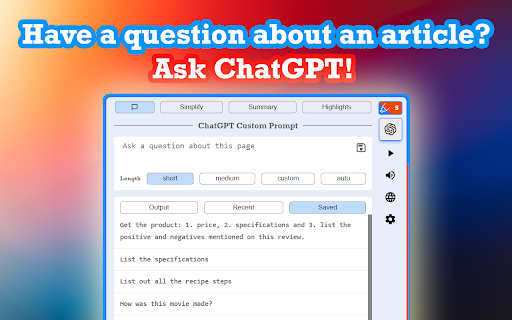

Ask questions and gain insights from a page with contextually relevant AI anwsers. Introducing Highlights AI - the perfect tool for quickly grasping and extracting information from any webpage! You can easily listen to summaries, find key highlights, and ask questions about the current page you’re on using ChatGPT. Obtain contextually relevant answers to all your questions by using ChatGPT on any website. Write custom prompts and ask questions that come to mind while browsing any article/page. Easily access your most recently used prompts and save your favorite ones for future reference. Effortlessly grasp the key points and main ideas of any page with the click of a button. Let ChatGPT generate concise summaries that provide a quick overview of the content, saving you valuable reading time. Instantly identify the most important sections and noteworthy information on any page. Utilize ChatGPT to generate highlights that pinpoint key insights, enabling you to focus on the interesting aspects of the content at a glance. ◼ Text-To-Speech: Listen to all the text output generated by ChatGPT with natural-sounding speech. Choose from multiple voice options, adjust the speed to your preference, and mute the volume when desired. ◼ Action Buttons & Keyboard Shortcuts: Boost your productivity with just one click or by using convenient keyboard shortcuts to generate summaries and highlights. Experience the full power of a personal AI assistant dedicated to supercharging your efficiency. Try Highlights AI to see how it can help you save time understanding a page!

Save Link to Highlight
Save and share multiple highlights on any page fast! Save all your highlights locally. This extension is a great alternative to Copy link to highlight for those who want to share multiple highlights instead of one. KEY FEATURES 【1】Share multiple highlights in one link. 【2】Built-in URL shortener. Turn you long links into short ones highlights.page/##### 【3】Saved highlights are stored locally and restored back to page on your next visit. HOW TO USE • Step #1 - Select any text on a page, right-click and select "Save Link to Highlight". A link to your selected text will be in your clipboard. Repeat Step 1 to add multiple highlights to your clipboard link. 𝐇𝐈𝐆𝐇𝐋𝐈𝐆𝐇𝐓𝐈𝐍𝐆 𝐓𝐈𝐏 Avoid highlighting dynamic/real-time text - If the text on a page stopped highlighting you may have highlighted real-time text. Real-time text is text that changes sometimes live while you are on the page (ex. stock prices) or the next time you visit the page(ex. relative dates - posted 5 minutes ago). Tip: Highlight the area before the dynamic text and the area after. 𝐃𝐈𝐒𝐂𝐋𝐀𝐈𝐌𝐄𝐑 Save Link to Highlight uses the same built-in technology in Chrome as Copy link to highlight. Anyone can view a link shared with multiple highlights without this extension installed. Multiple highlights on a page will look and work the same as single highlights do.

Vio - Your ChatGPT Companion
AI companion powered by ChatGPT that give your instant answers and help generating text on any page. Introducing Vio🤖, your ultimate ChatGPT companion powered by ChatGPT AI (including GPT-4) to deliver instant summarization, explanations, translations, rewriting, and text composition on any website!🌐 No more toggling between different tabs or apps, as everything you need is now just a click away. 💻 With Vio, everything you need is right there at your fingertips. And with its intuitive interface and easy-to-use features, Vio makes it easier than ever to write like a pro. Features: ✅ Support both ChatGPT web application access and OpenAI Chat API key ✅ Quick access to ChatGPT at the side of your screen by clicking the Vio floating button at the side 📌 or pressing Cmd + B for Mac and Ctrl + B for Windows/Linux ✅ Quick lookup by selecting text ✅ AI characters to assist you in various task (Eg. Math tutor, Personal trainer, UI designer etc) ✅ Summarize lengthy articles and explain difficult topics ✅ Translation on any page 🌎 ✅ Improve your writing 📝 with the help of AI with grammar checking and paraphrasing ✅ Generate emails, posts, and messages in the tone you prefer. ✅ AI copywriter to compose articles and Facebook advertisements. ✅ Easy copy paste of response and also download of images. ✅ Support for GPT 3.5 and GPT 4 (for Pro users 🚀) Use Vio as your reading companion 📖: * Summarize articles * Explain articles, words, or even code * Translate to any language * List key takeaways * Shorten or lengthen your text Or use Vio as your writing companion ✍️: * Write reply to emails or messages. * Compose emails 📧, messages 💬 , social media posts, and captions * Assist in writing Facebook ads. * Rewrite your content with a different tone * Make text shorter or longer * Fix grammar and spelling. Vio has got you covered. 😊

Enigma, ChatGPT Sidebar
Enigma is an AI assistant sidebar. It brings the power of AI into your hands. Access ChatGPT everywhere. ⭐⭐Now chat with any PDF file. Upload your documents, papers, or assignments and ask any questions about them! Access ChatGPT everywhere with the Enigma extension! ⭐Open the sidebar using ctrl+alt+j (ctrl+cmd+j on MacOS) or clicking on the Enigma icon at the bottom left corner of the screen. ⭐Easily Draft content for blogs and social media with the new "Compose" tab. ⭐Summarize long webpages without any limit to its size. ⭐ Write emails for Gmail and Outlook or summarize your mailbox. ⭐ Summarize Wikipedia pages. ⭐ Get answers with faster response times. ⭐ Download the response as a Word document. ⭐ Translate highlighted text. - Write tweets for twitter. - Query highlighted text from any website. - Keep chat context for each website separately. - Easily write essays with ChatGPT and generate Word documents. - Query highlighted text directly from the context menu. - Access ChatGPT anywhere anytime, even when demand is high! - Generate captions for Instagram. - Write posts for social social media such as LinkedIn. - Summarize Google, Bing, and DuckDuckGo results. - Desktop application and VS Code extension will be available soon!

ChatGPT Explain
A ChatGPT Chrome Extension that explains concepts in a simple way Looking for a way to understand complex concepts with ease? Look no further than ChatGPT Explain, the Chrome extension that simplifies even the most challenging topics. 📚 Select any text on your screen and get concise, brief, or detailed explanations of the concepts it contains. 💡 Customize the amount of detail you receive, from a quick overview to an in-depth analysis. ⏰ Save time and effort by getting instant access to the information you need. 👩🎓 Perfect for students, professionals, or anyone who loves to learn new things. 🆓 Completely free to use and easy to install with just a few clicks. With ChatGPT Explain, understanding new information has never been easier. Say goodbye to confusion and frustration and start learning with ease today!
