
kbgecjdooebmedkcbenhakhhchidlmnb
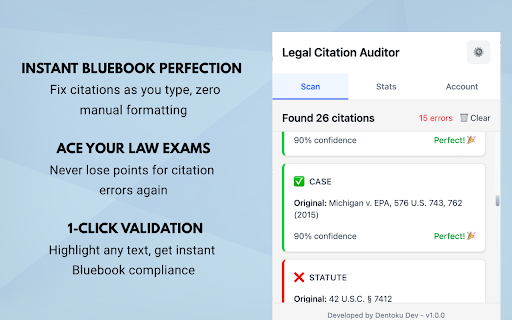


Manual first-pass checks for selected U.S. case and U.S.C. citations on standard web pages. Short description Manual first-pass checks for selected U.S. legal citations on standard HTML pages. Manual review required. Full description Legal Citation Auditor is a conservative, manual first-pass checker for selected U.S. legal citation formats on standard HTML pages. U.S. Supreme Court full citations using U.S. Federal appellate full citations using F.2d, F.3d, and F.4th Basic U.S.C. citations in the format Title U.S.C. § Section Manual scan of the current tab only How it works: You start scans manually from the extension popup The extension checks supported citation patterns on the current HTML page It highlights supported matches and flags likely issues in supported checks It labels unsupported and ambiguous citation-like text instead of guessing Suggestions are provided as “Suggested format for manual review” and can be copied Important limitations: This is not full Bluebook compliance This is not a final legal citation authority No automated correction or auto-apply changes Not supported: Google Docs, Office web editors, PDFs, canvas/rich-text editor environments Not supported: district court citations, state cases, state statutes, C.F.R., short cites (id./supra/infra), parallel citations, In re, Ex parte Access and data handling: Sign-in and active scan access are required to run scans Citation detection and validation run locally in the browser If signed in, account/subscription checks and usage counters are sent to the backend Usage counters are totals (e.g., citations checked, likely issues), not full-page text Optional “What’s new” (release notes) Version 1.0.8 Aligned product naming to selected U.S. citation scope Manual-first, limited-scope posture reinforced across UI Release package and options copy hardened for store consistency

Legal Simplifier - AI Legal & Law GPT Assistant
AI Legal Assistant & Law GPT for smart contract analysis. Transform complex legal documents into clear language using AI technology. Legal Simplifier - AI Legal Assistant & Law GPT for Smart Contract Analysis Your AI Lawyer in Chrome! Powered by advanced GPT technology, Legal Simplifier transforms complex legal documents into clear, actionable insights. Get instant AI compliance checks and contract analysis in simple language. 🤖 Powered by Advanced Legal AI: - GPT-powered legal document analysis - AI Compliance checking and alerts - Smart contract interpretation - Legal jargon simplification - Instant document summaries 🚀 Simple to Use: 1. Install your AI Legal Assistant 2. Click the Legal Simplifier icon 3. Upload contracts or analyze web pages 4. Get AI-powered explanations 5. Ask your AI Lawyer anything unclear 🔍 Perfect for: - Contract AI analysis before signing - Quick legal compliance checks - Understanding Terms of Service - Reviewing legal obligations - Making informed legal decisions ⚡ Key AI Features: - Law GPT powered explanations - AI Legal Q&A (2 free questions included) - Smart contract summaries - PDF and webpage analysis - Easy sharing of insights - Works right in your browser 🌐 Visit www.legalsimplifier.ai to unlock unlimited AI legal analysis and full Law GPT assistant access! Transform complex legal documents into clear insights with your AI Lawyer. Install Legal Simplifier now and get 2 free AI-powered document analyses!

Legal Research Tool Assistant
Legal research tool with AI prompt generation and AI Query and Querstion. Accelerate your legal research with this all-in-one extension featuring AI-powered tools and instant access to global legal databases. Perfect for lawyers, law students, and legal professionals. 🤖 AI Legal Assistant Generate specialized ChatGPT prompts for: • Case summaries • Q&A analysis • Legal analytics • Case law with citations 📄 PDF Intelligence Direct link to ChatPDF for AI-powered analysis of legal documents ⚡ Workflow Optimization Single interface for research tasks - no more tab switching 📋 Smart Prompt Generator Creates court-ready queries with proper legal terminology Transform your legal research process with AI-powered efficiency. Download now to save hours on case preparation and legal analysis.

Legal Sensus Chrome Extension
Open PDFs directly in the Legal Sensus web app with ease! The Legal Sensus Chrome Extension streamlines how you handle PDFs in your browser. Whenever you open a PDF in Chrome, the extension prompts you to seamlessly import and view it in the Legal Sensus web app. Instant prompts on PDFs – a in-page popover toast asks if you’d like to open the document in the Legal Sensus web app. Authentication handoff and resume – if you’re not signed in, the extension saves your pending import, takes you to sign in, and resumes automatically once you’re authenticated. Background upload with progress UI – PDFs upload in the background while a slim progress bar tracks the process. One-click access from the toolbar – trigger the in-page prompt again from the extension’s toolbar button. Uninstall survey – on removal, you’ll be asked for quick feedback to help improve Legal Sensus.

Legal Document Analyzer
Analyze and summarize legal documents using AI Legal Document Analyzer This Chrome extension lets you upload and analyze PDF, DOC, DOCX, and TXT files directly from the browser. It uses a locally hosted version of pdf.js (rather than remote CDNs) to ensure compliance with Chrome’s Content Security Policy (CSP). All scripts are stored and loaded within the extension, so no external script calls or inline scripts are required. Once a file is chosen, the extension processes the document’s text—providing a quick, AI-powered summary and key insights. A progress bar and loading indicator show the status of your document analysis, and upon completion, you can review the summarized content or download the analysis results as a text file. Security and Privacy No third-party scripts are pulled in dynamically, reducing external dependencies and meeting CSP requirements (script-src 'self'). Inline scripts have been moved to separate .js files, preventing CSP violations. Users are advised that all analysis results are for informational purposes only and do not constitute legal advice. Always consult a qualified legal professional for specific legal questions. Features File Upload: Accepts PDF, DOC, DOCX, and TXT files. Progress & Feedback: Shows a progress bar during analysis, and a loading spinner to indicate real-time processing. AI-Powered Analysis: Summarizes large documents quickly, providing main points and insights. Download Results: Exports the summarized analysis as a text file for easy reference. Friendly UI: Clear instructions and minimal design make it accessible for non-technical users. Disclaimer This tool is AI-driven and does not replace professional legal counsel. Results should be used for guidance only, and professional legal advice should be sought for specific matters.
