
kbdngpgbaojnjhddaamcfffbpbacdmmh
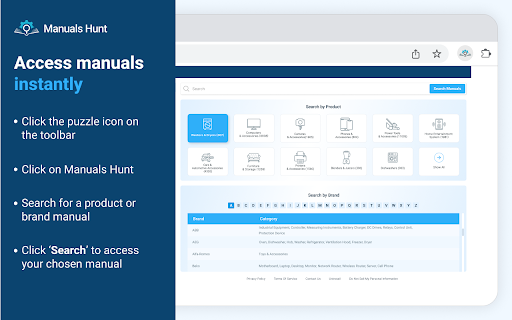

Access over 60,000+ manuals via a widget on your toolbar with the Manuals Hunt extension. Get quick access to repair and user guides for home appliances, gadgets, electronics, and more. Search by brand or product, download or print, or save for easy referencing later. How to use the extension: 1. Click the puzzle icon on the toolbar, then click on the Manuals Hunt icon to access the widget 2. Search for a product or brand manual via the search bar 3. Click ‘View Manual’ to access it Permission: Read and modify your data on manualshunt.com: This permission is required to make calls to our API via our domain to provide you with the communicated functionality. Want to share feedback? Please fill out this form and help us improve the product for you: https://manualshunt.com/contactus You can uninstall this product at any time. Please follow the instructions here: https://www.manualshunt.com/uninstall By clicking the button above, I consent to install this Chrome™ extension and abide by its Terms of Service and Privacy Policy. Chrome is a trademark of Google LLC. Use of it here does not imply any affiliation with or endorsement by Google LLC. Companies, product and service names, brands, logos or images mentioned here are trademarks or registered trademarks of their respective owners. Use of them here does not imply any endorsement by or affiliation with their respective holders.

Private Search Mode
A privacy-focused search extension that redirects searches through secure search engines Take control of your browsing experience with this extension, right from your browser. With Yahoo as your default engine and multiple options like Brave, DuckDuckGo, and more, switch between engines at any time to stay secure and in control of your searches. How to use the extension: 1. Click the puzzle icon in your browser toolbar to open the extension 2. Yahoo is set as the default engine 3. Switch the toggle on to enable Private Mode 4. Select your preferred engine for a secure browsing experience Want to share feedback? Please fill out this form and help us improve the product for you: https://privatesearchmode.com/contactus You can uninstall this product at any time. Please follow the instructions here: https://privatesearchmode.com/uninstall By clicking the button above, I consent to install this extension and abide by its Terms of Service and Privacy Policy. All trademarks, company/service names, and images are property of their owners. No affiliation or endorsement implied.

Photo Editor
From cropping and filters to AI image generation, upscaling, and background removal, get everything in one simple tool. Create, refine, or transform, Photo Editor opens from your browser for quick edits or powerful AI enhancements, all in one place. Easily crop, flip, resize, apply filters, add text or shapes, or explore the AI prompt catalog to create new visuals and refine your uploads with background removal, object erasing, upscaling, and more. How to use Photo Editor: Click the puzzle icon in the browser toolbar to access Photo Editor Select “Edit My Photo” or “Create with AI.” In Edit mode, upload a file and crop, rotate, resize, add filters, text, shapes, more In AI mode, pick a prompt, upload your image, and try background removal, upscaling, more Download your final result with one click Want to share feedback? Please fill out this form and help us improve the product for you: https://photoeditor.net/contactus You can uninstall this product at any time. Please follow the instructions here: https://photoeditor.net/uninstall By clicking the button above, I consent to install this extension and abide by its Terms of Service and Privacy Policy. All trademarks, company/service names, and images are property of their owners. No affiliation or endorsement implied.

SMARTlauncher for Google Chrome Apps/Calendar
SMARTlauncher uses Google Calendar/Apps to find lodging, directions, car, air & curated content all nearby —right from your browser 𝐓𝐮𝐫𝐧 𝐘𝐨𝐮𝐫 𝐂𝐚𝐥𝐞𝐧𝐝𝐚𝐫 𝐈𝐧𝐭𝐨 𝐘𝐨𝐮𝐫 𝐓𝐫𝐚𝐯𝐞𝐥 𝐄𝐧𝐠𝐢𝐧𝐞 SMARTlauncher is a free Chrome extension that transforms the Google tools you already use, such as Calendar, Search, Maps, and Contacts, into a seamless travel-planning experience. Find lodging, directions, car rentals, flights, and curated destination content right from your browser, without switching tabs or apps. And once you register, every trip can earn rewards, generate donations, and unlock a new revenue stream. 𝐓𝐫𝐚𝐯𝐞𝐥 𝐏𝐥𝐚𝐧𝐧𝐢𝐧𝐠 𝐓𝐡𝐚𝐭 𝐖𝐨𝐫𝐤𝐬 𝐖𝐡𝐞𝐫𝐞 𝐘𝐨𝐮 𝐀𝐥𝐫𝐞𝐚𝐝𝐲 𝐖𝐨𝐫𝐤 SMARTlauncher connects directly to your everyday tools so planning a trip feels effortless, not fragmented. • Book lodging near meetings and events in Google Calendar • Find hotels instantly from Google Chrome search or highlighted addresses • Plan trips from Google Maps, Contacts, and event listings • Discover travel tied to professional engagements on LinkedIn Just smarter planning, exactly where you are. • Every booking supports Special Olympics • Registered users earn $1 per booking after 10 nights • And, you choose your own charity • Share it with your network and earn royalties as they travel When your network travels, we give back. And you can earn, too. 𝐀 𝐍𝐞𝐰 𝐓𝐚𝐛 𝐘𝐨𝐮’𝐥𝐥 𝐀𝐜𝐭𝐮𝐚𝐥𝐥𝐲 𝐋𝐨𝐯𝐞 SMARTlauncher replaces the blank Chrome tab with stunning, curated photography, powered by Unsplash. Architecture. Landscapes. Wonders of the world. Inspiration every time you open a tab. Don’t love an image? Refresh instantly. Want more control? Upgrade and customize your collections. • Personal productivity launcher (3 items) • Ideal for frequent travelers • Perfect intranet for teams • 6 launcher items • Social media links • Choose your own image categories • Perfect intranet for teams • Ideal for loyalty groups and associations • Fully branded image libraries • Build your own custom image libraries • Built for loyalty, revenue, and AI-resilient engagement 👉 Join the beta: https://beta.solutionz.com/smartbranding 1. Install the SMARTlauncher / Smart Trip Pin for Chrome 2. Click the Smart Meets Heart icon 3. Register to unlock earnings, donations, and rewards • Save time by planning trips where the data already lives • Eliminate app-hopping and manual searches • Turn bookings into impact, rewards, and revenue This isn’t another travel site. It’s a smarter way to travel, built into your workflow. Built for Frequent Travelers Register to access the VIP Travel Program, ideal for travelers booking 4–6 nights per month or more. • Global lodging options: hotels, rentals, villas, apartments, condos • Personalized filters and preferences • Priority support 24/7 in 40 languages • 110% Best Rate Guarantee 1. Install the Chrome extension 2. Plan trips from Calendar, Search, Contacts, Maps, and more 3. Give Back & Earn with every booking Schedule a meeting → see nearby lodging instantly Highlight an address → book accommodations in one click Browse events → plan travel without leaving the page Free to Start. Powerful When You Register. • Free to use forever • Registration unlocks earnings, donations, and upgrades • Premium options available for power users and planners After deploying the extension: 1. Add the extension to your extension bar by clicking on the puzzle piece 2. Click on SMARTmeetsHEART icon on the extension bar 3. Select REGISTER NOW from drop down Join the first wave of SMARTlauncher users and start saving time, earning rewards, and making every trip count.

Clear Portal Cache
Clearing the cache with a single click! Easily clear your Dynamics portal cache without going to /_services/about. Just click the icon in your extensions! Everyone who worked in Dynamics portals, knows it is a struggle to clear the server-side cache. You always have to go the page "/_services/about" and click on the button "Clear cache". This simple Chrome extensions loads this page and clicks on the button automatically in the background. This extension only works for Microsoft portals and Power Pages.
