
kbbbnalhcflpolnloahgkbamhplkbbho
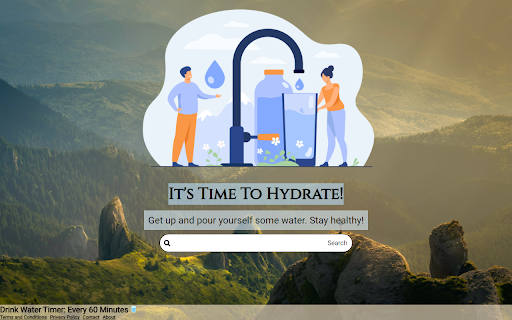
Drinking enough water each day is crucial for many reasons: to regulate body temperature, keep joints lubricated, prevent infections, deliver nutrients to cells, and keep organs functioning properly. Being well-hydrated also improves sleep quality, cognition, and mood. When using the this addon, every time you use the browser, a 60 minute timer will be being activated. Then, after 60 minutes, the next time you open a new tab, you'll get a reminder to take a water break. no annoying sounds or popups! Disclaimer: The search experience will be provided by Bing. Contact: http://www.feedsgo.net/contact About: http://www.feedsgo.net/about Terms and Conditions: http://www.feedsgo.net/watertimer/terms-and-conditions Privacy Policy: http://www.feedsgo.net/watertimer/privacy-policy

Drink Water
Stay hydrated by tracking the amount you drink throughout the day.

DrinkTime: Smart Water Reminder
Smart water reminder with voice alerts, intake tracking, and hydration stats in a clean UI. Never let a busy day get in the way of your hydration goals again! DrinkTime is a comprehensive Chrome extension designed to help you build and maintain healthy water drinking habits through intelligent reminders, personalized intake calculations, and easy-to-understand progress tracking. Staying properly hydrated is crucial for overall health, energy levels, and focus. But with hectic schedules, it's easy to forget to drink enough water. DrinkTime acts as your personal hydration coach, gently nudging you throughout the day and making it simple to monitor your intake. Set reminders at your preferred frequency (e.g., every 30, 60, or 90 minutes). Enable optional, friendly voice alerts to accompany visual notifications – choose from a selection of sounds! Desktop notifications allow you to log your intake with a single click. (This feature requires "Notifications" permission to display these alerts.) The extension uses the "Alarms" permission to reliably schedule these reminders. Smart Calculator: Get a scientifically-backed daily water intake recommendation tailored to your body weight, gender, local climate, activity level, and active hours. Simply input your details in the "Preferences" tab. Manual Goal Setting: Prefer to set your own target? Easily adjust your daily water goal using an intuitive slider in the "Goal" tab. Dynamic Reminder Amounts: Each reminder notification suggests a water amount calculated based on your daily goal (either recommended or manual) and your set active hours, ensuring you're paced correctly throughout your day. 📈 Track Your Progress & History: Daily Goal Visualization: See how you're doing at a glance with a clear doughnut chart in the "Goal" tab, showing your current intake against your daily target. Comprehensive Intake Log: DrinkTime automatically logs your water consumption when you confirm via notifications. Historical Data: Dive into your hydration history in the "History" tab. A bar chart visualizes your daily intake over time. Filter & Paginate: Easily filter your history by specific date ranges and navigate through your logged data with pagination. Organized Tabs: Quickly access all features through a clean, tabbed interface: Preferences: Set up your personal details for recommendations. Reminder: Configure reminder frequency, voice alerts, and start/stop the service. Also shows a live countdown to your next reminder. Goal: Adjust your manual daily goal and see today's progress. History: View and filter your past water intake. Info: Learn more about the extension and how to use it. Local Data Storage: All your settings, preferences, goals, and intake logs are stored securely on your local computer using the "Storage" permission, ensuring your data remains private and accessible across sessions. The extension intelligently manages alarms, calculates personalized intake amounts, and triggers timely notifications. The user-friendly popup provides a central hub for all settings and data visualization, including insightful charts to monitor your progress. Voice reminders are handled efficiently using modern browser capabilities. Install DrinkTime today and take the first step towards better hydration and a healthier you!

Tab Timer Switcher
Automatically switches tabs based on a timer specified for each tab. Automatically switches tabs based on a timer specified for each tab. When you press start the extension is active in that window and you can input the time for each tab.

Move Minder 1.1
Set reminders, track movement, and boost your daily activity. Stay healthy, one step at a time. Move Minder: Your Personal Movement Reminder What is Move Minder? Move Minder is a Chrome Extension designed to help you break the cycle of prolonged sitting and encourage regular movement throughout your day. It was inspired by the NPR Podcast called Body Electric where a study was done showing the benefits of getting up and walking for 5 minutes, every 30 minutes (or an interval that works for you). 1. Customizable Reminders: Set reminders at intervals that work for you - every 30 minutes, 1 hour, 2 hours, or a custom time of your choice. 2. Full-Screen Alerts: When it's time to move, a full-screen popup appears, ensuring you don't miss your movement break. 3. Flexible Options: - "Done Moving": Click when you've completed your movement break. - "Snooze": If you need to delay your break. - "Give Me 5 Minutes": A short extension for when you're almost ready to move. 4. Movement Tracking: The extension keeps track of your movement patterns. 5. Visual Progress: View your daily movement data in an easy-to-read graph. 6. Streak Tracking: Build and maintain a "movement streak" for consistent activity. 7. Customizable Sounds: Choose from various notification sounds or mute them if you prefer. 8. Pause Feature: Temporarily pause the timer when you're away or in a meeting. 1. Install the Move Minder Chrome Extension. 2. Set your preferred reminder interval. 3. Work as usual, and when the reminder pops up, take a break to move. 4. Record your action (moved, snoozed, or took 5 minutes). 5. View your progress and streaks to stay motivated. - Combat the negative effects of prolonged sitting - Increase daily physical activity - Improve focus and productivity with regular breaks - Build healthy habits with visual tracking and streaks Move Minder is perfect for office workers, students, or anyone who spends long hours at a computer. Start moving more and sitting less with Move Minder!
