
kaonbikphaokagplfljdhmmcgmhlbkhc

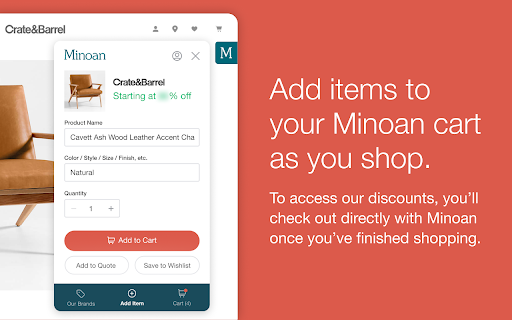


The best way for Minoan members to shop and save across hundreds of brands. The Chrome Extension will automatically appear on any brand partner page and display the Minoan discount. It will also log events on other industry websites to personalize the service for you. Let’s get started! To start adding items to your Minoan Cart with the Minoan Chrome Extension: 1. After you install the extension, visit any of our brand partner websites and find an item you'd like to add to cart. 2. Open the Minoan Chrome Extension by clicking the teal ‘M’ icon in the upper right corner of your screen. 3. In most cases, the details of the product will be pre-populated. Review the item specifications to ensure you’re getting exactly what you want and update any inaccurate or missing information. 4. Then simply click “Add to Cart”. If you’d like to add the item to an existing Minoan Quote or your Wishlist, you can do that too. 5. When you’re ready to checkout, head over to Minoan to request a quote and see all your savings.

AirReview: BnB Hosting Tools
AirReview helps Airbnb hosts & investors see every Airbnb listing's income. We also help Airbnb hosts with guest screening features AirReview makes your life easier as a host and investor on the Airbnb platform. With the extension installed, you can do the following: ⚡ Screen guests easily by seeing the reviews they’ve left other hosts. This helps improve your hospitality and avoid negative reviews. ⚡ See currently booked income for any property on the Airbnb platform. Just click the “Get listing data” button for any listing. ⚡ Get easy-to-read charts of your listing's most important metrics 🏆 AirReview was featured on Forbes as a must-have hosting tool as well! https://www.forbes.com/sites/sethporges/2017/07/27/all-airbnb-hosts-should-use-this-chrome-extension-for-screening-guests/?sh=7a6319474081 Install the extension & our quickstart page will guide you the rest of the way Rankbreeze is best known for our listing optimization platform for Airbnb properties. This includes features such as A/B testing for your Airbnbs, search funnel metrics, and pricing tools.

OwnerRez Channel Bridge
Download your booking and review data from channels. Export bookings from Vrbo in Excel format. This extension was created by the OwnerRez.com dev team as part of the OwnerRez Channel Management feature. This extension acts as a "bridge" between vacation rental channel Vrbo and OwnerRez so that users can easily extract information from their listings. Using the provided buttons, you can quickly download bookings and reviews from Vrbo into your OwnerRez account, via Excel format. The booking and review data that is exported out of the listing site is extremely thorough and includes every detail of the booking and review. Get the guest info, charges, trip details, transactions, payment schedule, commission and a lot more in just one click!

PriceLabs - VRBO Reconnection extension
Connect your VRBO account with PriceLabs This will help you connect your Vrbo listings with PriceLabs

VRPlatform Connect
Allows property managers to integrate their travel and accommodation services into our advanced financial integration platform With this extension, property managers can easily integrate their travel and accommodation services, such as booking.com or Airbnb, into the VRPlatform financial integration platform. After connecting to a supported booking channel, VRPlatform will begin pulling financial and booking data that can be viewed on the dashboard. You'll be able to set up accounting integrations to a supported platform (e.g. quickbooks, sage intacct) to automatically generate invoices, journal entries, payments, contacts and more. A VRPlatform account is required prior to using this extension.
