
kaokjlniinfbndjidkcgkhiakdfjgnif

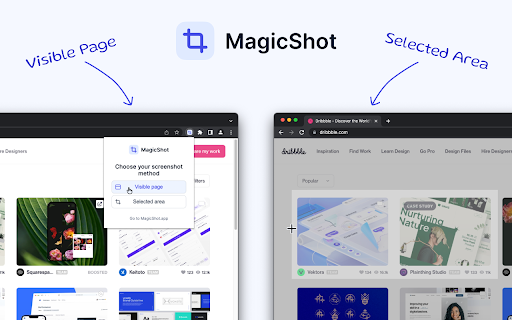
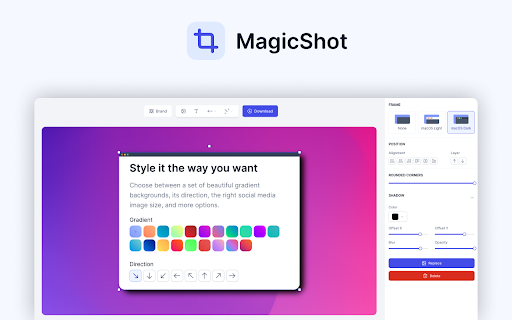
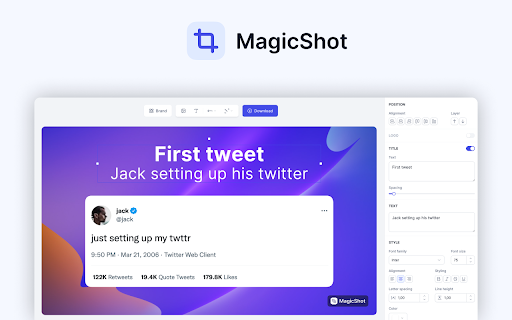
Capture a screenshot of your page or of a selected area and turn it into a beautiful image for your social media To take a screenshot of your current browser tab, simply open MagicShot extension and choose your screenshot method: 1. Visible Page (will capture the entire visible page) 2. Selected area (click and drag over the area you want to screenshot) Then, the image will automatically be imported into MagicShot, and you will be able to edit your screenshot with the following features: ✓ Change the background (gradient, solid color or image) ✓ Add text and style it ✓ Add other images ✓ Add a browser frame to your screenshot ✓ Add annotation elements (arrows, circles, emoji, etc...) ✓ Add your watermark (pro feature) ✓ Select the correct social media dimension for the exported image MagicShot is completely free to use. Only a few features require you to upgrade to our Pro plan. To stay up to date and don't miss any update, follow MagicShot on Twitter: https://twitter.com/MagicShotApp If you have any questions or feedback, please send us an email at hello@magicshot.app

Pika - Capture Website screenshots
Capture web page screenshots and design in Pika.style Pika Chrome extension lets you quickly capture your current tab as screenshot and open it in Pika.style app so you can design and beautify your screenshot quickly

BrandBird ✦ Beautiful Screenshots By Default✦
Create beautiful social media posts & sharable images by screenshotting your current tab! Just open the extension and choose one of the 4 commands and see the magic happen: 𝟙. 𝕍𝕚𝕤𝕚𝕓𝕝𝕖 𝕊𝕔𝕣𝕖𝕖𝕟 Grabs a screenshot of your current active tab and import it to BrandBird for further polishing. 𝟚. 𝔼𝕩𝕥𝕣𝕒𝕔𝕥 𝔼𝕝𝕖𝕞𝕖𝕟𝕥 Select any element from any website to avoid cropping the image, and import it to BrandBird to make it beautiful. 𝟛. ℍ𝕚𝕘𝕙𝕝𝕚𝕘𝕙𝕥 𝔼𝕝𝕖𝕞𝕖𝕟𝕥 Pick an element and the BrandBird Chrome extension will automatically highlight it. Perfect for product tutorials . 𝟜. 𝕆𝕡𝕖𝕟 𝔾𝕣𝕒𝕡𝕙 (𝕆𝔾) 𝕄𝕒𝕜𝕖𝕣 Extracts the title, description & logo from the active tab, grabs a screenshot, and imports everything to the BrandBird studio. Then, the image will be imported into BrandBird, and you can customize further edit it by adding: - Gradient, pattern, or image backgrounds - Shadows - 3D Effects - Device Mockups - Annotation elements like circles, arrows, rectangles, and text - Crop, resize, and blur parts of your image - And many more ℝ𝕚𝕘𝕙𝕥-ℂ𝕝𝕚𝕔𝕜 𝔸𝕔𝕥𝕚𝕠𝕟𝕤 You can instantly import text, images, and tweets to the BrandBird editor by using the right-click Chrome extension functionality. 🛟 Learn more in our how-to-use guide: https://help.brandbird.app/posts/how-to-use-chrome-extension

TakeAscreen | Record & Capture Screenshots
Take Screenshots | Screen Record & Capture Screenshots Unlock the power of visual communication with TakeAscreen – your go-to platform for capturing screenshots and screen recording. With TakeAscreen, you have the tools to effortlessly capture every moment. Whether you're showcasing dynamic content or preserving important information, our user-friendly interface ensures you can take screenshots with precision. Seamlessly transition from screenshots to screen recording, as TakeAscreen empowers you to capture video screen records effortlessly. Capture Screenshot moments that matter most to you. Our intuitive platform allows you to capture the essence of your content, making it perfect for presentations, tutorials, or simply sharing standout visuals. Beyond capturing images, TakeAscreen expands your capabilities into the realm of Screen Recording. Record your screen and create engaging videos that convey your message dynamically. Say goodbye to complexity and hello to streamlined content creation. Step into the future of content with TakeAscreen. Whether you're a professional, educator, or content creator, our tools empower you to bring your vision to life. Capture Screenshot excellence and embrace the power of Screen Recording with TakeAscreen – your all-in-one solution for visual storytelling.

Simple Screen Capture: Full Page Screenshot
Simple Screen Capture is a handy Chrome Extension that allows you to effortlessly capture full page screenshots with just a click. Easily capture & save screenshot of a whole web page or a part of it with a single click Have you ever been in a situation where you needed to capture a screenshot of a webpage but ended up with a partial image or missing important information? 😫 It can be frustrating and time-consuming to try and get the perfect shot, especially if you're not familiar with keyboard shortcuts or other methods for capturing screenshots. Fortunately, there is a solution that makes the process quick and easy - Simple Screen Capture! 🙌 This handy extension allows you to capture and save screenshots of entire web pages or specific sections with just one click. One of the biggest advantages of using Simple Screen Capture is that it saves you time and effort. Instead of manually taking multiple screenshots and trying to piece them together, this extension captures the entire page in one go. This means that you can get all the information you need in one shot, without having to worry about missing anything important. ⏰ Another great feature of Simple Screen Capture is its user-friendly interface. With just a few clicks, you can easily crop and edit your screenshots before saving or sharing them. This allows you to customize your images and make them look exactly how you want them to. 🎨 But that's not all - Simple Screen Capture also allows you to add annotations and highlights to your screenshots. This is especially useful if you need to point out specific information or highlight important details for others to see. 📝 Furthermore, Simple Screen Capture is compatible with all major browsers, including Chrome. 🌐 Whether you're a student, researcher, or just someone who loves to share content with friends, Simple Screen Capture is a must-have tool for anyone who wants to streamline their screenshot process and save time. So why wait? Try out Simple Screen Capture today and see how easy it is to capture and save your favorite online content! 🚀
