
kagnlebkaidfhbkcpjgobdonmkboblnm

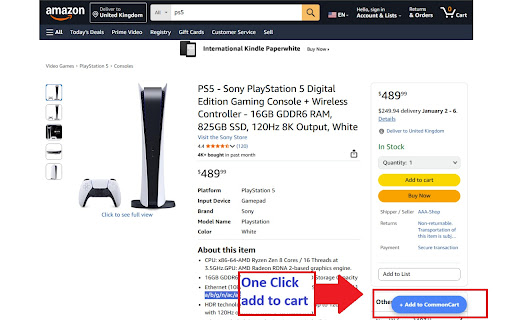


Save items from Amazon, Walmart, Target & 8 more to a single cart. Instantly compare prices, track drops, and close your tabs. Say goodbye to infinite tabs, lost bookmarks, and scattered wishlists. CommonCart is the free universal wishlist and shopping organizer that unifies your entire shopping experience. Save any product from your favorite retailers into a single, beautiful dashboard where you can organize lists, compare prices, and track everything in one place. 🚀 Universal Wishlist Seamlessly clip products from stores like Amazon, Walmart, eBay, and thousands more. If it's on your screen, it's in your universal list. ⚡ One-Click Save Forget copy-pasting links or managing multiple site-specific lists. Our smart "Add to CommonCart" button blends naturally into product pages, allowing you to save items from any store instantly without breaking your shopping flow. 📂 All-in-One Shopping Organizer Bring order to chaos. CommonCart is more than just a cart; it's a powerful manager for your shopping. Smart Collections: Group items by project, gift ideas, or category to keep your plans distinct. Price Comparison: View items side-by-side to compare features and find the lowest price instantly. Collaborative Sharing: Share your curated shopping carts with friends instantly using a unique 6-character code. Sorting & Filtering: Find exactly what you need by filtering specific Collections, stores, or sorting by price. 🔒 Privacy-First Your shopping habits are your business. CommonCart operates primarily on your device. No Account Required: No sign-ups, no passwords, no friction. Local Storage: Your data lives on your computer. No Personal Tracking: We do not collect your personal browsing history. We use limited, anonymous analytics to improve the app, which are completely optional and can be disabled in settings. 🎨 Aesthetic & Customizable Customize your experience with beautiful themes like Dark Mode, Ocean, Forest, and High Contrast. Work the way you want with a fully resizable interface and "Compact Mode" for power users. Import / Export: Restore backups or import shared carts from friends using share codes. Smart Checkout: Ready to buy? Our streamlined checkout flow guides you through each retailer’s purchase process, ensuring you never miss an item. Join thousands of smart shoppers who have ditched the tab chaos. Simplify your digital life. Download CommonCart today and turn your browser into a curated shopping powerhouse. Do I need an account? No. We prioritize your privacy. The extension works out-of-the-box without any registration. How does it work across different stores? CommonCart works as a universal aggregator. Whether you're on a major retailer or a niche boutique store, you can save any product to one central list. Can I compare prices? Yes, simply select multiple items in your dashboard to view them side-by-side in our Comparison Tool. Transparency Note: CommonCart is free to use. To support development, we may earn a small affiliate commission if you purchase items through links in the extension, at no extra cost to you. We remain committed to a privacy-first, user-centric experience.

Active Tab Tools
The easiest way to manage active tab local storage, behavior and other actions. The easiest way to manage tabs local storage, behavior and other actions 1. Install the Tab Tools extension in your browser -- To uninstall the extension -- - Right click on the extension icon and select "Remove from Chrome" - Is Tab Tools backing up my local storage automatically? No, your local storage data is only backed up when you choose to export it. - What type of file does Tab Tools use for import? Any text based file containing a typical JSON object - I imported my local storage file, what's next? Local storage content are instantly available to use on the website pages - A tab is refreshing or closing without asking me, what should I do? Make sure you have engaged with the tab and applied the rule to it or all tabs. Rule only works for tabs that has had at least one user interaction. - ActiveTab - to access background setting for the current tab you are on. - Scripting - to create and manage file export and import for local storage data. - Storage - to store and manage the tab specific settings and rules.

Secret Sanitizer – Paste Safely into AI Chats
Masks API keys, passwords & tokens before they reach AI chats. 100% local — nothing leaves your machine. Developers paste code snippets, config files, and debug logs into AI assistants every day — often without realising they contain API keys, database passwords, or auth tokens. Once that data leaves your machine, you can't take it back. Secret Sanitizer intercepts the paste before it reaches the chat, replaces secrets with safe placeholders, and stores the originals in a local encrypted vault. Everything runs entirely on your machine — no servers, no network requests, no data collection. ⚙️ HOW IT WORKS Paste text into any supported AI chat — Secret Sanitizer scans and masks secrets in real time, before they're sent. → Automatic masking — secrets replaced with [LABEL] placeholders on paste → Instant notification — see exactly what was caught, with a 5-second undo window → Encrypted vault — originals stored locally with AES-GCM encryption → Pattern controls — enable or disable individual detection patterns → Custom sites — extend protection to any website or domain → Stats dashboard — track secrets blocked today and over time ↩️ SMART RESTORE When the AI replies referencing your placeholders, getting the real values back is automatic. You ask: "Fix this connection string: [DATABASE_URL_0]" AI replies: "Change [DATABASE_URL_0] to use port 5433." You copy that response — Secret Sanitizer detects the placeholders and swaps them back to the originals in your clipboard instantly. No manual lookup. No digging through the vault. The clipboard you paste elsewhere already has the real values. 🔍 70+ SECRET PATTERNS DETECTED Access tokens and API keys across major cloud, DevOps, payment, and AI platforms. JWT and bearer tokens. Database connection strings for common SQL and NoSQL engines. Private SSH and RSA keys. Passwords in .env, YAML, JSON, and config files. Credit card numbers. Indian identity documents (Aadhaar, PAN, GSTIN) and UPI IDs. New patterns added regularly. 🔒 WHY YOU CAN TRUST IT → 100% local — nothing ever leaves your machine → Zero network requests — works fully offline → No servers, no tracking, no analytics → Open source (MIT) — audit every line of code → Minimal permissions — active on AI chat domains by default; you control any additions Takes 10 seconds to install. Could save you from a very expensive mistake. Free. Open source. Built with care. 📂 Source: https://github.com/souvikghosh957/secret-sanitizer-extension 🌐 Website: https://secretsanitizer.com

UpKit: Upwork Job Alerts
🚀 UpKit is an Upwork Chrome extension and toolkit for freelancers who want to find jobs faster, write proposals smarter, and track results. Stop refreshing feeds — let the Upwork job alerts come to you. Every minute counts on the platform. The earlier you apply, the higher your chances. UpKit works as an Upwork monitoring tool that scans job feeds in the background and delivers instant job alerts the moment a relevant posting appears. 1️⃣ Upwork job alerts & notifications Set up saved searches with keywords, budget, and client filters. UpKit sends Upwork instant job alerts and job notifications straight to your browser — no need to refresh the page. Get every Upwork new job notification within minutes of posting. Be among the first to apply and increase your response rate. 2️⃣ AI proposal generator for Upwork UpKit is an Upwork proposal generator that creates personalized cover letters based on your profile and the job description. The built-in proposal writer drafts tailored pitches in seconds — just click "Generate Draft" on the apply page. Also works as an Upwork cover letter generator and proposal maker for any job type. 3️⃣ Proposal scoring & analysis Built-in Upwork proposal analyzer scores your drafts on a 0–100 scale before you submit. Get feedback on hook strength, relevance, credibility, and tone. Upwork proposal scoring helps you understand what works and improve over time. Think of it as your personal proposal analysis tool that catches weak spots before the client does. 4️⃣ AI job scoring & client evaluation Not every job is worth your connects. UpKit rates each posting based on: - client payment verification and spend history - hire rate and review rating - budget and description quality - country and project scope signals Focus on jobs that actually convert. Skip low-quality postings and save your connects for the right opportunities. 5️⃣ ROI tracker & proposal analytics Track every proposal you submit — view rate, shortlist rate, interviews, hires. The built-in ROI tracker shows your cost per connect and which job categories bring returns. Full proposal analytics and Upwork job tracker in one dashboard. Understand your freelance performance at a glance. 1. Install the Upwork toolkit from Chrome Web Store 2. Sign in and create saved searches with your target keywords 3. UpKit monitors the job feed every 1–4 minutes 4. New matching jobs appear in the side panel with a score 5. Open a job, generate a proposal draft with AI, review, and submit The Upwork automation tool runs quietly in the background — even when you are working in another tab. No manual refreshing needed. ➤ Who is UpKit for? - Freelancers looking for an Upwork job alert chrome extension - Professionals who need an Upwork proposal writer and AI drafting assistant - Anyone who wants to track proposal performance and connects ROI - Remote workers tired of manually refreshing the job feed - Freelancers who want Upwork AI tools to speed up applications ▸ Real-time Upwork job notifications — not daily digests ▸ AI proposal generator + proposal scoring in one extension ▸ Client trust scoring so you don't waste connects ▸ Works directly on upwork.com — no separate app needed ▸ Lightweight chrome extension for Upwork, no impact on browser performance Getting started takes under 2 minutes: - install the Upwork tools extension from Chrome Web Store - sign in with your account - create your first saved search for job alerts - fill in your freelancer profile for AI proposal drafts UpKit works in the Chrome side panel — stays visible while you browse jobs without interrupting your workflow. Q: Does UpKit send proposals automatically? A: No. UpKit generates draft proposals for your review. You always control what gets submitted. Q: How often does UpKit check for new jobs? A: Every 1 to 4 minutes. The Upwork job feed tracker runs in the background automatically. Q: Is UpKit an Upwork bot? A: No. UpKit is an Upwork assistant chrome extension that helps you draft and analyze — it does not auto-submit or auto-bid. Q: Does the proposal generator work for all job types? A: Yes — hourly and fixed-price jobs are both supported. You can generate Upwork proposal drafts with custom prompts. Q: Is my data safe? A: UpKit only accesses pages you visit on upwork.com. Your profile and freelancer data are stored locally on your device.

SmartCart
Add items from any website to your smart shopping cart SmartCart is a powerful Chrome extension that revolutionizes your online shopping experience. With this tool, you can effortlessly add products from any website to a single, unified cart, streamlining your purchase process across multiple online stores. Key Features: Universal Shopping Cart: Browse products across different websites and manage them in a single, convenient cart interface. Simplify your online shopping experience by keeping track of items from various stores in one place Centralized Shopping Cart: View and manage all your selected items from different websites in one convenient location. Easy Price Comparison: Compare prices of similar products from various websites side-by-side in your universal cart. Secure and Private: Your cart data is stored locally and securely on your device, ensuring your privacy. Dark Mode: Enjoy a comfortable shopping experience with our sleek dark mode option. Share Cart: Easily share your curated list of items with friends and family. Save for Later: Move items to a "Saved" list for future consideration without cluttering your main cart. Save Time: No more juggling multiple tabs or forgetting items on different sites. Make Informed Decisions: Easily compare prices and products across various online stores. Streamline Your Shopping: Simplify your online shopping process with a centralized cart system. Enhance Your Browser: Add a powerful shopping tool to Chrome without slowing down your browsing experience. Whether you're a savvy deal-hunter, a meticulous comparison shopper, or someone who loves efficiency, SmartCart is the perfect companion for your online shopping adventures. Install now and transform the way you shop online! Be Smart!
