
kacefiaccibhgdjlmnclndfjdiolaeeb
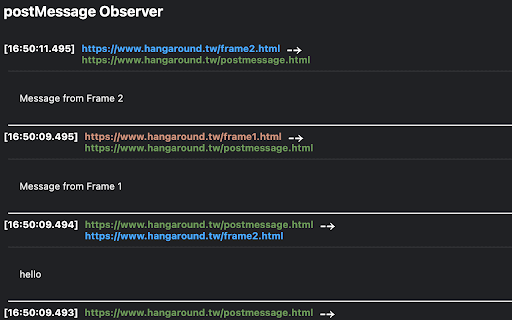
A Chrome extension that allows you to observe the flow of postMessage messages on the side panel. Chrome PostMessage Observer provides a convenient side panel to view postMessages for the current page. This extension offers a user-friendly UI that simplifies the debugging and observation of message flows between iframes and the top window. Easily intercept and analyze postMessage messages, view their payload, source, and target details, and efficiently troubleshoot communication issues within web applications. Contributions are welcome to the GitHub project, which can be found here: https://github.com/yishiashia/chrome-postmessage-observer

PostMessage Listener
A basic logger for postMessages. This allows you to easily monitor the post messages on the console. A basic logger for postMessages. This allows you to easily monitor the post messages on the console. This is an open source project. Contributions are welcome! https://github.com/kavithigroup/postmessage-listener-extension

rep+
rep+ - Capture, modify, and replay HTTP requests in Chrome DevTools with AI-powered security analysis. rep+ is a powerful Chrome DevTools extension that brings Burp Suite Repeater functionality directly into your browser. Now enhanced with AI, it helps developers, security researchers, and bug bounty hunters test and analyze HTTP requests smarter and faster—no proxy setup required. With rep+ you can: - Capture and replay HTTP requests from any tab, without proxy setup - Group, filter, block, and search requests using text or regex - Convert data inline (Base64, URL encode/decode, JWT decode, Hex/UTF‑8) - Inspect responses in multiple formats with syntax highlighting and line numbers - Passively extract hidden endpoints from JavaScript - Discover query, body, header, and path parameters with risk classification and confidence scoring - Suppress false positives by ignoring common frameworks, libraries, telemetry, and generic fields - Detect secrets in JavaScript using high‑coverage Kingfisher rules - Export endpoints, parameters, and secrets to CSV or Postman - Search deeply inside responses and JavaScript - Run built‑in automated attacks (Sniper, Battering Ram, Pitchfork, Cluster Bomb) - Use AI for request explanations and attack suggestions via API or local LLM (Ollama) - AI‑powered request analysis, modification, and attack suggestions - Per‑request isolated chat with cross‑request references - One‑click AI‑driven request edits with visual feedback - Local or API‑based LLM support with aggressive token optimization - Automatically remove duplicate requests during capture to eliminate noise and keep only unique traffic Why install it? - Works natively inside your browser - Designed for speed, clarity, and real pentesting workflows - Helps you uncover security issues and understand application behaviour faster - Ideal for bug bounty hunters, red teamers, AppSec, and curious devs

PostMessage Inspector
Track and monitor postMessage communications between iframes and the main page. PostMessage Inspector adds a dedicated Post Messages tab to Chrome DevTools, giving you instant, real-time visibility into every postMessage flowing between your page and its iframes - across all frames, all origins, all directions. No setup. No build step. Just open DevTools and start inspecting. postMessage is the backbone of modern iframe communication - but it's notoriously hard to debug. Console logs get buried, events are easy to miss, and cross-origin frames make things even messier. PostMessage Inspector was built to fix that. Whether you're tracing a subtle race condition, verifying a third-party integration, or auditing security boundaries, you'll have everything you need in one place. Real-time capture Every postMessage send and receive across every frame - caught the moment it happens, displayed instantly in the panel. Powerful filtering Slice through the noise. Filter by origin, keyword, event type, or direction (sent / received) to zero in on exactly what matters. Full JSON payload viewer Click any message to inspect its complete payload with syntax highlighting. Switch to Compact Mode to focus on the data and nothing else. Sortable & resizable columns Sort by time, origin, direction, size, or frame depth. Resize columns to fit your workflow. Payload size & frame depth See the byte count of every message and track exactly which frame depth it originated from. Pause / Resume - without data loss Freeze the live feed at any moment. Messages keep buffering in the background, so you never miss anything when you resume. Keyboard navigation Move through messages with arrow keys - fast, focused, no mouse required. Export to JSON Capture a session and export all messages as a JSON file for sharing, archiving, or deeper analysis. Light & dark theme Follows your system preference automatically. Looks right wherever you work. WHO IS IT FOR? Frontend developers building embedded widgets, payment flows, or third-party integrations. QA engineers verifying iframe event contracts and catching unexpected message patterns. Security researchers auditing postMessage handlers for origin validation vulnerabilities. 1. Install the extension 2. Open Chrome DevTools (F12 or Cmd+Option+I) 3. Navigate to the Post Messages tab 4. Load or interact with any page - messages appear instantly

DOMLogger++
DOMLogger++ allows you to monitor, intercept, and debug JavaScript sinks based on customizable configurations. DOMLogger++ is a browser extension developed for web developers and security researchers. It hooks into specific JavaScript sinks, helping users understand how web scripts operate. With customizable JSON settings, users can adjust how the extension works according to their needs. This tool is especially useful for those looking to identify security risks in web applications. By offering insights into JavaScript interactions, DOMLogger++ can help spot potential vulnerabilities in websites. - [x] Regex-based domain management. - [x] Flexible hooking configuration (class, function, attribute, event). - [x] Regex-based hooks arguments and stack trace filtering (match, !match, matchTrace, !matchTrace). - [x] Dynamic regex generation (exec:). - [x] Dynamic sinks arguments update (hookFunction). - [x] Customizable notifications system (alert, notification). - [x] Required hook logging condition (requiredHook). - [x] On-demand debugging breakpoints. - [x] Integrated Devtools log panel. - [x] Response headers filtering. - [x] Remote logging via webhooks. - [x] Extensive theme customization.
