
jpjgkfmfbmaahogcicdgooeomcbljgak
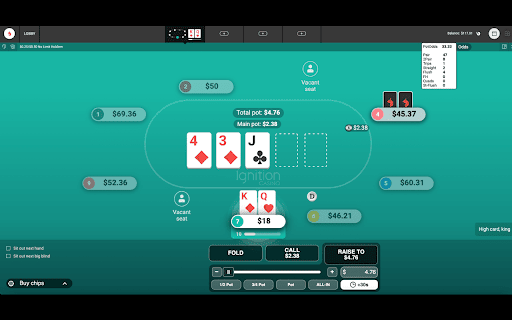
Poker odds and equity calculator for Poker Ignition game Within your Ignition Poker game, upon an action, this extension will automatically calculate your pot odds and hand equity to help you make the right decision. The following shortcut keys can be used: o - present the odds on screen k - 'check' (when it is your action) c - 'call' (when it is your action) f - 'fold' (when it is your action)

PokerNow Action Tracker
● Analyzed system design of popular poker website to display betting action from poker hands in real time ● Navigate DOM of existing website to interpret every possible game action with code and inject custom HTML tags

Banana Poker Game
Now you can play Banana Poker Game right on Chrome™ Browser! Offline and Popup Version, without internet required! Banana Poker is an exciting game available as a Chrome extension and on the website retrobowls.org. This game offers a unique twist on traditional poker with a fun and whimsical banana theme. Whether you're a seasoned poker player or new to the game, Banana Poker provides a delightful and entertaining experience. In Banana Poker, you'll find yourself immersed in a vibrant and colorful world filled with bananas and other fruity symbols. The game features intuitive controls and a user-friendly interface, making it easy to navigate and enjoy. You can play against computer opponents or challenge other players online, testing your skills and strategies. The objective of Banana Poker is to create the best possible poker hand using the cards you're dealt. The game follows standard poker rules, including hand rankings and different betting rounds. However, the playful banana theme adds a lighthearted and enjoyable twist to the gameplay. Whether you're playing for fun or aiming to improve your poker skills, Banana Poker offers various gameplay options. You can choose from different game modes, such as Texas Hold'em or Omaha, and adjust the difficulty level to match your expertise. The game also provides tutorials and tips to help beginners understand the rules and strategies of poker. Banana Poker on retrobowls.org is a fantastic platform to indulge in the world of poker with a delightful banana twist. So, if you're looking for a free and entertaining poker experience, grab your Chrome browser and visit retrobowls.org to enjoy the lighthearted and exciting Banana Poker game. If you want to play more games, click the "Unblocked Games" button or other games we add links for users to easily find more games on our website: https: //retrobowls.org

Poker GTO Randomizer
Simple yet powerful GTO randomizer for poker players. Based on a random number generator, the extension provides several quick-access buttons that allow you to easily and quickly randomize common spots. This tool can also be use as random number generator. You can click on the "RNG" button if you need to generate a random number between 0 and 100. You can also auto-generate a random number every 5 seconds with the "Auto Generate" button. The extension can be detached from the browser and used as a standalone window, which you can place anywhere on your desktop for added convenience. NEW PRO VERSION: With the Pro version, you can access the settings and customize: - The values of the 4 buttons. - Save up to 3 sets of button configurations. - Adjust the random number generator frequency. - Set the number of generated numbers, up to a maximum list of 5. Version 0.6.0 Update: Added Pro version with customizable settings. Improved readability and minor cosmetic changes.

Poker GTO Preflop Ranges - Spin and Cash Game
Improve your 6-max cash game and Spin and Go poker skills by creating, mastering and practicing optimal GTO preflop ranges/charts. This extension is the perfect tool to create, train, learn, and review GTO preflop ranges/charts and strategies for Texas Hold’em 6-max poker and Spin & Go tournaments. Whether you're a poker novice or an experienced player, having a strong preflop strategy is essential. Choosing the right hands in the right situations, and playing them correctly, will simplify your preflop decisions and improve your postflop play. GTO Preflop Ranges uses an innovative tree-like system to quickly access the correct range based on position, action, and stack size. More than 320 ranges are included in the tool, covering 90% of preflop situations. These are divided into two sets of ranges: Simplified ranges and GTO ranges. Simplified Ranges This is the default mode and should be used most of the time. While based on GTO calculations, it follows a simplified, exploitative strategy. The simplified ranges have been designed by professional players and battle-tested by our team of grinders. GTO Ranges These ranges come directly from solvers with no alterations. GTO Preflop Ranges uses an innovative system to minimize the number of ranges you need to learn and practice. It drastically reduces complexity without sacrificing profitability. Three sets of ranges are available in the tool: Simplified, Pure GTO, and Custom. Both the Simplified and Pure GTO range sets are based on solver calculations using the latest available solver technologies, which is why they are considered GTO-based ranges. The Custom range allows you to edit and create personalized ranges. Simplified This is the default mode and should be used most of the time. While based on GTO calculations, it follows a simplified tight-aggressive strategy. The simplified ranges have been designed by professional players and battle-tested by our team of grinders. Pure GTO These ranges come directly from solvers with no alterations. They are intended for higher stakes, where players tend to follow closer-to-GTO strategies. Custom (NEW) In this mode, you have full control over the ranges and can modify and fine-tune them to fit your strategy. Version history : Version 2.0.1: Stability improvements & analytics Version 2.0.0: Added Spin & Go support Version 1.0.10: Minor wording fixes Version 1.0.9: Improved readability and added new payment options Version 1.0.7 & 1.0.8: Improved stability Version 1.0.6: Added a new custom range mode with editable and fine-tunable ranges Version 1.0.5: Added a quick tutorial Version 1.0.4: Added the ability to take notes on ranges; notes can be saved to a file and restored
