
jpbdgankeaohbackdjbnbicfiijaemod

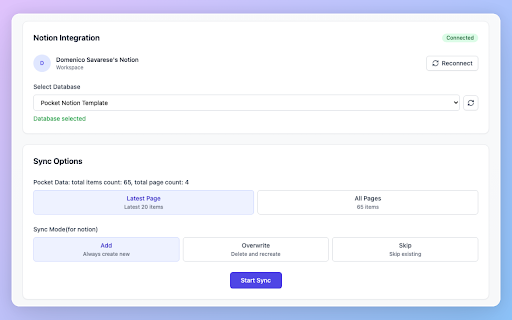


Seamlessly migrate your Pocket articles to Notion & Obsidian. Export and backup your reading list with ease. 📚 Bulk Export & Backup Your Pocket Articles to Notion or Markdown Files 🔒 IMPORTANT: With Pocket's upcoming service changes, now is the perfect time to backup your saved articles! Update Log: 20250612: Added Markdown export feature for better compatibility with other tools like Obsidian. 20250603: Fixed the abnormal issue, added success and failure records, and added the function of skipping if already synced. ❓ What is Pocket to Notion? Pocket to Notion is a powerful Chrome extension that helps you bulk export and backup your Pocket articles to Notion or Markdown files. It's the perfect solution for Pocket users who want to preserve their reading history and migrate to Notion or other Markdown-compatible tools. ❓ Why do I need this extension? • Pocket is changing its service, and you need to backup your articles • You want to centralize your reading list in Notion or other tools • You need a reliable way to export all your Pocket articles • You want to preserve your article metadata and formatting • You need flexibility to use your content in different tools ❓ What features does it offer? • One-click bulk export of all your Pocket articles • Multiple export formats (Notion/Markdown) • Seamless integration with Notion • Multiple sync modes (Add/Overwrite/Skip) • Preserves article metadata, tags, and content • Beautiful and intuitive interface • Real-time sync progress tracking • Markdown export for maximum compatibility ❓ How does the sync process work? • Choose between exporting latest articles or your entire library • Select your preferred export format (Notion/Markdown) • For Notion: Select your preferred database • Customize how to handle existing articles • Track the sync progress in real-time • View detailed success/failure status for each article • Get organized Markdown files ready for any tool ❓ Is it easy to use? Yes! The extension features: • Simple one-click export process • Clear progress indicators • Intuitive interface • Detailed documentation • Active community support • Flexible export options ❓ What makes it different from other tools? • Fast and reliable bulk export • Multiple export formats (Notion/Markdown) • Maintains article formatting and metadata • User-friendly interface • Regular updates and improvements • Active community support • Maximum compatibility with other tools ❓ What can I do with this extension? • Backup your Pocket articles before service changes • Export your entire Pocket library to Notion • Export articles as Markdown files • Import to any Markdown-compatible tool (Obsidian, Logseq, etc.) • Sync your reading list with Notion • Migrate from Pocket to Notion or other tools • Import Pocket articles to Notion databases • Transfer Pocket data to Notion • Create a backup of your Pocket reader • Integrate Pocket with Notion • Find a Pocket alternative • Use as a Pocket backup tool • Sync Pocket articles with Notion • Manage Pocket database in Notion • Export to Markdown for maximum flexibility ⚠️ Don't wait until it's too late - backup your Pocket articles today! Update Log: 2025-05-27: Fixed the Notion connect issue.

Obsidian Web Clipper
Save and highlight web pages in a private and durable format that you can access offline. The official extension for Obsidian. Bring the web to your personal knowledge base. Save content to your Obsidian vault so you always have access to it, even offline. Obsidian is secure, private, and designed around durable open formats that allows you to preserve your data for the long term. Obsidian Web Clipper is the best way to save, highlight, and interpret the web: - Save anything: From news articles and blog posts to recipes, product pages, and research papers — if it's on the web, you can save it. - Highlight: Easily highlight important passages, and save highlights to Obsidian. When you return to a page, your highlights are visible. - Interpret: Use natural language to extract and modify data from pages. Compatible with any model provider including local model options. - Save entire pages, selected text, or just the main content. - Templates let you automatically extract structured metadata from web pages. - Rules let you apply a specific template based on the website you're on. - Advanced templating variables let you extract data from OpenGraph, Schema.org, CSS selectors, and more. - Filters let you format and transform data before saving it. - Hotkeys let you save pages with a single keystroke. As with everything Obsidian, Web Clipper is designed to protect your privacy, and give you control over your data. - No lock-in: Your data is saved in durable, portable Markdown files. No proprietary formats. - Offline access: Your data is stored locally, and available later even without an internet connection. - 100% private: Obsidian doesn't gather or store any data about your requests. Obsidian helps you create connections and links between your notes so you can organize your thoughts. You can create links between everything — ideas, articles, lists, locations, books — anything you can put in a note, you can link to other notes. Obsidian Web Clipper is open source. You can help us improve it by submitting issues and feature requests on GitHub: https://github.com/obsidianmd/obsidian-clipper

Bulk Export Perplexity to PDF, MD(Obsidian), and Notion
Bulk save Perplexity chats. Export to Notion, Obsidian, PDF, and Markdown instantly. 🌟 The Advanced Perplexity Exporter: Export Perplexity AI Chats to Notion, Markdown, PDF, and Obsidian. 🌟 Stop losing valuable Perplexity AI threads, answers, citations, uploaded files, and research workflows. AISaver.app is a dedicated Perplexity chat exporter for users who need reliable Perplexity backup, Perplexity to Notion sync, Perplexity to Markdown export, Perplexity to PDF conversion, and Obsidian-ready research archives in one workflow. Whether you want to export a single Perplexity thread, bulk export your Perplexity history, archive online research for compliance, or build a searchable second brain, this extension turns Perplexity conversations into structured assets you can save, organize, review, and reuse. If you need a secure Perplexity chat backup tool, a Perplexity to Notion extension, a Perplexity to Markdown exporter, a Perplexity PDF saver, or a way to archive Perplexity research with sources, this extension replaces them all. 🚀 Key Features (Bulk Export • Local-First • Research Archive) • Dedicated Perplexity Support: Export conversations directly from Perplexity AI with one focused extension. • True Bulk Export: Export dozens of Perplexity threads from your history in one workflow instead of saving them one by one. • Local-First Privacy: Your data stays in your browser for Markdown and PDF exports, while Notion sync connects only through official APIs you authorize. • Clean Markdown for Obsidian: Save readable .md files with YAML frontmatter metadata for personal knowledge bases, PKM systems, and offline archives. • Export Perplexity Document Files: Capture generated document assets, file-style research outputs, and embedded markdown documents from supported Perplexity responses. • Notion Database Sync: Push Perplexity chats into structured Notion databases with organized metadata for search and review. • PDF Export for Research Sharing: Generate clean PDF documents for reports, documentation, team handoff, and long-term retention. • Flexible Organization: Configure export folders, naming rules, job history, failed retries, and bulk workflow settings inside the extension dashboard. 🎯 Who This is For • Researchers, analysts, and consultants who use Perplexity for web research, source discovery, and citation-heavy workflows. • Founders, operators, and PMs who want a searchable AI research archive in Notion or Obsidian. • Students, writers, and journalists who need offline copies of Perplexity answers and source-backed notes. • Privacy-conscious users who want local Perplexity exports without sending data through a third-party cloud. 📝 What You Can Export • Perplexity to Notion • Perplexity to Markdown • Perplexity to PDF • Perplexity to Obsidian-compatible Markdown 🔐 Privacy and Permissions This extension is built with a Local-First architecture and only works on supported Perplexity AI pages you explicitly open. It uses: • tabs: To detect supported Perplexity pages and connect to the correct source tab. • storage: To save your settings, export preferences, and job state locally. • downloads: To generate and save Markdown and PDF files directly to your computer. • Notion API: Only when you explicitly authorize Notion and choose it as an export target. No middleman servers are required for Markdown or PDF exports. Your Perplexity conversations stay in your browser unless you choose to sync them to your own Notion workspace. 👉 Install AISaver.app: Perplexity Chat Exporter today to back up Perplexity research, save citation-rich answers, export threads in bulk, and turn temporary AI sessions into permanent knowledge assets for Notion, Markdown, PDF, and Obsidian. 🔄 Changelog • 2026-05-11: Fixed the issue where the Markdown code block displayed black in the preview page. • 2026-05-25: Added support for exporting Perplexity document files and generated research document assets to Markdown, PDF, Obsidian, and Notion with cleaner duplicate-content handling.

Bulk Export Gemini to PDF, MD(Obsidian), and Notion
Bulk save Gemini chats. Export to Notion, Obsidian, PDF, and Markdown instantly. Export Gemini chats to Notion, Markdown, PDF, and Obsidian — individually or in bulk. AISaver helps you save, organize, and back up your Gemini conversations with a local-first workflow designed for researchers, developers, students, analysts, and knowledge workers. • Export Gemini chats to Notion, Markdown, PDF, and Obsidian • Bulk export Gemini conversation history • Batch export opened Gemini tabs • Local-first architecture — your data stays in your browser • Clean Markdown with YAML frontmatter support • Structured Notion database sync • Readable PDF exports for sharing and archiving • Flexible export folders and filename patterns • Export progress tracking, retry support, and failure isolation 🎯 Perfect For • Researchers and students • Developers and engineers • Product managers and founders • Consultants and analysts • Knowledge workers building a personal knowledge base Sync Gemini conversations into organized Notion databases with structured metadata fields. Generate clean Markdown files with properly formatted text, code blocks, tables, and YAML frontmatter. Create readable PDF documents for offline access, sharing, documentation, and archiving. Export Obsidian-compatible Markdown files for your vault, Zettelkasten workflow, or second-brain system. AISaver automatically organizes exported conversations with structured metadata such as: Your conversations stay under your control. • Markdown and PDF files are generated locally in your browser • Your data is not uploaded to AISaver servers • Notion sync connects directly through the Notion API • No intermediate cloud storage or external processing The extension only works on supported Gemini conversation pages that you explicitly open. • Back up Gemini chat history before deleting conversations • Build a searchable AI knowledge base in Notion • Save coding discussions and research notes to Obsidian • Archive AI research as Markdown or PDF documents • Batch export Gemini conversations for long-term storage AI conversations often contain valuable research, ideas, workflows, and technical knowledge. AISaver helps you transform Gemini chats into a reusable, searchable archive for your projects, research, and personal knowledge systems. • 2026-05-09: Optimized export workflow and export details • 2026-04-17: Added custom export features • 2026-04-16: Added filename pattern selector and multi-account support

Export Gemini Chats to Obsidian
Easily bulk export your Gemini AI chats directly into Obsidian as Markdown files. Perfect for fast bulk processing. ✨ Bulk Export AI Chats to Obsidian (for Gemini) Easily export your Gemini (Google AI) chat conversations to clean, readable Markdown files with just one click! No more copy-paste chaos—organize your AI insights, share with your team, or archive your knowledge effortlessly. 🚀 Features - One-click export of Gemini chats to Obsidian-ready Markdown - Bulk export Gemini chat history into separate Markdown files - Selectively choose conversations for bulk export instead of exporting an entire page or full history - Export conversations by Gems, with support for selecting full Gems or specific Gem conversations - Exports generated images and saves them into a local images folder with Markdown links - Includes an image export toggle, enabled by default - Preserves formatting, code blocks - Supports Gemini chat pages under both /app and /gem URLs - Adds Obsidian-friendly YAML frontmatter including gem, model, uuid, tags, created time, and exported time - Supports exporting Gem chats into subfolders named after the Gem - Supports filtering bulk export by date - Uses your current browser time zone for exported timestamps, date filtering, and filename dates - Date filters are normalized to clean YYYY-MM-DD values for more reliable exports - Beautiful, modern UI with clearer date filter controls and intuitive export settings - Secure: No data leaves your browser 🛠️ How to Use 1. Open a Gemini chat. 2. Click the extension icon. 3. Instantly download your conversation as a Markdown file! 🛡️ Privacy Your data stays 100% private—everything is processed locally in your browser. 💡 Why Export Gemini to Markdown? - Backup, Organize your Gemini AI research and notes - Share insights with colleagues or friends - Archive important conversations for future reference 📝 Change Log - 2026-06-13: Fixed the value acquisition issue of the created field. It now records the start time of the conversation instead of the current time. - 2026-06-11: - Added Export Mode with Bulk Export, Selective Export, and Gems Export options - Added selective conversation loading and selection for targeted bulk exports - Added Gems-based export, including full Gem selection and individual Gem conversation selection - Added Gemini Conversations count in the options page Overview - Improved the Export Configuration module and unified export wording around Bulk Export - 2026-06-10: - Added generated image export support, saving images into a local images folder and linking them from Markdown - Added an optional Download Images setting, enabled by default - Fixed current conversation title detection to use page-based title resolution more reliably - 2026-04-09: - Improved Markdown export format for better readability and consistency with other AI conversation export tools - Changed conversation headers from H2 to H1 (`# You` / `# Gemini`) for clearer semantic structure - Fixed Attachments header level from H3 to H2 to maintain proper Markdown hierarchy - Added automatic escaping of markdown headers in user content to prevent hierarchy conflicts when pasting documentation or markdown content - 2026-03-20: - Updated the bulk export page so the Export Configuration panel remembers whether you left it expanded or collapsed - Improved the Export Configuration header to show a quick summary of the current settings when collapsed - 2026-03-17: - Improved date formatting so bulk export date filters are normalized to YYYY-MM-DD values - Updated the bulk export date filter UI to use a clearer checkbox + date picker flow with today as the default when enabled - Added a default `gemini` tag in Markdown frontmatter when no conversation tags are available - 2026-03-15: - Added Gem subfolder export support for popup and bulk export - Added model, uuid, and tags fields to Markdown frontmatter - Added bulk export date filter support - Fixed empty uuid exports and normalized uuid by removing the c_ prefix - Improved popup title detection by reading the current page title from Gemini DOM - Updated time handling to use the current browser time zone for frontmatter timestamps, filename dates, and daily limits - 2026-03-12: - Updated product title and short description text - 2026-02-21: - Fixed multi-account URL support (/u/0/, /u/1/) - Improved YAML frontmatter formatting - 2026-02-04: Optimize the options for bulk export, allowing the export range to be persisted in the cache. - 2026-02-02: Fixed and optimized minor issues mentioned by users. - 2026-01-13: - Added support for exporting Gem conversations with proper URL format (/gem/{gemId}/{conversationId}) - Added gem field in exported markdown frontmatter to display the Gem title - Fixed duplicate c_ prefix in bulk export URLs - 2026-01-09: Optimize the YAML tag format for exporting to md format; optimize the export prompts. - 2025-12-09: Improved error messaging and fixed Gemini sub-document retrieval.
