
jpaaodoaibnmlipiaihcfonpmjdbnfoo
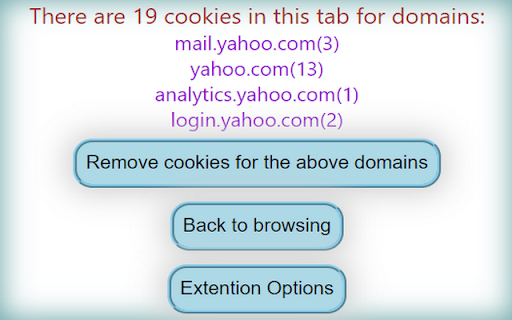
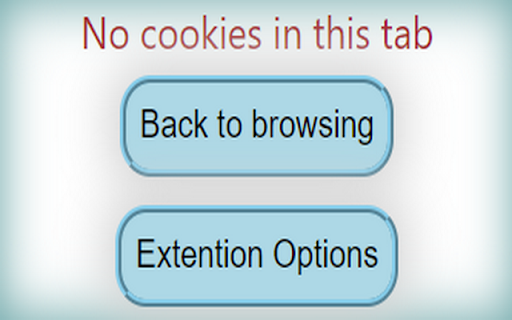
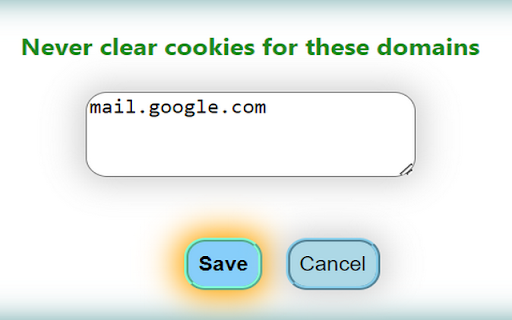
Remove cookies exclusively within the current tab top level domain. Whitelist functionality with regular expressions. Facilitates the streamlined removal of cookies exclusively within the current browser tab, offering whitelist functionality with support for regular expressions to provide enhanced control.

Clear Cache and Cookies Chrome
🧹 Clear Cache and Cookies Chrome: Quickly clear cache and cookies for one specific site or many. Ideal for cleanup Chrome. Boost Your Browsing Speed with Our Clear Cache and Cookies Chrome Extension Are you tired of slow browsing speeds and constant cache-related issues? Our Clear Cache and Cookies Chrome extension is here to save the day! Designed to optimize your browsing experience, this extension is a must-have for anyone looking to keep their Google Chrome running smoothly. Why Clear Cache and Cookies? Clearing cache and cookies is essential for maintaining a fast and efficient browsing experience. Here's why you should consider our Clear Cache and Cookies Chrome extension: - Enhances browsing speed - Resolves loading issues on websites - Improves privacy and security - Frees up storage space - Ensures up-to-date content display Our Clear Cache and Cookies Chrome extension offers a range of features tailored to your needs: 1️⃣ One-click cache and cookie clearing 2️⃣ Options to clear cache for one site 3️⃣ Selective clearing for specific sites 4️⃣ User-friendly interface 5️⃣ Fast and efficient performance Using our extension is as easy as 1️⃣, 2️⃣, 3️⃣: 1. Install the Clear Cache and Cookies Chrome extension from the Chrome Web Store. 2. Click on the extension icon in your toolbar. 3. Select the desired clearing option – whether you want to clear cache and cookies for one site or for all sites. Benefits of Using Our Extension With our Clear Cache and Cookies Chrome extension, you can enjoy numerous benefits: - Speed Up Your Browser: By clearing unnecessary cache and cookies, your Google Chrome will run faster and more efficiently. - Improved Privacy: Remove tracking cookies and protect your online privacy. - Resolve Website Issues: Fix loading problems by clearing cache on Google Chrome. - Free Up Space: Clear cache for specific sites and free up valuable storage space. Our extension provides flexible options to suit your preferences: ➤ Clear cache for one site chrome ➤ Remove website cache selectively ➤ Chrome clearing cache for one site ➤ Clear cache for specific site chrome ➤ Google chrome cache delete We understand that a smooth browsing experience is crucial. Our Clear Cache and Cookies Chrome extension is designed to make the process as seamless as possible: - Intuitive Design: The interface is simple and easy to navigate. - Quick Access: Access the extension directly from your toolbar. - Custom Settings: Choose to clear cache and cookies for one site or multiple sites. Steps to Clear Cache for Specific Sites Clearing cache for specific sites has never been easier: 1️⃣ Click on the extension icon. 2️⃣ Select the “clear cache for specific site” option. 3️⃣ Enter the URL of the site you want to clear. 4️⃣ Confirm and let the extension do the rest. Why Choose Our Extension? Here are a few reasons why our Clear Cache and Cookies Chrome extension stands out: - Efficiency: Quickly clear cache and cookies with just a few clicks. - Customization: Options to clear cache for specific sites. - User-Friendliness: Designed for users of all levels, from beginners to experts. - Reliability: Trusted by thousands of users worldwide. Our extension also helps troubleshoot common issues: Don't let a cluttered cache slow you down. With our Clear Cache and Cookies Chrome extension, you can maintain a fast, efficient, and secure browsing experience. Whether you need to chrome clear cache for one site or clear all cookies, our extension has got you covered. Download the Clear Cache and Cookies Chrome extension today and experience the difference! 🚀

No Cookie Banners
This extension automatically clicks cookie banners away. "No Cookie Banners" is browser extension to get rid of annoying cookie policy pop-ups. Say goodbye to cookie warnings. This extension tries to automatically deny all cookie requests whereas normally you would need to click "Refuse All Cookies". The extension does not send any data to any service. There is no company behind this extension to crawl your data. Note: Due to technical constraints it is not possible to remove the cookie warnings in all cases on all websites. For security reasons the browser doesn't allow to interact with iFrames from different domains. Unfortunately, it is not possible as an extension to interact with cookie warning if it is embedded as an iFrame from a different domain. The code for the extension is open-source. Feel free to create feature requests or bug reports on this GitHub repository: https://github.com/JeannedArk/no-cookie-banners-browser-extension You want to support the active development of this project? https://www.buymeacoffee.com/jeannedark

Cookie Cleaner
🍪 Cookie Cleaner - Smart Cookie Manager Effortless Cookie Management with Whitelist Protection Tired of manually deleting cookies? Want a cleaner browsing experience without losing access to important websites? Cookie Cleaner is your ultimate browser companion that helps you clear unwanted cookies while preserving those from trusted websites. 🚀 Key Features ✅ One-Click Cookie Cleaning – Instantly remove all cookies with a single click. ✅ Whitelist Protection – Save trusted websites to ensure their cookies are never deleted. ✅ Auto-Cleaning – Set up periodic cleaning for a clutter-free browsing experience. ✅ User-Friendly Interface – Simple, minimalistic, and easy to use. ✅ Real-Time Counter – Displays the number of deleted cookies after each cleaning. ✅ Secure & Privacy-Focused – Your data stays on your device; no external tracking. 🎯 How It Works 1️⃣ Clear All Cookies: Click the "Clear All Cookies" button to remove all stored cookies instantly. 2️⃣ Whitelist Management: Add websites to the whitelist to keep their cookies safe. 3️⃣ Auto-Clean Mode (Optional): The extension can automatically delete unwanted cookies in the background. 4️⃣ Delete Individual Sites: Manage saved websites and remove them with ease. 🔧 Advanced Features & Customization 📌 Whitelist System Easily add websites to the whitelist by typing their domain (e.g., example.com). Whitelisted websites remain untouched when clearing cookies. Manage saved websites and remove them when needed. ⏳ Auto-Cleaning (Background Mode) Runs periodically to delete cookies from non-whitelisted sites automatically. Uses Chrome’s built-in alarm system for scheduled cleaning. 💡 Smart Deletion Logic Ensures cookies from subdomains (sub.example.com) are considered part of the main domain. Deletes cookies only if they are not associated with whitelisted websites. ⚙️ Permissions & Privacy 🔒 We respect your privacy. This extension requires: Cookies Permission: To access and delete cookies as per user request. Storage Permission: To save and manage your whitelist settings locally. Host Permissions (): Required to detect and manage cookies from all visited websites. 🚫 No data tracking, no ads, and no third-party analytics. Your browsing data stays completely private. 📥 Installation & Usage 1️⃣ Install the extension from the Chrome Web Store. 2️⃣ Click the 🍪 Cookie Cleaner icon in the toolbar. 3️⃣ Manage cookies effortlessly with simple buttons and settings. ❓ FAQs 1. Does this extension delete passwords or other stored data? Enter the website domain in the "Manage Whitelist" section and click "Add Website". 3. Can I undo cookie deletion? Once cookies are deleted, they cannot be restored. Be sure to whitelist important sites! ⭐ Why Choose Cookie Cleaner? ✔ Lightweight & Fast – Doesn't slow down your browser. ✔ Ad-Free Experience – No pop-ups, no tracking, just pure functionality. ✔ Open-Source Code – Transparent and secure development. ✔ One-Click Operation – Super easy to use for everyone. 🔹 Start Cleaning Your Cookies Today! Install Cookie Cleaner and enjoy a safer, faster browsing experience. 🚀

Clear Cache for Current Tab
Clears the browser cache for the current tab only. Unlike most cache-cleaning extensions, this one targets the current tab only. This is particularly useful when developing and testing a web app. With this extension, clearing the browser cache no longer affects your experience on other websites. To use it, click the extension icon or assign a keyboard shortcut. This is the full list of items that the extension clears. Chromium does not allow clearing anything more than that when targeting a specific tab: In the future, I will add an option to select which of the above categories to clear.
