
jooljogmncojjfjoomhaamdbgjolnpkp

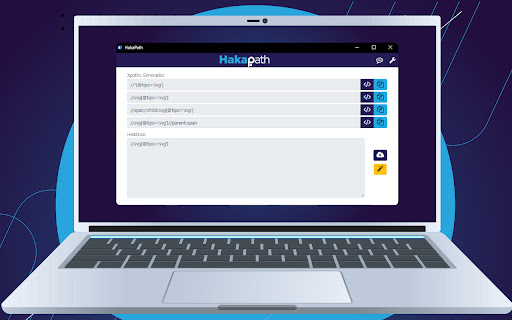
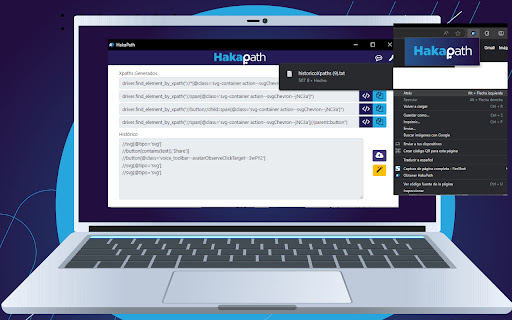
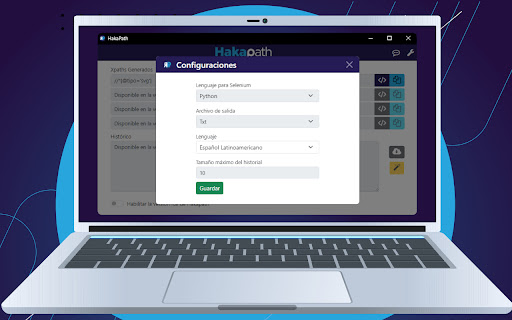
¿Qué hace? - Permite descargar el historial de localizadores generados en hasta 5 diferentes tipos de archivos. - Crea hasta 4 localizadores (2 XPath + 2 CSS) de forma automática utilizando algoritmos precisos. - NUEVO: Los primeros slots usan algoritmos locales optimizados (más confiables) - NUEVO: Los segundos slots pueden usar IA local para generar alternativas inteligentes - Conserva un historial de hasta 30 localizadores generados para su posterior consulta o reutilización. - Permite convertir los localizadores a código de Selenium en hasta 4 lenguajes de programación. - NUEVO: Conteo inmediato de coincidencias con badges de colores - NUEVO: Generación de Page Object Model (POM) automático Discover our plugin developed to generate XPaths and CSS selectors that will help you automate tests and make them up to 70% faster and with fewer failures. 🔵 Haka Path is a valuable extension designed specifically for web browsers that revolutionizes the way you generate XPaths and CSS selectors for your test automation projects. With just a few clicks, this tool allows you to create locators efficiently and effectively, significantly speeding up your workflow. 💻 🔵 One of the standout features of Haka Path is its ability to generate multiple locator alternatives. This means that you won't just get one XPath, but several options in both XPath and CSS selectors to choose from, giving you flexibility and precision in your automation testing. This results in a drastic decrease in the time needed to build locators, allowing you to focus on other essential tasks in your project. 🤖 NEW FEATURE: CHROME LOCAL AI INTEGRATION Now with support for Chrome Built-in AI (Gemini Nano), HakaPath can generate intelligent locators using local artificial intelligence, without sending data to external servers. The AI analyzes element context and generates more precise and unique XPaths and CSS selectors. Characteristics - Web Plugin. It integrates easily and natively into Google Chrome and Microsoft Edge. - Downloadable directly from the Chrome Store. - Construction of XPath and CSS selectors using the Hakalab methodology to create effective locators. - NEW: Intelligent generation with Chrome local AI (Gemini Nano) - NEW: Dark/light mode for better visual experience - NEW: Live preview with element highlighting - NEW: Real-time locator validation - Languages: Spanish and English. What does it do? - Allows you to download the history of generated locators in up to 5 different file types. - Creates up to 4 locators (2 XPath + 2 CSS) automatically using precise algorithms. - NEW: First slots use optimized local algorithms (more reliable) - NEW: Second slots can use local AI to generate intelligent alternatives - Preserves a history of up to 30 generated locators for later consultation or reuse. - Allows you to convert locators to Selenium code in up to 4 programming languages. - NEW: Immediate match counting with colored badges - NEW: Automatic Page Object Model (POM) generation Benefits - Generation of locators up to 70% faster - NEW: More precise locators with local AI (when available) - Multiple locator options: 2 XPath + 2 CSS selectors - NEW: Total privacy - AI works locally without sending external data - Selenium code generation for automation with a single click, in up to 4 different programming languages - Locators history, allows you to create groups per page and download the document - NEW: Modern interface with dark mode and live preview

brocrobes
Browser plugin for https://transcrob.es Brocrobes is the Chrome-compatible web extension for interacting with the open source foreign language content enrichment system of Transcrobes (https://transcrob.es). It allows you to take any webpage and enrich it with personalised, hypertext-based comprehension aids. It requires an existing account on a Transcrobes server. Free accounts are available at https://am.transcrob.es NEW! Now with personalised language learning support for watching many of your favourite movies on Netflix or Youku (in Mainland China)!

XPath One-Click Copy
Extract XPath of the selected text. XPath Clipboard is a powerful and user-friendly Chrome extension designed to streamline the process of extracting XPath queries from web pages. With just a click, users can easily copy the XPath of any selected element directly to their clipboard, making it an essential tool for web developers, testers, and users.

LetXPath
XPath Finder, simple and useful, open-source project by LetCode with Koushik LetXPath: Your Ultimate XPath & CSS Selector Finder LetXPath is an open-source project designed to help you find XPath and CSS selectors with a single click, complete with code snippets tailored to the element type. 1. Install the Extension: After installation, restart your browser. 2. Navigate to the Desired Page: Open the page from which you want to extract XPath. 3. Open DevTools: Click on the inspect window or press `F12` (Function `F12`). 4. Access LetXPath: Open the LetXPath menu from the sidebar panel. 5. Get Your XPath: Click on the desired element to obtain its XPath. 1. Single-Click XPath: Obtain the best XPath with just one click. 2. Smart XPath Generation: Generates XPaths based on direct elements or parent-child relationships. 3. Dynamic XPaths: Supports dynamic XPaths, including relationships like `following`, `following-sibling`, `preceding`, and `preceding-sibling`. 4. Axis-Based XPaths: Creates XPaths based on axes. 5. User-Enhanced Axes: Allows enhanced axes XPaths through user selection. 1. XPath with Driver Code: Provides driver code snippets. 2. Supported Frameworks: Currently supports Selenium (Java, Python, C#), Protractor JS, and Playwright (Node & Java). Why Choose LetXPath? 🤔 While there are many XPath tools available, LetXPath stands out by not only offering XPaths and snippets but also providing video tutorials on building the entire tool. It’s the only product that shows you how to create the tool itself. Troubleshooting 😢 If it doesn’t work, restarting your browser should resolve most issues. Feel free to raise any bugs on GitHub. Is It Free? 😱 Yes, LetXPath is completely free and always will be. What’s in It for You? 🙋 Installing LetXPath brings you the joy of seamless XPath generation and the satisfaction of leaving a 5-star rating. Roadmap 😁 Our roadmap is extensive and full of features designed to save you time. Stay tuned for more updates! Thanks for reading this far! Install LetXPath now and start exploring—you might just fall in love with it. 😉

Xpath Ninja
Generates xpath on clicking the element. Xpath Ninja is a game-changing extension for Chrome that revolutionizes the way you generate XPath expressions. With its user-friendly interface and intuitive functionality, Xpath Ninja allows you to effortlessly generate XPath expressions and their corresponding variable names by simply clicking on elements within any webpage. No more tedious manual XPath creation or guesswork. Xpath Ninja empowers developers, testers, and enthusiasts of all skill levels to quickly and accurately generate XPath expressions with just a few clicks. Whether you're a automation enthusiast, web developer professional, or an quality assurance, Xpath Ninja is the must-have tool in your arsenal. And now, accessing Xpath Ninja is even easier! After installing the extention open the inspect panel with the shortcut Ctrl+Shift+I, you can navigate to the "Elements" panel section and find the dedicated "Xpath Ninja" panel. This streamlined integration ensures that you have instant access to Xpath Ninja's powerful features, right at your fingertips. But Xpath Ninja doesn't stop there. We've taken it a step further by introducing a seamless integration with Django, the renowned Python web framework. By following our comprehensive documentation, you can unlock the true potential of Xpath Ninja. With the "Start New Test Case" button, you can effortlessly create Python files containing all the XPath expressions for your specific test cases, without the need for complex setup or configuration. Xpath Ninja simplifies your workflow, saves you time, and enhances your productivity. Experience the power of effortless XPath generation today with Xpath Ninja, the essential Chrome extension for automation testing and web development. Get ready to conquer XPath challenges like a true ninja! For any support or inquiries, please don't hesitate to reach out to jdawani@cisco.com
