
joffpgeladignadppokcgghabgaoldlp
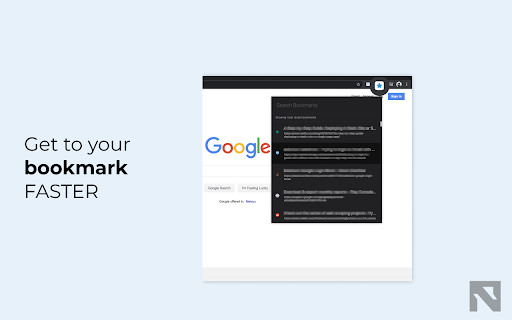
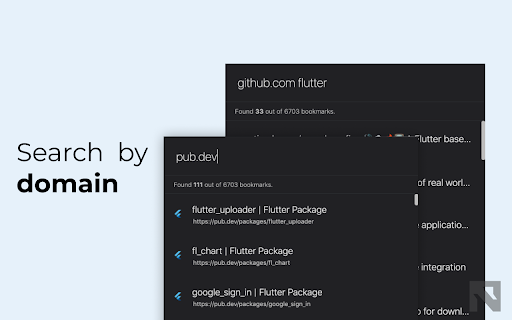


Simple, fast and working bookmark search Focus on what you looking for, Not the whole bookmarks. Bookmark is for a lifetime Folder tree are great. It's great to feel organized. Well for, people that have time. But i'm not one of them. I have about 50 folder and 6,549 bookmarks. My bookmark is kept for all my life. Most of bookmark extension are created for the organized people. But honestly, I just want something that can quickly get what i was looking for. I know, i have to clean up those one fine day. But today, i just want to get my work done. That is all this extension is all about. Add to Chrome and access to all this feature. Feature: + access bookmark from the icon + show all your recent bookmark + no folder tree + search result are ordered by date + search by website (eg: "github.com my repo") + modern native looks + search with typo If chrome does not update your chrome automatically somehow, just go to the extension tab and click update. Permission Required: - Read and change your bookmarks: To read, delete, and search bookmark - Read your browsing history: Check current tab url, if newtab it will open in current tab, unless you explicitly right click and open in new tab - access to chrome://favicon/*: To show site favicon next to the bookmark Privacy: I don't put any tracking or analytics so please contact me on twitter (@noxasch) if you have any problem or mail me your inquiries. Contact: You can reach me on twitter @noxasch or email me your inquiries at support[at]noxasch.tech. My Other Extension: Shoji Tab lite - Navigate and search tabs from anywhere update v0.11.3 - quickfix and improvement for delete function update v0.9.0 - add support for light theme - support search with typo

Chrome Web Store
Add new features to your browser and personalize your browsing experience.

Smart Bookmarker (Save bookmark to folder)
Save bookmarks smartly to folders, with smart bookmarker and see your bookmark's folder structure. Smart Bookmarker (Save Bookmarks to Folder). An extension to add bookmarks with custom details and folder selection. Adds super power of searching folders before adding bookmark instead of manually looking for 100s of folder accumulated over years... Transform your bookmarking experience with the Smart Bookmarker extension. Effortlessly add bookmarks with personalized titles, URLs, and organized folders right from your browser's context menu. No more generic bookmarks feature distracting from actual work. Search folder with name and add bookmark quickly in that folder. **Key Features:** Seamless Bookmarking: Quickly add bookmarks for the current active tab by right-clicking and selecting "Add Bookmark" from the context menu. Customizable Titles and URLs: Edit the title and URL of the bookmark to match your preferences and make your bookmarks more meaningful and easy to find. Intelligent Folder Management: Select existing folders for your bookmarks, or create new folders on the fly, all while maintaining a structured and organized bookmark tree. Smart Folder Search: Easily search through your existing folders to find the perfect place for your new bookmark. Also see through your folder structure to better recall your bookmarks memory. Default Folder Option: If no folder is selected, bookmarks are saved to a default folder, ensuring your bookmarks are always organized. Quick Mode: Now, by default it comes with quick mode enabled. Open popup, start typing and hit enter to save the bookmark in first search result. Search functionality supports to look for words in any order, so no need to recall exactly whether it is 'smart bookmarker' or 'bookm mart', you can search with any word as long as one single word exists in folder name. Improved User Experience: Search and hit enter, and you folder will be saved in first search result. Alternatively just look through the folder tree to identify exact folder inside folder tree, and double click to bookmark active tab as bookmark in that folder. Quick Mode with Cache: Displaying Bookmarks from extension is expensive process, but it can be avoided using cache from the options menu at the top of window. Added Shortcut option (default: Alt + Shift + A) to open popup. Can be changed from manage extensions setting from browser. Save link from page or selected text as bookmark: Added option to save link as bookmark by right clicking and selecting 'Add Link as Bookmark'. Added option to save selected text as bookmark and automatically extract link from selected text. **How It Works:** Right-Click to Add Bookmark: Simply right-click on any webpage and select "Add Bookmark" from the context menu to open the bookmark creation popup. Ensure to refresh page if add bookmark page was already open. Customize Your Bookmark: The popup will automatically fetch and display the current tab's title and URL. Modify these fields as needed. Organize with Folders: Use the search function to quickly find the appropriate folder or create a new one for your bookmark. Save and Organize: Click "Add Bookmark" to save your new bookmark to the selected folder or the default folder if none is selected. **Perfect For:** Users who want a more organized and customized bookmarking experience. Those who frequently bookmark pages and need a quick, efficient way to categorize and quickly save links to appropriate folders. Anyone looking to enhance their productivity by keeping their bookmarks structured and easy to access. Enhance your browsing experience with Custom Bookmark Creator and keep your bookmarks neat, organized, and tailored to your needs. Update v1.1 bug fixes and optimizations Update v2.0.1 - Added Quick Mode - Improved User Experience - Added Shortcut option (default: Alt + Shift + A) to open popup - Option to enable and disable quick mode - Performance optimization - and more Update v2.1.0 - Added option to save link as bookmark by right clicking and selecting 'Add Link as Bookmark'. - Added option to save selected text as bookmark and automatically extract link from selected text. - Performance optimization Update v2.2.0 - Bug fixes - Added navigation for selecting folders using Up and Down Arrow buttons. - Better cache handling Update v2.3.0 - Performance improvement. - UI/UX Improvement for more intuitive design. - Added cache option in full mode. - Ability to check folder in which current tab link (http:// and https://) is saved. - Alt + Key (1-5) to save to recent 1 to 5 folders. - Alt + G (suggested default, can be changed from settings) to save current tab as bookmark in most recent folder if interacted earlier, else in browser's default folder for boomarks - (Quick Mode) Option to see folder path right below the folder name (need to enable from options) - (Quick Mode) A yellow colored highlight and a star icon besides folder name that indicates the current link is already saved in the folder. Clicking on star icon can unbookmark the url. (In case of multiple bookmarks in a folder, click the icon removes one bookmark at a time.) - Better highlight to indicate current folder selection... - Removed smooth scrolling while traversing folders with arrow keys to improve performance.

QuickFind: History, Bookmarks & Tabs
Quickly search and access your browsing history, bookmarks, and open tabs. QuickFind helps you quickly search and manage your browser history, bookmarks, and open tabs across all Chrome windows from one powerful popup. If you’ve ever lost a tab, struggled to find a previously visited page, or wanted to clean up your browsing data faster, QuickFind is built for you. You can search using page titles, URLs, domain names, and bookmark folder names. - Instantly find open tabs, even across multiple Chrome windows - Click a result to jump directly to the existing tab - Close open tabs directly from the results list - Bulk actions to close selected or visible tabs - Website / domain filter based on your most visited sites - Time range filter for browsing history: - Today - Last 7 days - Last 30 days - All time - Result limit control: - 25 - 50 - 100 - Website favicons for easy visual recognition - Page title shown when available - URL shown when no title exists - History items display exact date and time of last visit - Bookmark results show folder hierarchy - Clean and redesigned user interface - Light and Dark mode support - Manual theme toggle and system theme support - Theme preference is remembered - No background polling - No analytics or tracking - No external servers - All data stays locally in your browser QuickFind only uses Chrome permissions required for its functionality and does not collect or transmit user data. - Save time finding tabs, links, and bookmarks - Manage browsing data efficiently - Keep your browser clean and organized - Designed for productivity and power users

Better Bookmarks | Streamline Your Favorites
Effortlessly organize bookmarks with advanced sorting, powerful search, bulk actions, and seamless import/export. Better Bookmarks is the perfect solution for users looking to efficiently organize, manage, and retrieve their bookmarks. With its sleek design and advanced features, Better Bookmarks replaces your browser's default bookmark manager, providing enhanced controls, faster search capabilities, and seamless functionality. Say goodbye to cluttered bookmarks and hello to streamlined organization. (1) Advanced Sorting Options (2) Powerful Custom Bookmark Search (3) Bulk Operations for Editing, Moving, and Deleting (4) Enhanced Bookmark Folder Organization (5) Optimized Bookmark Index View (6) Comprehensive Import and Export Options (7) Dark and Light Themes (8) Secure Bookmark Deletion with Undo Function (1). Advanced Sorting Options Organize your bookmarks your way: • By Date: Keep your most recent bookmarks on top. • By Name: Arrange them alphabetically for easy navigation. • Chrome Default Order: Maintain the default sorting for a familiar browsing experience. (2). Powerful Custom Bookmark Search Locate bookmarks instantly with our advanced search functionality. • Real-Time Results: Get results as you type for faster retrieval. • Efficient Search Filters: Narrow down your search to pinpoint the exact bookmark. (3). Bulk Operations for Efficient Management Manage multiple bookmarks effortlessly with powerful bulk actions: • Select Multiple Bookmarks: Easily select and perform actions on several bookmarks at once. • Open in New Tabs/Windows: Open multiple bookmarks simultaneously in new tabs, new windows, or private mode. • Edit Bookmarks: Update bookmark titles and URLs to keep them accurate. • Move Bookmarks: Reorganize bookmarks into appropriate folders quickly. • Delete Bookmarks: Remove unwanted bookmarks individually or in bulk. • Export Bookmarks: Save your bookmarks in HTML or CSV formats for backup or sharing. • Copy URLs to Clipboard: Select multiple bookmarks and copy their URLs to the clipboard for easy sharing with anyone. (4). Enhanced Bookmark Folder Organization • Folder View: See all folders along with the number of bookmarks in each. • Parent Folder Display: Every bookmark shows its parent folder name for better context. (5). Optimized Bookmark Index View • Comprehensive Overview: View all bookmarks in a neatly arranged list with folder names, URLs, favicons, and titles. • Better Navigation: Quickly identify and access bookmarks related to specific projects or categories. (6). Comprehensive Import and Export Options • HTML and CSV Formats: Import/export bookmarks for backups or sharing. • Seamless Sync: Sync bookmarks via your Chrome profile—no additional login required. • Data Safety: Always have a backup to ensure your bookmarks are secure in case of accidental deletion. (7). Dark and Light Themes Choose between dark and light themes to suit your preferences and reduce eye strain during extended use. (8). Secure Bookmark Deletion with Undo Function Accidentally delete a bookmark? No problem! Easily restore deleted bookmarks with the undo function. ⭐ Active Support Center At Better Bookmarks, we care deeply about our users. We continually improve the extension based on your feedback. Feature Suggestions: Share your ideas and requests for new features. Support Assistance: Need help? Our team is ready to assist you. ↪ Submit a Request: https://betterbookmarks.io/contact/?reason=feature ⭐ Privacy Policy Your privacy is our priority: • No Data Tracking: We don’t track your browsing data, website usage, or any personal information. • Local Storage Only: All data is securely stored in your browser. We don’t access or share your data. • Anonymous Analytics: We use Google Analytics solely for anonymous error reporting to improve extension quality. Have questions or concerns about your privacy? Contact us anytime: ↪ Contact Us: https://betterbookmarks.io/contact/?reason=general
