
jodmdeigoihdilihpipdbacobeobiejo
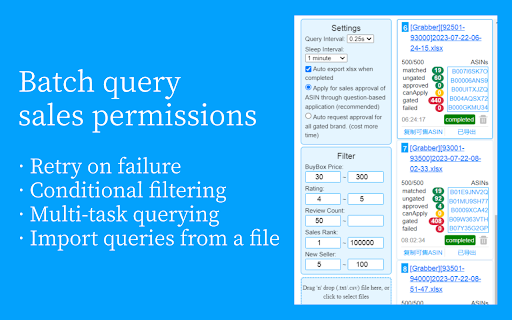
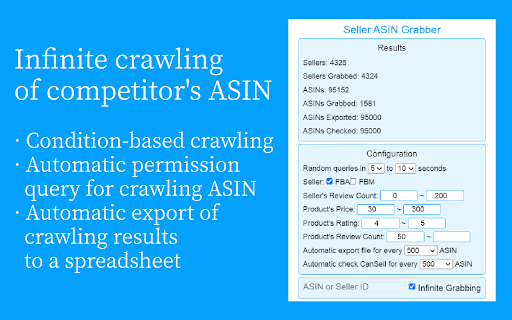
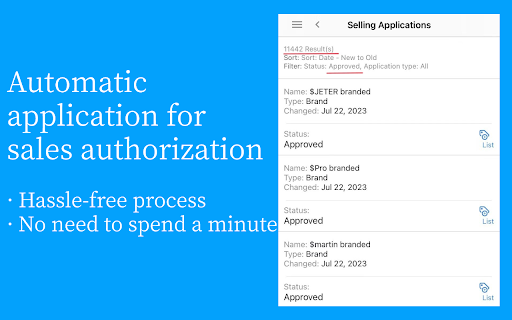
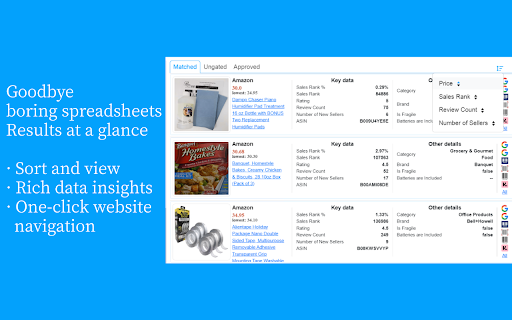
An effective tool for Amazon online arbitrage sellers to increase efficiency. A Chrome extension that helps Amazon Online Arbitrage sellers improve their efficiency. Its main features include: ✔ batch query ASIN's sales permissions ✔ automatically crawl seller's ASINs(aka spy other sellers) ✔ automatically apply for sales permissions ✔ automatically export query results to spreadsheets ✔ ... It supports 'crawl → check permissions → apply permissions' fully automatic unattended operation, supports importing from files, and eliminates tedious operations such as filtering, deduplication, copying, pasting, etc. of EXCEL spreadsheets! Combined with the 'result view' and 'website shortcut jump' functions, it can greatly improve the seller's efficiency! If you encounter any bugs or have any feature suggestions, please send an email to asinchecker@hotmail.com.

AI Amazon Product Research - AMZScout PRO AI Extension
AI-Powered Amazon Product Research Tool: Discover profitable products, estimate sales, and leverage AI insights for smarter selling. AI-Powered Amazon Product Research Tool: Discover profitable products, estimate sales, and leverage AI insights for smarter selling. This built-in AI Chatbot provides instant, Amazon data-backed answers to help you research products, validate niches, and build your strategy faster. AMZScout PRO AI extension makes the process of Amazon product research easy, helping sellers find the most profitable products quickly and efficiently. Verify the potential of your ideas with the comprehensive AI Product Analysis feature, which offers insights into each product’s strengths and weaknesses, and suggests improvements to enhance its profitability. AMZScout’s Product Finder is a powerful, user-friendly tool for sellers with Private Label, online arbitrage, and wholesale businesses. This FBA chrome extension provides the easiest way to find profitable products by analyzing trends, seasonal history, and bestseller rankings. With its advanced scoring algorithm, the Amazon Product Finder tool evaluates millions of products, providing users with accurate insights into demand, competition, and profitability. Whether you're a beginner or an experienced seller, AMZScout’s PRO AI add-on simplifies your product research so you can make data-driven decisions with confidence. Its intuitive interface ensures smooth navigation, which allows sellers to find the most promising products quickly and efficiently. Use this innovative AI Amazon product research tool to help you find winning products to sell in just a few steps: ➤ [Step 1]: Evaluate Product and Niche Potential Assess the potential of any product or niche directly while navigating the Amazon website in your Chrome browser with convenient info widgets built into Amazon pages. This Amazon plugin simplifies your product analysis by providing key insights to help you identify opportunities and find the best products to sell on Amazon. Gain comprehensive insights into any niche or product that catches your interest. With this easy-to-use Amazon seller app, you can analyze the following information: • Product and niche profitability • Demand • Competition levels • Sales history • Price changes • Niche keywords • Product suppliers • ... and more ➤ [Step 3]: Get Instant Answers with the AI Chatbot Ask natural questions like, “Is this niche profitable?”, “Which products should I sell?”, or “Which keywords can help me rank faster?” and get clear, data-driven answers. Analyze product ideas, research competitors, generate keywords, and get strategic tips, all powered by the most up-to-date AMZScout data. ➤ [Step 4]: Develop a Business Plan with AI Support Create a robust business plan with the help of AMZScout’s AI feature, which suggests tips for product improvement to enhance your offerings and boost your sales potential. This Amazon seller tool will also provide a detailed SWOT (Strengths, Weaknesses, Opportunities, and Threats) analysis for any selected product. ➤ [Step 5]: Save Your Favorite Ideas Keep track of your favorite product ideas for easy comparisons. Whether you're exploring different items or evaluating market trends, AMZScout app helps you organize and save your results efficiently. Compare your saved products with ease and choose the best one for your business. The AMZScout extension allows you to make data-driven decisions about what to sell, ensuring that you select products with high demand and profitability. Once you identify a promising product, use the PRO AI application to help you find reliable local or international suppliers. ➤ [Step 8]: Launch Your Product Using the Most Effective Keywords Use AMZScout’s Keyword Research feature to help you select the most popular keywords in your niche. This feature identifies keywords used by high-ranking products so you can optimize your listings and PPC campaigns. Explore profitable products in various marketplaces, including the U.S., Canada, U.K., Australia, Germany, France, Italy, Spain, Brazil, Mexico, India, Japan, U.A.E., and Saudi Arabia. Install the Amazon Scout web extension now to learn how to find products to sell on Amazon, estimate potential sales and profits with a built-in sales estimator, and start selling smarter. Launch a free trial to unlock the full potential of Amazon FBA and start making data-driven decisions that will boost your sales! This extension uses affiliate links to support its development. Some links you click may result in a commission for us, at no extra cost to you.

Amazon ASIN Keyword Rank & Index Checker
Amazon ASIN Keyword Rank & Index Checker enhances sellers and marketers tracking of product ranking and indexing. Amazon ASIN Keyword Rank & Index Checker enhances sellers and marketers'tracking of product ranking and indexing. Do you need help getting the product index in search results? Extfy Offers an ASIN-based keyword ranking and indexing checker tool. This free ASIN-based keyword ranking and indexing checker extension shows your product's current position when searching for relevant keywords and tracks its position changes over time. This extension also checks the sponsor product listing. If you select the sponsor list, it provides you with the relevant data. Use this extension to monitor the impact of your advertising campaigns and listing optimizations on your organic ranking and consistently improve it. This extension offers three convenient methods: Single ASIN, Multiple ASIN, and Batch File Upload: Single ASIN: Using a single ASIN feature, users can easily track a specific product's keyword ranking and indexing status by entering a single ASIN. Ideal for focused insights and optimizing individual listings. Multiple ASINs: Input multiple ASINs to monitor keyword rankings across several products simultaneously. Gain accurate insights to manage and optimize various listings efficiently. Batch File Upload: For bulk keyword tracking, upload a CSV file containing multiple ASINs. A sample CSV format is provided for convenience. These features allow you to check keyword rankings in bulk quickly. Export your ranking and indexing results to Excel or CSV for further analysis and reporting. If you're worried about whether your listed product is indexed and which keywords it ranks highest for, this extension is made for you. Select your marketplace location, input the product ASIN number, and enter your desired keywords for ranking insights. That's it! This extension will provide valuable data, including the percentage indexed, average page rank, average product rank, and average competing products. Higher search results will lead to increased sales through organic, unpaid traffic. As your products increase in the search rankings, you'll attract more and better potential customers, resulting in increased traffic and higher sales figures. Explore the features of our Chrome Extension: - Multi-Marketplace Support - Track Keyword Rankings - Check Multiple keywords - Index Checker - Real-Time Updates - Sponsored Product Listing Tracking - Effortless Listing Optimization - Export Results - User-Friendly Interface Don't wait! Experience the power of data-driven success today. Try it today and unlock the potential of data-driven success. Add this extension to Chrome to your PC now. Our support team is here to help if you have any questions. You can easily reach out to our developers for guidance or clarifications. Remember to explore our comprehensive help page section for additional resources and advice.

Amazon Price Tracker Extension
Use an amazon price tracker extension to get alerts on your favorite products with amazon price monitor and amazon price tracker. 🛒 Discover the Ultimate Tool for Smart Shopping! Tired of checking for deals constantly? Imagine having a personal assistant that monitors rates for you. Our amazon price tracker is designed to make your shopping experience smarter and more affordable. ⚠️ Note! As an Amazon Associate, we earn from qualifying purchases. This extension may use affiliate links when redirecting to Amazon product pages. If you purchase through these links, we may earn a commission at no additional cost to you. 🚀 Why This Extension is Essential Shopping online can be overwhelming, especially with fluctuating rates. Without the right tools, you might miss out on the best deals. This is where our amazon item price tracker comes in, ensuring you never overpay again. How It Works Using our price tracker amazon extension is simple: 1️⃣ Install: Add it to your Chrome browser with just a few clicks. 2️⃣ Follow: Browse and select items. The extension starts tracking instantly to track item price on amazon. 3️⃣ Get Alerts: The tracker notifies you when the rate drops. 🛍️ Key Features. Our extension offers: Get alerts when an item drops to your desired rate. Pursue multiple items, ensuring you never miss a deal. Amazon Price Monitor: View historical data and track amazon item price effectively. Custom Alerts: Set notifications based on your preferences. Multi-Platform Support: Monitor rates across devices. ✅ Maximize Your Savings Our tool offers several key advantages to help you save money effortlessly. 💰 Rate Drop Alerts: Get notified instantly by amazon price tracker plugin when your favorite items go on sale. 💰 Multi-Device Sync: Seamlessly monitor your deals across all your devices. 💰 Notifications: Tailor alerts to your preferences, so you only receive relevant updates. 📱Benefits of Using This Tool. With our tracker, you can: • Save Money: Buy at the lowest rate. • Save Time: No more manual rate checks. • Smart Purchases: Make informed decisions with app. • Stay Informed: Be the first to know about rate drops with . 📊 Effortless Shopping Experience using amazon price tracker extension – Elevate your online shopping with features designed for ease and convenience: – Quick Setup: Start monitoring deals with just a few clicks. – Cross-Browser Compatibility: Works on all major browsers to keep you updated wherever you are. – User-Centric Design: A clean, intuitive interface that makes navigation a breeze. – Comprehensive Insights: Access detailed information on item rates at a glance. – Real-Time Updates: Stay ahead of the curve with instant rate change notifications. 🏦 How It Stands Out While tools like keepa and camel camel camel are popular, our offers unique benefits: ➤ All-in-One Solution: Comprehensive tracking within your browser. ➤ Real-Time Alerts: Instant notifications ensure you never miss a deal. ➤ User-Friendly Interface: Accessible even for beginners. ➤ Customizable Alerts: Set your preferences easily. 📉 Why Choose amazon price drop plugin? User-Friendly: Simple navigation, even for beginners. Accurate Monitoring: Get the best deals with our app. Lightweight: Doesn’t slow down your browser. 🔄 How to set up. Tracking is easy: 1. Install our tracker on Chrome. 2. Browse and select items to track amazon prices. 3. Add them to your watchlist. 4. Set your target rate and wait for notifications from the app. 5. Buy when the rate hits your target with amazon price tracker app. 🎯 Trusted by Thousands Thousands of users trust our tracker to watch rates and save money. Whether you're a casual shopper or a deal hunter, this tool meets your needs. ⚙️ Compatible with Major Browsers Our app works not only on Chrome but also on other major browsers, ensuring that you can track rates on any platform. 🔍 Frequently Asked Questions Q: How accurate is amazon price checker? A: Our tracker provides real-time updates, ensuring accurate information. Q: Can I follow multiple items at once? A: Yes, manage all your favorite products in one place. Q: Is there a limit to how many items I can track? A: There is no limit. Track as many items as you like with price monitoring amazon. 💼 Conclusion 🔗 Stop overpaying and start using our plugin today. Whether you're using keepa chrome extension or camel camel, our tracker enhances your shopping experience. 🔗 Our system includes features allow you enabling to effectively track rate changes. Stay updated on the latest information for all the products you're interested in. 🔗 Don’t miss out on the best deals — install our app now and change the way you shop! Your shopping will never be the same. Track rates with our powerful tool and enjoy features like amazon price watch. 🔗 Even if you use tools like keepa amazon or keppa, our extension offers unmatched convenience. Start saving today with our solution. Plus, with camelcamelcamel and keepa extension, you’ll stay informed about the best deals.

AMZBase - Free Amazon Product Research Tool
Free product research tool for Amazon sellers. Shows BSR, ASIN, FBA sellers, Buy Box and chart links on every product page. AMZBase is a free product research tool for Amazon sellers. It renders ranking, offer, listing and chart-link data directly on Amazon search, category and product detail pages, so research data is available without leaving the page. Search and category page data cards — at-a-glance information, no need to open the product detail page. On Amazon search results, category pages and Best Sellers lists, AMZBase renders a data card under each product, displaying: • ASIN, with a one-click copy button • Best Sellers Rank, including the subcategory rank where applicable • Lowest Fulfilled-by-Amazon (FBA) offer price • FBA seller count • A "Sold by Amazon" indicator when Amazon itself is on the offer list • A green indicator when an FBA offer sits at least 30% above the lowest offer (a possible arbitrage signal) Data cards render automatically once the page loads. The request rate to Amazon's detail endpoint is configurable in settings (default 500 ms) to limit interaction with Amazon's anti-bot system. Hovering over a product image opens a popup containing the price-history chart (CamelCamelCamel) and the rank-history chart (Keepa). Holding Cmd or Ctrl while hovering pins the popup; the popup can be configured to anchor to the top-right corner of the viewport instead of following the cursor. When typing into the Amazon search bar, AMZBase adds a column of additional keyword suggestions next to Amazon's native dropdown. Suggestions are generated from seven concurrent variations of the typed query: terms appearing before the phrase, terms appearing after, terms appearing between the words of multi-word phrases, and three connector variants ("for", "and", "with"). Results are deduplicated against Amazon's own suggestions and grouped by category. The expander can be disabled in settings. Product detail page side panel On any product detail page, a side panel can be opened on the right of the page from the toolbar action button. The panel contains: • Quick navigation: About, Similar items, Product Information, A+ Content, Videos, Description, Reviews • Pre-filled outbound links: CamelCamelCamel, Keepa and the Amazon Seller Central Revenue Calculator (FBA fee estimator), each scoped to the current ASIN and the current marketplace • Per-field action toolbars on ASIN, brand and UPC: copy to clipboard; search Amazon, Google, eBay, AliExpress • A formatted view of the product's specification tables (dimensions, weight, technical details) When Amazon returns a verification page, AMZBase pauses its background data requests and presents the captcha in a focused popup iframe. The data request queue resumes once the captcha is solved or the popup is dismissed. The same tool and the same workflow apply across every Amazon marketplace AMZBase supports — including the United States, United Kingdom, France, Germany, Italy, Spain and Japan, with 20+ marketplaces in total. The marketplace is detected from the current page URL; no per-region setup is required.
