
jodfjmaiakpnmeddgpeflpafebmlhppn
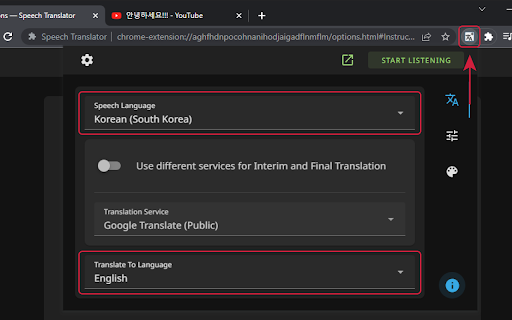

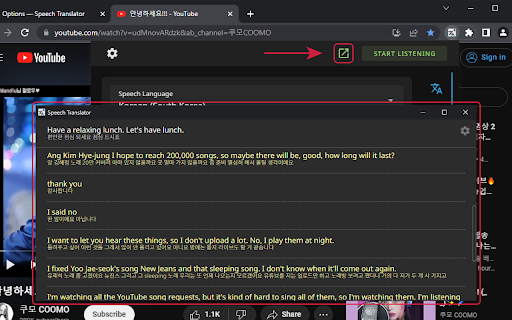


This extension uses speech recognition technology, powered by Google, to convert speech from any source into text: the transcribing process. Then it translates the text from one language to another using the selected service. You can use it for: — 🎞️ Transcribing and translating livestreams, videos, calls, etc. — 🎤 Transcribing and translating your speech for a livestream overlay in OBS (for livestreamers) — 🖥️ Real-time computer-assisted translation (basically human translation) — 📖 Practicing language learning by dictating the text and reading the translation — 🔠 Creating translated subtitles or captions for videos or podcasts — 👩💻 Creating a non-machine translation using the textual version of spoken words (called transcript) — 👂 Enhancing accessibility for people with hearing impairments The extension can be used on Android with Kiwi Browser. But please keep in mind that the extension is not designed for video translation on mobile devices and for mobile usage in general. You may experience some limitations and issues on Android devices, due to technical reasons. If you want to enjoy full functionality on mobile devices, please consider to fund the mobile app development. This will ensure that all features of the extension work correctly on mobile devices.

TranslateTube: YouTube Video Translator
Real-time AI voice dubbing for YouTube videos, no subtitles needed Language barriers shouldn't stop you from enjoying YouTube. Our extension translates videos in real-time using advanced AI, offering both voice dubbing and text translation. • Translates YouTube videos to English and 50+ other languages • Works even with videos without subtitles (no CC required) • Provides AI-generated voice dubbing so you can listen instead of read • Automatically creates transcripts while watching • Translates live streams in real-time as they happen 🔧 How to Use This Extension: 1. Install the extension 2. Open any YouTube video or live stream 3. Select your preferred language 4. Choose translation mode: Voice dubbing or subtitles 5. Click "Start" - translation begins immediately 1. YouTube Video Translator - Convert any video to your language 2. Auto-Translate - Works automatically with one click 3. AI-Powered - Uses advanced neural networks for accurate results 4. Transcript Generator - Creates text transcripts while you watch 5. No Subtitles Required - Translates videos without existing captions • Need to understand videos in other languages? → Get instant translation with voice or text output • Watching content without subtitles? → Our AI generates captions and translates them automatically • Following live international events? → Real-time translation for streams and broadcasts 🎓 Perfect For: • Students watching educational content in foreign languages • Professionals following international industry updates • Travelers preparing for trips with local videos • Anyone enjoying global entertainment without language limits • Supports 50+ languages including English, Spanish, French, German, Russian • Requires internet connection for AI processing • Privacy-focused: no personal data stored • Free basic plan with premium options available ⚠️ Important Note: This extension provides AI-generated translations, not professional human translation. Accuracy may vary with audio quality and specialized terminology.

Interpreter - Live Captions & Translation for Interpreters
Transcribe and translate any audio in real time. 60+ languages — calls, meetings, interpretation sessions, webinars. Interpreter puts every word on your screen as it's spoken. Both sides of the conversation, in real time. Works with any browser tab that has audio, including Zoom, Teams, Meet and any website. Also captures system audio from desktop apps. Open the side panel and go. How it works: 1. Open your call in a browser tab or desktop app 2. Click the Interpreter icon to open the side panel 3. Pick your languages and hit Start 4. Audio is transcribed and displayed as text in real time 5. Click any line to translate it, or switch to live mode for automatic two-way translation - Real-time transcription with automatic speaker labels - 60+ languages with auto-detection - Click any line to translate, or turn on live two-way mode - Quick term lookup with Ctrl+K - Custom glossary for your own terms - 10 domain modes: medical, legal, banking, insurance, government, and more - Focus Shield keeps you "online" on agency portals while using the side panel - Floating notes, keyboard shortcuts, dark mode - Works with any page that plays sound 1 hour free, no credit card. After that, pay as you go. No subscription, no monthly fee, your funds never expire. HIPAA compliant and SOC 2 Type II certified. When your call ends, your data is gone.

Real-time Video Translator & Dubbing - DubTab
Live AI speech translator with dubbing. Dual subtitles for YouTube, courses, meetings & streams. Supports 60+ languages. DubTab helps you understand any video in your browser by dubbing it in real time. When you’re watching YouTube, online courses, K-pop livestreams, product demos, webinars, or any site with spoken audio, DubTab: - translates what you’re hearing as it happens, - shows live translated subtitles on screen, and - plays a natural AI voice speaking the translation (real-time dubbing). If you’ve ever thought “I wish this video had a voiceover in my language” — that’s exactly what DubTab is built for. 🎧 What DubTab is best at - Real-time AI dubbing (the main feature) DubTab turns speech into translated speech with low latency, so you can keep watching without constantly staring at subtitles. - Live translated subtitles Subtitles appear in real time, so you can follow every sentence as it’s spoken. - Bilingual subtitles (when you want both) Show original + translation together — great for learning or quick accuracy checks. - Choose a voice you like Pick from multiple voices so the dub sounds clear and comfortable to listen to. - Works on any tab that’s playing audio Great for YouTube, video platforms, courses, K-pop livestreams, webinars, and more. ✨ Use cases - Keep up with fast-paced tutorials, courses, and tech talks without missing details - Language learning with bilingual subtitles + spoken translation - Teams who consume international content (training, demos, talks) - Watch YouTube videos in other languages hands-free (listen instead of reading) - Follow K-pop livestreams and understand what’s happening in real time 🪄 How it works 1) Install DubTab 2) Play a video/audio in your browser 3) Select your Target Language (and source if needed) 4) DubTab shows live translated subtitles and starts dubbing 5) Listen to the translated voice in real time 🔒 Privacy & support DubTab is built with privacy in mind and designed to support GDPR principles. Your viewing history stays on your device — all history is stored locally.

Sokuji - AI Meeting Translator
Real-time AI voice translation for video meetings. Speak your language, be heard in theirs — works with Meet, Teams, Zoom & more. 🗣️ Speak your language. Be understood in theirs. Instantly. Sokuji is an AI-powered real-time speech translator that works directly inside your video meetings — no extra apps, no copy-pasting, no awkward pauses. Just speak naturally, and your words are translated and spoken aloud in your teammate's language, in real time. Unlike text-based translators or clunky meeting bots, Sokuji provides voice-to-voice translation that flows naturally into your conversation: • Real-time voice translation — Your speech is translated AND spoken aloud, not just displayed as text • Virtual microphone — Others hear the translation directly through their meeting audio, no setup needed on their end • Works inside your meetings — No separate window, no screen sharing, just seamless integration • Multiple AI engines — Choose from OpenAI, Google Gemini, Volcengine (ByteDance Doubao), Palabra AI, or Kizuna AI based on your needs • Offline AI models — Run translation entirely on your device with built-in AI models, completely free, no API key needed, no internet required • True privacy by design — Your voice NEVER passes through our servers. Not even we can hear your conversations • 35+ languages supported — From English, Japanese, Chinese to Arabic, Hindi, and beyond 🖥️ WORKS WHERE YOU WORK Sokuji works seamlessly with all major web-based video meeting platforms. Whether you're on a team call, a client meeting, or a virtual conference, just select "Sokuji Virtual Microphone" in your meeting's audio settings and you're ready to go. It supports any web-based meeting tool that allows microphone selection. 1. Open your video meeting on any supported platform 2. Click the Sokuji icon and configure your AI provider & languages 3. Select "Sokuji Virtual Microphone" as your mic — done! Your colleagues hear the translated voice automatically. No installation or setup needed on their side. 💡 PERFECT FOR • International teams with daily standups and meetings • Customer calls across language barriers • Global conferences and webinars • Remote workers collaborating across countries • Language learners practicing in real conversations • Content creators working with international collaborators • Privacy-conscious organizations that cannot send audio to third-party servers 🔒 PRIVACY-FIRST — YOUR VOICE STAYS YOURS Sokuji is built so that your voice data NEVER touches our servers. By architecture, not by policy. • Zero data collection — We have no server that receives your audio. It's technically impossible for us to hear your conversations • Offline AI mode — Use built-in AI models that run 100% on your device. Your voice never leaves your computer. Completely free • Cloud AI mode — When using OpenAI or Gemini, you use YOUR OWN API keys. Data flows directly between you and your chosen AI provider — we are never in the middle • No third parties — Your voice is only heard by meeting participants and (if you choose cloud AI) your selected AI provider. No one else. Ever • Open source — Don't take our word for it. Inspect the code yourself at github.com/kizuna-ai-lab/sokuji • No account required for basic usage • Chrome/Edge browser extension (this listing) • Desktop app for Windows, macOS, and Linux We'd love to hear from you! • Report issues: github.com/kizuna-ai-lab/sokuji/issues • Star us on GitHub if you find Sokuji useful ⭐ Made with ❤️ by Kizuna AI Lab
