
joddbgdiaecgbenoeloffehlpclnppfa
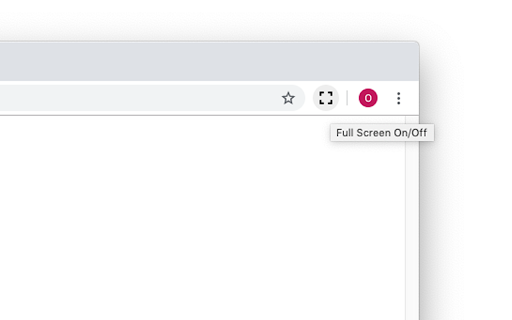
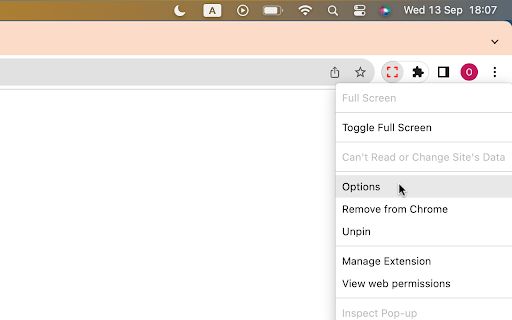

Add fullscreen button to the Chrome toolbar and to the context (right-click) menu This is just a full-screen button, added to the toolbar and the context menu. It does exactly the same as the keyboard shortcuts (F11 on Windows or fn+F on Mac). You can change the icon to match your chrome theme and that's it. I made this because I need to be able to click a button/menu item with the mouse, not all of my browsers come with keyboard. When in full screen, I need the context menu to get back. That's why this extension adds itself in the right-menu also. And that's it. To change the default settings, simply right-click on the extension icon and select "Options". On the settings page, you can change the icon to a different color (to match your Chrome theme or simply because you don't like the default black color) or even set your own icon. Rest assured, this extension doesn't require any special or risky permissions. The only permissions it needs are "contextMenu" and "storage." It doesn't access your data or sites. Its sole purpose is to add the buttons to the toolbar and context menu while saving the selected icon in local storage.

FullscreenEverything
Fullscreen everything in your browser's web page F11 key allows you to fullscreen whole web page. If you want to fullscreen arbitrary elements on a web page, try FullscreenEverything! Usage: * click FullscreenEverything to enter the selecting mode * in selecting mode, the element will be highlighted when the cursor hovers on it * in selecting mode, by clicking the highlighted element to fullscreen it * in selecting mode, press the Esc key to exit without fullscreen anything

Full Screen Tabs
Enjoy chrome tab navigation in fullscreen — instantly switch & open tabs like normal in chrome kiosk mode with Full Screen Tabs! 🚀 Full Screen Tabs brings browser’s native navigation into fullscreen mode, so you can switch between open pages, tab-groups, or even windows effortlessly. Perfect for productivity, media, and presentations in browser kiosk mode! Why Choose Full Screen Tabs? ✅ Native Chrome UX – Familiar page switching, close tabs, and navigation like standard Chromium. ✅ No Compromises – Keep fullscreen benefits while accessing browser tabs instantly. ✅ Tab-Groups Support – Display pages inside tab-groups as usual without exiting fullscreen (hide collapsed groups for clutter-free view). ✅ Keyboard Shortcuts – Toggle the bar fast with Alt+T (fullscreen shortcut, customizable). ✅ Address Bar auto-complete – Get Chrome-style suggestions (history, bookmarks, open tabs) on the fly. ✅ Bookmarks Access – Browse your Chrome bookmarks with folder navigation directly in fullscreen. 🔑 Key Features 1️⃣ Complete Tab Navigation • Switch, close page, or open new tabs in full screen like normal browsing. • Full support for Chrome’s tab groups (show in groups, hide closed tab-groups). • Pinned tabs stay visible for quick access to frequent sites. • Best navigation app for power users with 50+ open pages. 2️⃣ Intuitive Navigation Bar • Menu bar with back/forward, reload, and new buttons. • Address bar integration: Search or edit URLs without exiting fullscreen. • Change tab shortcut (Ctrl+Tab) works seamlessly. • New page button to quickly launch pages. 3️⃣ Powerful Address Bar • Type URLs/search in full screen with Chrome-style suggestions (history/bookmarks/open pages) • Instant access without exiting presentations/videos/games • Privacy-safe: Processes everything locally (no server tracking) • Lightning fast: Shows results before you finish typing 5️⃣ Smart Customization • Drag the navigation bar anywhere (top, bottom, or sides). • Auto-hide mode: Hide navigation-bar automatically to maximize screen space when idle. • Light/dark themes to match browser’s appearance. • Custom shortcuts: Change show tabs shortcut (e.g., Alt+Q). • Hide collapsed tab groups for minimalist workflows. • Hide the pin handle (top\bottom notch) on the navigation bar • Show fallback navigation bar on non-scriptable pages (or only show when shortcut is used) • Cunfigure Auto-hide duration: time in seconds before the navigation bar automatically hides • Reorder suggestions in the address bar. Enable/disable suggestion sources. 6️⃣ Bookmarks Bar Integration • Access your Chrome bookmarks directly without exiting fullscreen. • Browse bookmark folders with smooth dropdown navigation. • Configure which bookmark folders to display (Bookmarks Bar, Other Bookmarks, Mobile Bookmarks). • Horizontal scrolling support for many bookmarks. • Select-friendly bookmarks styled as native links. 7️⃣ Optimized for Workflows • Presentation-ready: No distracting UI elements during slideshows. • Media-friendly: Auto-hide during video playback (Netflix, YouTube). • Multi-page productivity: Ideal for coding, research, or design work. 🛠️ How to show tabs in Chrome fullscreen mode? 1️⃣ Install Full Screen Tabs from CWS (1-click setup). 2️⃣ Enter fullscreen (press F11 or use browser menu). 3️⃣ Access pages instantly via the floating menu bar or using Show Tabs keyboard Shortcut 4️⃣ Customize: Adjust position, auto-hide, themes in settings. 🎯 Who Needs This? ✔ Developers – Code/docs in fullscreen with tab control. ✔ Designers – Preview work without losing navigation. ✔ Presenters – Switch slides discreetly. ✔ Researchers – Manage 50+ open browser pages efficiently. ✔ Gamers/Streamers – Quick page access without exiting games. ✔ Chrome kiosk mode users – Navigate between pages even when screen is blocked. ✨ Bonus Tips for Power Users • Use Ctrl+Tab to cycle pages faster. • Enable auto-hide during videos for distraction-free viewing. • Pair with closed pinned tabs functionallity for ultra-efficient workflows. ❓ FAQs ❓ Can I move the navigation bar? ✅ Drag it anywhere—top, bottom, or sides (even on multi-monitor setups). ❓ Does this work with Chrome’s native tab-groups? ✅ Yes! App shows all tab-groups if needed. 💡 We recommend to Enable Hide Collapsed Tab Groups to declutter. ❓ Is there a show menu shortcut? ✅ Toggle with Alt+T (customizable in settings). ❓ Can I access my bookmarks in fullscreen? ✅ Yes! Enable "Show Bookmarks Bar" in settings to access your Chrome bookmarks with folder navigation. ❓ How many bookmarks can I display? ✅ Unlimited! Use horizontal scrolling or the scroll buttons to navigate through many bookmarks seamlessly. 🚀 Get Full Control Today! 📌 1-click install → Never lose tabs in full screen again. 📌 No ads/tracking → Just pure productivity. 📌 Updated monthly → Based on user feedback. 👉 Install now and browse in Fullscreen with our app forever! Updates: - 0.6.5 - Fixed zoom to be independent from page Zoom. - 0.7.x - Added ability to hide addressBar + exit Full-Screen btn - 0.8.x - Added Bookmarks Bar with folder navigation, horizontal scrolling, and dynamic positioning

Full screen your Videos
Watch your videos in full screen with one click on the full screen button Watch your videos in full screen with one click on the extension button. This software works with video websites such as YouTube, Vimeo, etc. With this extension you can watch your videos in full screen thanks to the software button. This works for all HTML5 video player and YouTube™. So you can enjoy your videos. Enjoy watching your videos today with one single click. To begin using our software, simply install the software and begin watching your video. To turn on full screen for the video, click on our extension icon and our software will maximize the screen size for the video for you.

Windowed Fullscreen for Videos
Works with most websites that include videos through the HTML5 tag, including videos that are embedded through iFrames and videos on websites that use shadow roots. Options: Enable / disable the extension for specific websites, and adjust button positioning so it doesn't interfere with other video overlays. You may report websites that are not compatible with this extension, but this usually happens due to websites being coded in exceptionally weird ways, so it might not always be possible for me to fix the problem. Please blame the website and not the extension :-)
