
jocnlahnjacckbiffghcopjfbifdjocj
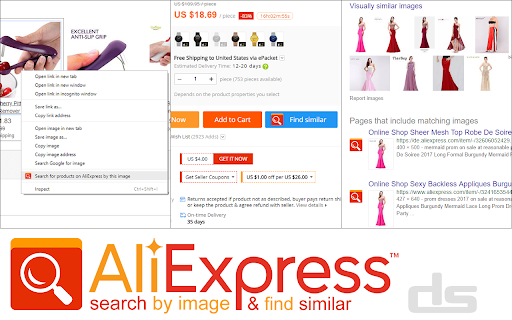

Search for products on AliExpress by image and find similar products A working Chrome extension that simplifies online shopping. Just right-click any product image and let it find exact or similar items on AliExpress. No more endless text searches. Try Search AliExpress by Image today for a hassle-free shopping experience!

Dropizi
🚀 Get started with high quality Dropshipping from Dropizi. 🇫🇷 European suppliers with quality products. Make way for ethical Dropshipping! 😲 No prior knowledge needed and no need to invest in stock! Follow the guide and discover the steps to creating your own store: Find your best-selling product Create your amazing store Generate your first sales Boost your income To help you succeed, Dropizi provides: ✔ A complete and FREE training course (to understand the ins and outs of dropshipping and apply them in practice) ✔ All the tools that you need to create a successful Dropizi store (no additional modules or subscriptions needed, everything is transparent) ✔ This extension (which will enable you to automate everything and save time!) The Dropizi extension will allow you to save time by: 🔎 Easily detecting the best-selling products on AliExpress (thanks to our DropiziRank) ⬇️ Importing, with just 1 click, products from AliExpress, BigBuy, BDropy and BusyX-Pro to your Dropizi store 🔄 Automating your orders on AliExpress, BigBuy, BDropy and BusyX-Pro Behind the scenes at Dropizi is the WiziShop team, a renowned European ecommerce company that has already helped 8,000 retailers achieve success online. The extension can use affiliate links or tracking links. The extension enables you to use product catalogues from AliExpress, BigBuy, BusyX Pro and BDropy. 🔥 Dropizi is published by the ecommerce solution WiziShop, the best alternative to Shopify & Oberlo extensions for creating a online store and dropshipping business.

Shine Commerce
Access vital data about almost any online store, including overall store sales, SKU details, new product launches, ads, and more. Shine Commerce uncovers the hidden gems of any e-commerce store you visit. Stay ahead of the competition with unparalleled insights about product and industry trends. The Shine Commerce Chrome Extension (formally known as Commerce Inspector) will “light up” when it detects a Shine compatible store. Click on the icon to reveal sales, product, traffic, and competitor insights as you browse. Key Features: - Reveal shop and product level revenue and units sold, by date. - Analyze revenue trends over time, identifying growth opportunities and areas for improvement - Access shop ad campaigns, including recently launched and ongoing Facebook ads, for inspiration in your ad campaigns - Discover related shops to expand your network and learn from their strategies - Follow shops to stay updated on their activities, launches, and promotions - Delve into product insights, including recently launched products, sales velocity, and pricing details For more information, visit https://www.shinecommerce.com/

AliExpress - Search by Image
Search products on AliExpress using images or screen area selection Have you ever seen a beautiful dress on Instagram, a cool gadget on TikTok, or a great piece of furniture on Pinterest and wondered where to buy it? This extension is your ultimate visual shopping assistant. Easily find exact items or visually similar products on the world’s most popular e-commerce platform using just an image. Forget about trying to guess keywords — let AI-powered reverse image search do the work for you! 🎯 Who is this extension for? • Bargain Hunters: Found an expensive item on a local website? Search by photo to find high-quality, budget-friendly alternatives and dupes directly from manufacturers. • Dropshippers & E-commerce Sellers: Instantly find suppliers, source trending products, and compare wholesale prices using competitor product images. • Everyday Shoppers: Don't know the name of an item? Just right-click the picture and find where to buy it online in seconds. ✨ Key Features: • 🚀 Lightning-Fast Search: Get results in just a few seconds. • 🎯 High Accuracy: Advanced image recognition finds the closest matches. • 💰 Price Comparison: Discover the same items from different sellers to get the best deal. • 🌐 Works Everywhere: Right-click on any image on any website, blog, or social media platform. 🛠️ How to use it: Install the extension and pin it to your browser toolbar. Find any picture of a product you like online. Right-click the image and select the "Search by Image" option. A new tab will open, showing you all matching products available on AliExpress. Start saving time and money on your online shopping today. Discover millions of products at the best prices without typing a single word! Disclaimer: This extension is an independent tool created to improve your shopping experience. It is not officially affiliated with, endorsed by, or sponsored by AliExpress.

AliExpress Image Search
Find the best suppliers with the lower prices for your products Find the cheapest products with AliExpress search by image. ✜ Download Choose the extension for AliExpress image search by Ali Chrome Press the “Add to chrome” button This extension only works on your Chrome browser ✜ Use and operation The Search by image plugin helps you find the best products: Starting from https://aliexpress.com/ itself as several sellers sell the same product at different prices and with different seller reviews Starting from another site (dropshipping for example) and finding a supplier of this product. The extension works by searching AliExpress by photo and then sorts the products by best match (which means the best price and bestseller via the simple image search) ▻ How to use Search by image Chrome extension ? There are two ways to use photo search: 1) Once the search by image extension is installed, a yellow logo appears in your browser a) Go to the product page which has an image b) Press the yellow lamb (the logo of the plugin) c) A yellow circle turns, like an hourglass to display the best offers. The yellow circle may spin for a few tens of seconds, this is the time needed to sort the best products. If there is an error detected, the yellow circle turns red. d) You can click on the first product displayed which will be the best product found by picture search 2) You can also use it on any site to see if the product is available (to compare prices on Wish, Amazon, eBay etc ...). The extension image search works on any site. a) All you have to do is go to a product page of a competitor site that has an image b) Click on the image (right click) and press "search for the best deals" this will automatically generate the photo search from search by image AliExpress c) A page opens and allows you to display search results. d) You can thus find the best product by searching by image. ✜ Privacy and collection Personal data is not required to use the extension. The "search AliExpress by image" extension is in no way related to https://aliexpress.com/ or the Alibaba Company, the extension uses the Thieve API to allow users to find better products. By using the extension "AliExpress reverse image search", you accept the T & Cs, you agree that the extension will be remunerated as a reporter by Alibaba on orders
