
joammhfncokdljlakikcgdbmeadognil
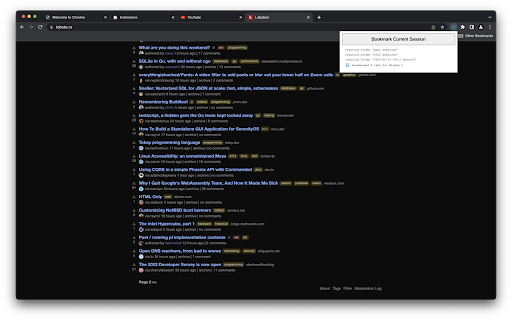

Bookmarks your session Gives you a single button to save all opened tabs into your bookmarks in an organized way, so you can close your browser with peace of mind. Bookmark Session will maintain a bookmark folder named `past sessions` , and once the `Bookmark Current Session` button is clicked, bookmark directories will be created by year/day/window, and all the associated open tabs will have bookmarks saved for them. The intended usage is for the user to realize they have way too many tabs open, click the button to save all opened tabs to their bookmarks, and close all the tabs to start a fresh browser session. This addon will prevent you from losing any important tabs you meant to keep open. Here's the structure of how the `past sessions` directory is arranged: GitHub Repo Link: https://github.com/davgra04/bookmark-session-extension

Save Tabs - Browser Session Manager
A password-protected tab saver and session manager to store tabs in the current window, or all windows with tab grouping support This extension saves tabs for later to prevent cluttering of the tab area. You can request to store tabs and close them to free the memory usage of these tabs when they are not needed. This extension uses the built-in sync API to allow storing in a machine and restoring in another one. Also, it is possible to protect stored tabs with a password. The extension uses the built-in crypto method to encrypt your tab data with the SHA-256 encryption key before storing them in your browser storage to protect data. Stored tabs keep their active and pinned states. Features: 1. Save and store window dimensions 2. Save and restore incognito states 3. Save and restore tab's pinned state 4. Save and restore tab groupings and their properties (color, name, and collapsed state) Notes: 1. There is no way to restore tabs if they are password protected and the password is forgotten. 2. By default, when a new session is restored, the session gets erased from the storage. You can use the Shift key while pressing a session to keep the session in storage. 3. This extension uses synced storage to allow the user to store and restore from multiple computers. 4. you can restore all session tabs in the current window by pressing the Ctrl (Command) key while restoring the session 5. You can edit a session from the popup view or ask the extension to update a session from the currently open tabs. This feature makes it possible to use the extension as a browser session manager. 6. This extension saves and restores tab groups and their properties.

Tab Manager
Easily organize all your open tabs in multiple windows from toolbar popup! This extension is designed to organize tabs from the toolbar popup. The UI for the extension can also be opened in a standalone popup window or a new tab (choose an item from the toolbar button context-menu). Tab Manager add-on supports multi-window and incognito mode. To work with this addon, just open the extension UI and start managing your tabs. Within the UI you can see a search bar at the bottom. Above that, there is the list of open tabs for window #1 (a new section is added for each new window). Within each row (tab item) in the list, there are several buttons. The first is the pin button which can be used to pin a desired tab(s). Next is the HTTP/HTTPS sign which shows if a website supports SSL protocol or not. The third icon is the tab icon which updates automatically depending on the tab URL. You can see the tab title right after the tab icon. There are also two buttons on the right side for editing or removing the current item. Please note that within the extension interface, all tab items are draggable. Once you drag an item, the actual tab will be re-positioned as well. Note: The extension interface supports dark mode. To switch the interface theme to dark, please press the moon icon in the bottom-right toolbar. To report bugs, please fill out the bug report form on the addon's homepage (https://mybrowseraddon.com/tab-manager.html).

Session Bookmark
Extension for saving and managing Google Chrome tabs. Google Chrome extension for storing and manipulating whole tab sessions. Store all tabs from current window under named session with the ability to reopen it later in current/new session/window and incognito mode. Extension can be set to show all stored sessions as a new tab. All sessions can be exported to json file.

Bookmark All Tabs
A Chrome extension that allows you to bookmark all open tabs with one click. Choose to save to a new or existing bookmark folder. Bookmark All Tabs is a simple and convenient Chrome extension that allows you to bookmark all open tabs with just one click. Key Features: 1. Save Tabs to Folders: Choose to save tabs in a new bookmark folder or an existing one. 2. Auto-Title Folders: Automatically title the folder with the current date, time, or the most common words found in the tab titles. 3. Access Recent Folders: Select a recently opened bookmark folder for quick saving. 4. View and Select Tabs: View all open tabs in a list and pick the ones you’d like to bookmark. 5. Copy URLs and Titles: Copy URLs or titles of selected tabs to the clipboard for easy sharing or organization. How to Use: 1. Open the Extension: Click the extension icon in your browser. 2. Choose a Folder: Select an existing bookmark folder or create a new one. For new folders, you can auto-title them with the current date, time, or common words from tab titles. 3. Bookmark Tabs: Once a folder is selected, click "Bookmark All Tabs" to save the tabs. We hope you find Bookmark All Tabs to be a useful and time-saving extension. Thank you for using it!
