
joamkiaiadhffogmbggnfnhogcjkfmgj


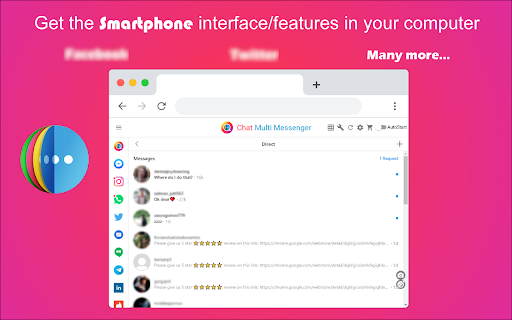
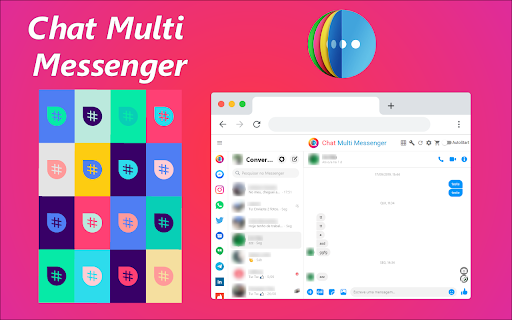
Merges all Social Media chats in one App. Support for twitter, tiktok, telegram and many more! Direct message DM your friends! ★★★★★ Access to many Social Media Apps in a single App 😱 See https://jitt.wwevents.fun/project/chat-multi-messenger/ for a full list. The state is kept when switching between Apps meaning that you can have all Social media Apps opened and have instant switch 🚧 This Chat Multi Messenger allows to fast switch between all the Web Messengers for Chrome 🚨 You can enable/disable the Chat Apps that you want to be active 🔥 Monitor all notifications, news feed, posts, messages in real time 🏆 Non-intrusive, by showing the number of missed notifications in the App icon on the Browser Toolbar 🥊 FEATURES ★ App shows as a sidebar and runs the mobile versions of the available Apps meaning less CPU/RAM/Internet consumption 👑 ★ You computer will run faster with more resources available without have to sacrifice functionality. ★ Choose your preferred communication method from a wide number of available messengers 😍 ★ Combine all the mainstream messengers into one simple window! ★ Chat Multi Messenger is a wrapper for worldwide messengers. It allows you to have access to the official services quickly from a standalone sandboxed window 🔥 ★ Sidebar with all Web Messenger like Messenger, Android Messages, Reddit, Youtube, Skype as the main available Apps 👑 ✔ Best extension for Social Media 🔧 You can fast-switch between all Social Media Networks 🎓 ✔ Clean and simple interface 💻 ✔ Very Low CPU/RAM/Bandwidth consumption. ✔ HTTPS and on official platforms for maximum security 🔑 No share of credentials to third party 🔓 💎 Building Apps and Extensions for Google Chrome and Android 🔥📣 📔 Available on the product page: https://jitt.wwevents.fun/project/chat-multi-messenger/#changelog All websites are a trademark of their own company's, registered in the U.S. and other countries. This is an independent project developed by WWEvents and has no relationship to them. By installing this product you agree to our privacy policy & terms of service: https://jitt.wwevents.fun/privacy-policy/ You may consult the list of permissions and the reason why they are required on the product page: https://jitt.wwevents.fun/project/chat-multi-messenger/#permissions “notifications” – Used to send desktop notification. For example when a new message arrive or App is updated. “contextMenus” – Allow to add more settings when right click in the App icon in the browser toolbar and browser context menu. “webNavigation” - The extension uses iframes to allow fast switch between the social media sites. webNavigation is used to control those iframes and know the timing to insert css or js into the iframe. “storage” – Used to save settings on your local computer. “scripting” – Used to be able to insert JS or CSS on the required host/domains. “system.display” – Used to detect the display size and position the Extension window. “unlimitedStorage” – Storage is limited to 5MB of data that may not be enough to store all configs. “host_permissions” – Permission to access to some hosts/domains that we must modify in order to provide the desired functionality detailed in the functionality. It also allows that you can share content (links or text) from other pages directly to inside the App and send it as a SMS/Android message to a friend for example. Also used to allow intercommunication with other WWEvents Apps (i.e. Emojis). “activeTab” – Permission to access the window that the extension is running and is show to the user. “all_urls” – Permission required for users be able to take screenshots of the current window – captureVisibleTab. “declarativeNetRequestWithHostAccess” - Used to get the iframe version of the websites. Only impact the Extension Window. “declarativeNetRequestFeedback” - Used to get the iframe version of the website by changing the iframe requests. “browsingData” - Used to remove serviceWorkers on some website in order for MV3 extension run properly. “alarms” - Used to update App icon badge. This information is also available inside the App: Options -> About

Chat Exporter - Save Gemini chats to Word, PDF, Google Docs, Notion & More
A powerful Gemini exporter that saves your chats to PDF, Word, Google Docs & Notion in one click. Export Gemini chat to PDF, Word, Notion & Google Docs in one click. A powerful Gemini exporter that saves your entire chat or a selected Gemini conversation with ease. Customize font, size, and text color before you export your Gemini chat history. 1. OVERVIEW ⭐ Export Gemini is a reliable Gemini exporter that turns your Gemini chats into clean, shareable files in seconds. Instead of copy-and-paste chaos, you can export exactly what you need — a selected Gemini conversation or your entire chat history — and save it as PDF, Word (DOCX), Google Docs, or Notion. Before exporting, you can also set your preferred font, font size, and text color so the final document looks professional and consistent. If you're looking for how to export Gemini chat, how to export Gemini chat history, or a reliable Gemini-to-PDF Chrome extension and Gemini-to-Word converter, this Gemini exporter is built to make the process fast, readable, and repeatable. 2. KEY FEATURES ✅ ✔ GEMINI TO WORD ● Use this Gemini exporter to save conversations as editable Word documents... ● Cleaner layout than copy/paste: headings, paragraphs, code blocks, and lists are preserved as readable text. ● Great for proposals, reports, SOPs, emails, and content drafts. ✔ EXPORT GEMINI TO PDF ● Export Gemini chat to PDF for sharing, printing, archiving, or compliance. ● Use it as a gemini to pdf saver for important chats and decisions. ● Works great when you need export gemini conversation to pdf with consistent fonts and spacing. ● Supports common “gemini to pdf converter” needs without manual formatting. ✔ EXPORT TO GOOGLE DOCS ● Export Gemini chat to Google Docs to co-edit with your team. ● Ideal for content planning, meeting notes, and approvals. ● Perfect when you want export gemini chat to google docs instead of downloading files. ✔ GEMINI TO NOTION ● Send your Gemini chat into a Notion page for knowledge base building. ● Great for project documentation, product research, and team playbooks. ● Optimized for “gemini to notion” workflows. ✔ EXPORT SELECTED OR FULL HISTORY ● Choose ONE conversation (selected messages) or export the full chat thread. ● Turn messy scrolling into a structured “export gemini chat history” file. ● Helpful for saving transcripts, decisions, prompts, and outcomes. ✔ STYLE SETTINGS BEFORE EXPORT ● Set font family, font size, and text color for your output. ● Create templates for different audiences (client-ready, internal notes, academic format). ● Keep exports consistent across Word, PDF, and document tools. 3. USE CASES 🎯 No matter your workflow, this Gemini exporter fits into how you already work: ➤ Writers & marketers: save drafts, outlines, and content briefs from Gemini to Word for editing. ➤ Sales & support: export conversations for follow-ups, onboarding docs, and handover notes. ➤ Students & researchers: export Gemini chat history to PDF as study material and citations. ➤ Product teams: move decisions into Google Docs or Notion and keep everything searchable. ➤ Consultants & freelancers: deliver polished Word/PDF outputs to clients in minutes. Step 1: Open Gemini and navigate to the chat you want to save. Step 2: Click the Export Gemini extension icon. Step 3: Choose what to export: ● Selected messages (a specific part of the conversation) ● Full conversation (complete chat history) Step 4: Pick your format: ● Word (gemini to word converter) ● PDF (gemini to pdf extension / gemini to pdf converter) ● Google Docs (gemini export to google docs) ● Notion (gemini to notion) Step 5: Customize styling (font, size, color) if you want. Step 6: Click EXPORT and save or send it to your chosen destination. 5. PERMISSIONS & REQUIREMENTS 🔐 ● Works on Gemini pages to read the chat content you choose to export. ● May require typical Chrome extension permissions such as: ✔ Access to the current tab (to capture the visible chat content) ✔ Storage (to save your export settings like font/size/color) ✔ Downloads / file creation (to save Word/PDF files) ● Google Docs / Notion exports may require you to sign in or authorize those services, depending on your setup. ● Recommended: use the latest version of Google Chrome. 6. WHY THIS EXTENSION 🚀 ★ SAVE TIME: Unlike manual methods, this Gemini exporter eliminates copy-and-paste work and formatting fixes entirely. ★ STAY CONSISTENT: One look across Word, PDF, Docs, and Notion outputs. ★ WORK YOUR WAY: Export one conversation or the full Gemini chat history. ★ BUILT FOR REAL WORK: Editing in Word, sharing as PDF, collaborating in Docs, documenting in Notion. 7. IMPORTANT LINKS 📌 ● Website: https://backrun.co/ ● Support: info@slimsoft.vn ● Privacy & terms: See the “Privacy practices” section on this listing. ● Documentation: Open the extension → Setting → Read Documentation. 8. CHANGELOG 🔄 v1.0.0 - Initial release: export Gemini chat to Word, PDF, Google Docs, and Notion - Select partial conversation or full chat history - Style settings: font, size, color v1.0.4 - Added free monthly exports: 5 full chat exports and 7 selected-content exports - Renamed the extension to Chat Exporter - Fixed an issue with exporting images from Gemini Gemini is a trademark of Google LLC. Use of this trademark is subject to Google Permissions. Chat Exporter is an independent third-party tool and is not affiliated with, endorsed by, or sponsored by Google LLC or Gemini.

WhatsApp™ Web Translator
Translate WhatsApp, Telegram, and Discord messages with our extension. Just select text for instant translations in any language! WhatsApp Translator | Auto WhatsApp Translator | Translator for WhatsApp | Translator for WhatsApp Web | Translate WhatsApp Messages | Lang Translator for WhatsApp | Chrome Extension for WhatsApp Translation | Translate WhatsApp Web Messages | Language Translation for WhatsApp | Instant Translation for WhatsApp Definition: WhatsApp Translator is a powerful and free Chrome extension designed to instantly translate WhatsApp Web messages with ease and accuracy. Whether you're chatting with global clients, friends, or collaborators, this auto WhatsApp translator empowers you to translate WhatsApp messages in real time. As a reliable language translation tool for WhatsApp, it enables seamless communication across 100+ languages, making it the ultimate translator for WhatsApp Web and beyond. Perfect for both personal and professional use, it brings instant translation for WhatsApp directly into your browser. How to Use: Download and install the WhatsApp Translator extension from the Chrome Web Store. Open WhatsApp Web and start a chat - the translation feature activates instantly. Configure your source and target languages in the extension settings. Type or receive messages - the translator for WhatsApp will auto-translate in real-time. Features: ✅ Auto WhatsApp Translator: Automatically detects and translates messages on WhatsApp Web. ✅ Translator for WhatsApp: Supports over 100 languages with fast, accurate results. ✅ Lang Translator for WhatsApp: Customise source/target languages for multilingual chats. ✅ Translate WhatsApp Messages Instantly: Translate both sent and received texts in real time. ✅ Chrome Extension for WhatsApp Translation: Lightweight, secure, and easy to use. ✅ Translate WhatsApp Web Messages: Integrates directly with WhatsApp Web for seamless operation. ✅ Language Translation for WhatsApp Web: Ideal for global communication in business or travel. ✅ Manual & Auto Mode: Switch between manual and automatic translation as needed. ✅ Secure & Private: No data stored or shared - all translation occurs locally in your browser. Translate 50 Messages for Free - That’s Not It… Sign Up & Get 50 More! Here's how to unlock your 100 free translations: Install & Pin the WhatsApp Translator extension from the Chrome Web Store. Click the extension icon - you'll see a Sign-Up button. Enter your email address, complete verification via code, and set your password. That’s it - your account is ready with 50 bonus translations added instantly! ✅ Use your first 50 messages instantly - no login needed ✅ Create an account and unlock 50 additional translations for free ✅ Enjoy seamless, real-time translations across 100+ languages Why wait? Break the language barrier - 100 messages at your fingertips now! Start Translating in Seconds - No Cost, No Catch! Why Choose Us? ✔ Built for remote teams, global users, e-commerce sellers, educators, and international clients. ✔ Eliminate language barriers in real-time with fast, reliable message translation. ✔ Enhance customer experience and boost engagement by responding in your audience's native language. ✔ Works great for multilingual customer support, international coaching, cross-border trade, and education. ✔ 100% browser-based- no WhatsApp API, no login required, and no server-side processing. ✔ Privacy-first design: We never access, store, or share your chat data. Support: Need help? Our support team responds within 24 hours, even on weekends. Contact us via email or through the extension’s support tab for quick resolution. Disclaimer: WhatsApp™ is a trademark of WhatsApp Inc., registered in the U.S. and other countries. This Chrome extension is not affiliated, endorsed, or certified by WhatsApp™, Meta™, or Facebook Inc. WhatsApp Translator is an independent tool built to enhance messaging functionality, in full compliance with WhatsApp’s terms and Chrome Web Store policies.

Discord Chat Export Tool
Effortlessly export Discord messages, photos, videos, and all files with just one click! Need a simple way to back up or archive your Discord conversations? With our Discord Chat Export Tool, you can quickly export all your messages and files with just one click. 👨🏻💻 Features ✓ Export all messages from any channel with a single click ✓ Export messages from private conversations ✓ Export messages with attachments, including images, videos, audio files, and other documents ⚙️ Get Started 1. Open the conversation in Discord that you wish to export. 2. Launch the extension and click 'Export' to start downloading your messages. 🔒 Data Privacy Your data privacy is paramount. All data processing occurs on your local machine; it never transits through our servers, ensuring no one else has access to your collected data. ⚠️ Disclaimer DISCORD is a trademark of Discord Inc. Discord Chat Export Tool is an independent tool and is not affiliated with, endorsed, sponsored, or otherwise connected to Discord Inc. or any of its affiliates or subsidiaries.

OChat: AI chat companion for WhatsApp & more.
Your AI chat companion, Everywhere you chat! Enhance your chat speed and effectiveness on WhatsApp, Linkedin, Telegram and Teams. By leveraging advanced AI, OChat provides a personalized WhatsApp, LinkedIn, Telegram, and Teams assistant. OChat considers the context, tone, and intent of your conversations to craft quick, contextually relevant, and grammatically correct responses. Whether handling business communications, chatting with customers, or just keeping up with friends, OChat enhances your productivity and ensures that your conversations are more effective, enabling you to convey your thoughts clearly and promptly. 🚀 How to use OChat? 🔸Click the "Add to Chrome" button and pin it to your toolbar. 🔸Signing up for a free 3-day trial (no credit card required). 🔸 Open WhatsApp, LinkedIn, Telegram, or Teams on your Chrome. 🔸 Enjoy using Ochat by Opening conversations and clicking on the OChat bottom next to the text box to get the perfect, context-aware replies. 🔸After the 3-day free trial, you can choose to continue with a premium plan. Watch the below video to learn how to boost your WhatsApp chat speed and quality in under 20 seconds! https://www.youtube.com/watch?v=rxGt6zx5Ndg 🚀 How OChat Elevate Your Messaging Experience? ✔️ Speed Up Your Conversations OChat employs cutting-edge AI to provide you with instant, context-aware suggestions that keep your chats flowing. No more pauses or delays in finding the right words, allowing you to respond swiftly across WhatsApp, LinkedIn, Telegram, and Teams. Whether it's a quick catch-up with friends or addressing a client's query, OChat ensures you're always ahead of the conversation. ✔️ Enhance Chat Effectiveness Our AI doesn't just speed things up; it makes every message count. By understanding the context, tone, and intent behind your conversations, OChat crafts responses that are on-point and tailored to your chat's specific needs. This precision enhances the quality of your interactions, making them more productive and satisfying for everyone involved. ✔️ Ensure Grammatical Excellence With OChat, grammatical errors and typos are a thing of the past. Our advanced language models review and refine your messages to ensure they're grammatically correct and professionally presented. This feature is invaluable for maintaining a polished and professional image in business communications and for anyone looking to make a great impression. ✔️ Sound Like a Native Speaker Whether English is your first language or not, OChat helps you craft messages with the nuance and flair of a native speaker. Our AI analyzes idioms, colloquialisms, and language patterns to help your chats resonate more naturally with your audience. This feature is particularly beneficial for non-native speakers who want to communicate more effectively with global contacts. 🚀 Experience Enhanced, Efficient Chatting Today with OChat! 🔥 OChat.ai Powered by Circlebit.ae | Reach us at: info@OChat.ai
