
jnkjkpapplndagboidnhphaciphgjeca
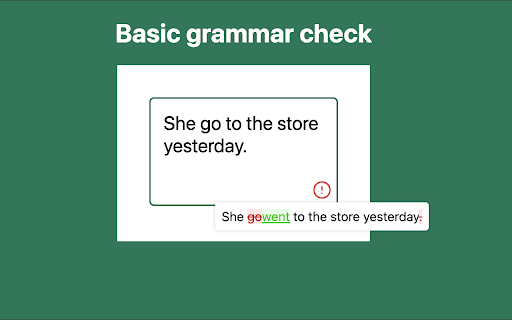


Completely free and open source Chrome AI Grammar Check Extension - Completely free. No subscriptions required. No ads. - Absolutely safe. AI works on your machine. No data sent to the internet. - Smart grammar check. Checks full sentences, not only individual words. - By default, it uses the built-in Gemini Nano in Chrome versions 138 and above, but you can switch it to a local Llama server.

Free Adblocker for Chrome by Open Adblocker
Free Adblocker for Chrome by Open Adblocker Block ads across the web with Open Adblocker, the best free open source adblocker for Chrome. We keep our goal simple: Blocking all types of ads on all pages in one click for enjoy an easy, clean ad free browsing experience. 🍪Automatically block annoying cookie consent pop-ups across the internet for a smoother browsing experience. ⚙️A completely redesigned settings page with quick access to filters, feedback, and bug reporting. Add Open Adblocker to your browser access these features: 🧩Lightweight, memory efficient adblocker extension for Chrome - Easily block banners, popup, pop under and video ads. 🎥 Block YouTube Ads - Skip distractions and enjoy uninterrupted viewing experience. 🌐 Choose the domains you want to block - Control which sites have ad blocking on or off. 🧱 Block malware and adware - Stop unwanted and misleading content across the web. 📊 Tracking protection filters – Block trackers, analytics scripts, and tracking parameters in URLs. ⚙️ Transparent and Open Source - Our entire codebase is open source and available on GitHub. 🍪 Hide and block Cookie banners - Automatically remove cookie pop up banners across the internet. 🔌 Social media filters – Remove Like/Share widgets and embedded social elements. 🆕 The ability to report a bug - Report issues directly from the settings page to help improve Open Adblocker. Why Open Adblocker? - Lightweight hustle free experience, just one click and you are set. - Built in free cookie consent popup blocker - Optimized memory consumption. - True open source transparency. - Block cookie banners. How to get started? 1. Click “Add to Chrome” and confirm installation. 2. Pin it to your taskbar for quicker access. 3. Open the open adblocker extension and turn Ad blocking on or off. What’s New 🛡️ Advanced security filters enhancement – Block malicious sites, phishing URLs, scams, malware, badware risks, and extensive anti-malware lists. 🔌 Social media filters – Remove Like/Share widgets and embedded social elements.

Exploratory Testing Extension
Chrome extension for exploratory testing A Chrome extension designed for making web exploratory testing easier Features: - 🐛 Quickly create and track bugs, notes, ideas and questions - 📸 Capture full page or custom cropped screenshots - 🔗 Automatically track URLs for each annotation created - 🔍 Advanced filtering of annotations by type in reports - 📊 Visualize testing data through interactive charts - 👁️ View screenshot previews instantly on hover - 💾 Export testing sessions to JSON, CSV or HTML formats - 🤝 Share and collaborate by importing/exporting sessions

Grammarly: AI Writing Assistant and Grammar Checker App
Grammarly for Chrome helps you write with confidence. Get AI support for grammar, clarity, and tone, from first draft to final edit. Grammarly for Chrome is your always-on AI partner for clearer, more compelling communication. From brainstorming ideas to final edits, Grammarly’s advanced AI helps you write faster and with more confidence. It works across everything you write, whether it’s an email, a school paper, or a business proposal. Advanced AI support you can count on: • Generate one-click drafts to help you start faster • Build outlines to organize ideas clearly • Rewrite sentences for flow, clarity, and engagement • Adjust tone and word choice for any audience • Check originality with built-in plagiarism detection and AI content safeguards And now, with Superhuman Go, you can go beyond writing. Go works alongside you in Chrome to streamline tasks and minimize interruptions—combining Grammarly’s trusted AI writing support with tools that help you stay focused and productive. Currently available as an opt-in beta, Go can be enabled directly from your Chrome extension settings. ➤ How it works Grammarly integrates directly into your browser, offering real-time suggestions as you type in Gmail, Google Docs, LinkedIn, and across 500,000+ other sites. • See corrections and improvements instantly • Expand edits to learn the “why” and strengthen your skills • Stay focused with Go, the AI assistant that understands what you’re working on and offers proactive support Free – Essential tools for confident writing: • Grammar, spelling, and punctuation corrections • Suggestions to improve clarity and tone • Auto-citations in APA, MLA, and Chicago style • AI help to brainstorm, draft, and rewrite • Sentence rewrites for clarity, flow, and engagement • Tone, formality, and word choice enhancements • Audience insights to guide how your message is received • Feedback tailored for academic, technical, or professional work • Plagiarism detection and AI content checks • Team features like style guides and tone profiles (for business users) “Grammarly rightfully touts itself as more than a simple spell checker ... Grammarly has a generative AI tool that helps you build outlines, brainstorm ideas, and even generate text.” —CNET “Grammarly’s advanced AI suggestions go beyond simply flagging grammatical mistakes to offer intelligent suggestions for improving clarity, tone, and conciseness for whatever you’re writing.” —Tom’s Guide “The beauty of this tool is that it uses AI to exemplify how your work can be enhanced rather than doing it for you.” —ZDNet • Desktop app: Use Grammarly in Word, Outlook, Slack, and more by downloading Grammarly on your desktop → www.grammarly.com/desktop • Docs: Grammarly’s dedicated writing space for deep focus and strategic insights → www.grammarly.com/docs ➤ Privacy and security you can trust Your data privacy and security are at the core of everything we do. Learn more about our user-first approach to trust and safety: www.grammarly.com/trust California residents, please see the California Privacy Notice: https://www.grammarly.com/privacy-policy#sectionSingleColumn_47y4NWiOf89wt12wcc6a74 By installing the extension, you agree to and acknowledge:

API Tester
Rest API Tester is an easy api testing tool. Streamline your software development and test api online with this Chrome extension. API testing is essential in software development, ensuring interfaces work correctly and provide accurate data. With the rising complexity of modern applications, a reliable tool for validating endpoints is crucial. This api tester streamlines the process, enabling developers and qa engineers to efficiently identify and resolve issues, facilitating seamless integration among systems. Our instrument serves as a comprehensive solution for your needs, whether you are validating or debugging endpoints. The importance of api in software testing cannot be overstated; it enhances workflow efficiency and simplifies the entire process, making it an essential asset for ensuring quality assurance across your projects. 🚀 With this extension, you can test api online without the need for complex setups or additional software. It’s built to help you conduct api tests quickly and accurately, ensuring your applications run smoothly and deliver exceptional performance. Additionally, you can test api endpoint configurations to ensure they function as intended. Why Should You Consider This Option? 1️⃣ Ease of Use: Designed with a user-friendly interface, it’s easy for both beginners and experts to work with endpoints effortlessly. 2️⃣ No Installation Required: As a chrome extension, it’s lightweight and accessible directly from your browser. 3️⃣ Versatility: From verifying web services to making request validations, this tool supports a wide range of methods, including GET, POST, PUT, DELETE, and more. 4️⃣ Real-Time Results: Get instant feedback on your tests with detailed responses, status codes, and headers. 5️⃣ Cost-Effective: Unlike many tools for api testing, this api tester online is free to use, saving you time and money. Who Can Benefit? This instrument is ideal for: 🔺 Developers who need to test rest api during the development process. 🔺 QA engineers looking for reliable api testing tools to ensure software quality. 🔺 Students and learners exploring concepts of endpoint verification. 🔺 Freelancers and professionals who require a quick and efficient test tool for their projects. Advantages of Using This Rest Client ➤ Efficiency: Save time with a solution that simplifies qa procedures and delivers instant results. ➤ Accuracy: Ensure your endpoints are error-free with detailed response analysis. ➤ Accessibility: As an online api tester, it’s always within reach. ➤ Scalability: Whether you’re verifying a single endpoint or multiple services, it scales with your needs. How to Get Started 1. Install the chrome extension from the web store. 2. Open the tool and enter the url you want to verify. 3. Choose the request method (GET, POST, PUT, DELETE, etc.). 4. Add headers, parameters, or body content as needed. 5. Click Send and analyze the response in real-time. What Makes This Application a Preferred Choice This api tester is more than just a solution - it’s a comprehensive resource for all your needs in software development. Unlike other solutions, it combines simplicity, power, and accessibility into one seamless experience. Whether you’re a seasoned developer or a beginner, it helps you be confident in the quality of your product. Use Cases 🔸 Debugging and validating web service workflows. 🔸 Performing http test requests to ensure the reliability of web services. 🔸 Checking endpoints during software development. 🔸 Learning and experimenting with qa concepts related to web services. 💬 Frequently Asked Questions (FAQ) ❓ What is an api tester, and why do I need it? 💡 An api tester is a solution that helps developers and qa engineers evaluate endpoints to ensure they function correctly. This instrument simplifies the process by allowing you to check rest api without complex setups. ❓ Can I use it for rest api testing? 💡 Yes! It’s designed to handle it, allowing you to send requests (GET, POST, PUT, DELETE) and validate responses effortlessly. ❓ Is it free to use? 💡 Absolutely! Unlike many others, this api tester is free to use, saving you time and money. ❓ How do I verify endpoints using this application? 💡 Simply install the Chrome extension, enter the url, choose the request method, add parameters if needed, and click Send. You’ll receive real-time results instantly. ❓ Is it suitable for beginners? 💡 Definitely! With its user-friendly interface, this application is perfect for both beginners and experts looking to test software efficiently. Conclusion Our api tester is the ultimate solution for anyone looking to streamline their api testing online process. With its intuitive design, powerful features, and accessibility as an online api checker, it’s the perfect companion for developers, qa engineers, and tech enthusiasts focused on testing api functionality. Try it today and experience the future of software solutions! 🌟
