
jniahojkplpgpnkollnemeianmnadpid
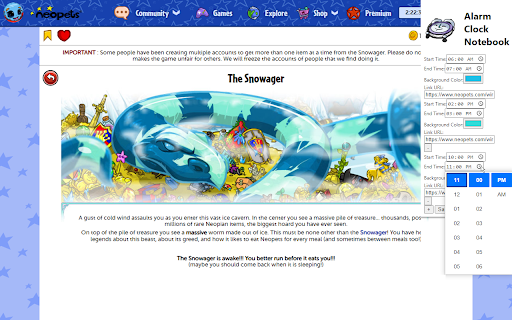
Customize the appearance and functionality of the Neopets clock. This is just a light chrome extension that allows you to create a little visual reminders and link to those. I use this for my worm missions, snowager, and other time specific events. This Chrome extension allows users to customize the appearance of the Neopets clock based on specific time intervals. Users can set the start time, end time, background color, and a clickable link for the clock. This feature-rich extension is designed to enhance the user experience on Neopets by providing a personalized interface. This extension is proudly designed and developed by GameDirection.net (https://gamedirection.net), an indie game studio and publishing company. GameDirection.net is committed to creating innovative solutions for game designers and gamers alike, with a portfolio that includes board games, role-playing systems, and digital game enhancements. After installation, you can customize the Neopets clock by following these steps: 1. Open the Extension: Click on the extension icon in the Chrome toolbar to open the settings popup. 2. Set Your Preferences: For each desired customization: - Specify the Start Time and End Time for when the customizations should apply. - Choose a Background Color using the color picker. - Enter a Link URL to make the clock clickable, directing to your specified URL. 3. Add or Remove Settings: Click the "+" button to add more custom settings or the "-" button to remove them. 4. Save Your Settings: Click the "Save" button to apply your customizations. Note: Ensure that your specified time intervals do not overlap, as the extension will prevent saving overlapping time settings to ensure consistent behavior. Enjoy a personalized Neopets experience with your customized clock! For support, suggestions, or contributions, please visit [GameDirection.net](https://gamedirection.net) or open an issue in this GitHub repository. Proudly designed by GameDirection.net – Enhancing your gaming experience.

Curtain - Simplify, Focus, Control.
A Chrome extension to streamline your productivity disabling medias you don't need on a webpage. Introducing Curtain: The Ultimate Content Control Extension In today’s digital world, controlling what you see online can enhance your productivity, focus, and even protect your well-being. Whether you’re looking to eliminate distractions, reduce eye strain, or simply have a more tailored browsing experience, Curtain is here to help. Hide Images, Videos, Icons, and Backgrounds: • With Curtain, you can easily toggle the visibility of images, videos, Icons, and even background images on any webpage. This helps in decluttering your view and focusing on the content that matters most to you. Greyscale Mode: • Enable the greyscale filter to turn all visual elements on a webpage into greyscale. This can reduce eye strain and help in creating a distraction-free environment. Easy Control Panel: • Curtain features an intuitive and sleek control panel that allows you to manage your settings effortlessly. Simply click the Curtain icon in your browser to access the panel and toggle your preferences. Persistent Settings: • Your settings are saved per website, so you don’t have to reconfigure them every time you visit. Curtain remembers your choices and applies them automatically. Minimalist Design: • The control panel is designed to be unobtrusive and easy to use, with a dark theme that blends seamlessly with any webpage. Safe: • Curtain runs fully locally. Curtain is designed to be user-friendly and efficient. From installation to daily use, every aspect of the extension aims to provide a seamless and empowering experience. Whether you’re a professional needing to eliminate distractions or someone looking to control their visual environment, Curtain adapts to your needs. Experience the web the way you want with Curtain – your personal content controller. Support the Development: If you find Curtain useful, consider supporting its development through the donation link in the control panel.

NeoHelper for Neopets
Solution kit to improve your experience playing Neopets (Only works with Neopets in english). Automate the way you play Neopets, so you can enjoy the fun stuff in this beautiful game, automatic purchases, non-competitive games played automatically, highlighting products of interest, a shop wizard, trading post and improved random events. 100% secure extension, we do not save any information from your account, we put at your disposal the best features that we will improve day by day, so that you can play comfortably and meet your goals. Features: NeoHelper base (free) * Quick shop wizard: Search for products without having to change pages (works with faeries quests). * Quick trading post: Search for products in trading post, without having to change pages, save a search history. * Pyramids autoplayer: Plays automatically to get the trophies (The gold trophy can take hours to a few days since it is random). * Wishlist loader: Load your jellyneo wishlist or item detail (or checklist) directly to NeoHelper to be able to highlight or buy automatically in restock (NeoHelper base plus). * Judhora and Illusen autoquest: Find the items you are asked for quickly and automatically. * Potato counter autoplayer: Automatically fill in the number of potatoes. * Petpet arena autoplayer: Will automatically train your petpet as long as you have battles available. * Itemdb quick price: Check the price in itemdb of one of your items. * Random Events history: Will list the random events that have appeared to you. * Negg cave resolver. * Shenkuu lunar temple resolver. * Igloo garage autobuyer: Automatically buys all the items on your wishlist that are available, and automatically updates if the page is active. * Rubbish Dump autotaker: Will automatically take all the items on your wishlist that are available, and automatically updates if the page is active. NeoHelper base plus ($35 USD a one-time payment) * All the features of base NeoHelper. * Restock autobuyer: Automatically buys all items on your wishlist (also works for black market goods) that are available in a store, and automatically updates if the page is active. * Abandoned attic autobuyer: Automatically buys all available items on your wishlist, and automatically updates if the page is active. * Auction autobiding: Automatically bid on the auction you have active on your page. * Koadoatery autofed: Will refresh the Koadoatery page until there are Kadoaties asking for food, then will quickly buy the food they ask for, there is a chance that they won't always be able to feed them first, but over time you will easily get the trophies (or the avatar if you want). * Sakmeth solitaire autoplayer: Plays automatically to get the trophies (The gold trophy can take hours to a few days as it is random). * Kiss the mortog autoplayer: Plays automatically to get the score you configure (This bot passes staff validation), we recommend not playing this game more than 4-5 hours a day with the bot active. * Double or nothing autoplayer: Plays automatically to get the score you configure (This bot passes staff validation), we recommend not playing this game more than 4-5 hours a day with the bot active. NeoHelper base plus + Telegram ($40 USD a one-time payment) * All the features of NeoHelper plus. * Telegram automatizations: * It will notify you with a telegram message when an item is purchased (very useful when you use automated purchasing in restock or garages). * You will be able to know the money movements of your store. * You will be able to know the latest random events. * Koadoatery fed. * Kiss the Mortog score achieved. * Double or nothing score achieved. * Petpet arena daily fights finished.

Weather Forecast
Type a country what you want This extension will show you the weather of the city that you want to know. So you can schedule you plan more suitable.

Smart Alarm Clock & Timer – Snooze, Sync & Themes
Set alarms & timers with snooze, repeat, and synced dark/light themes in popup and fullscreen. Meet Smart Alarm Clock & Timer — the fast, reliable way to manage alarms and timers in Chrome. Why it’s great • Snooze & Stop controls on alarms and timers • Popup ↔ Fullscreen sync so settings match in both views • Dark/Light themes with corner radius & color controls • Repeat timers & custom sounds (Test button included) • Lightweight and privacy friendly (no personal data collection) What you can do • Start a 10 minute timer with one click • Set a single or repeating alarm (with Snooze) • Switch themes instantly; tweak corner radius to your taste • Keep everything in sync between popup and fullscreen Privacy • Uses Chrome storage only to remember preferences. • No selling of data; no unrelated tracking; no external accounts. • Perfect for focus sprints, cooking timers, calendar reminders, and daily routines. • Updated manifest.json to remove the tabs permission. The extension no longer requests unnecessary permissions and only uses storage
