
jnhibbjmekoijdjaopflcjbjieamifhh
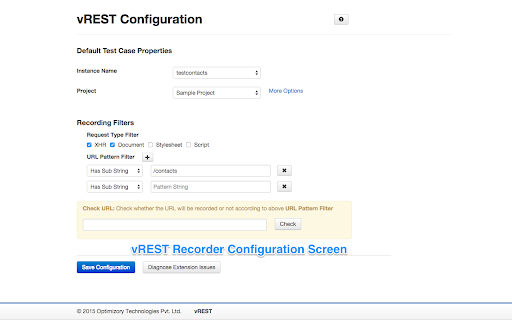

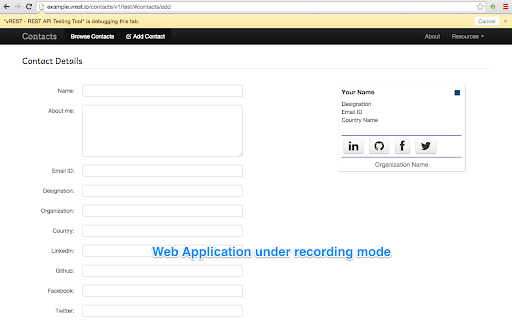

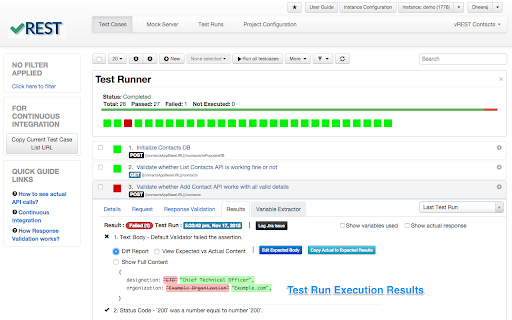
vREST is an automated REST API Testing Tool. This extension records HTTP requests and their responses in vREST application. This extension works as part of the hosted application vREST (https://vrest.io - An Online tool for Automated Testing, Mocking, Automated Recording of REST / RESTful / HTTP APIs). It is a very simple extension, which records the HTTP requests of web application under test and also records their parameters, headers, responses and it will automatically store them as test cases in vREST. It can be configured to filter out HTTP requests according to content type and URL pattern while recording. More info about vREST - A simple and intuitive tool to quickly validate your REST APIs. - Deliver zero defect web applications with very less effort in API testing. - Works in hosted mode (https://vrest.io) - No skilled resources required to validate your web application. - De-couple your frontend development with backend development with easy to use Mock Server - Ease of maintenance over a span of releases.

REST Client
Use Rest Client – your powerful REST API client tool for testing and debugging HTTP requests both online and locally in Chrome This is an effective tool to simplify your API development. It integrates directly into your browser, eliminating the need for external downloads or installations. This extension offers all the essential tools developers need to efficiently interact with restful services. 🔍 Our chrome extension offers significant advantages over standalone options. Unlike traditional rest api clients, which require separate installation and maintenance, our solution is always available right in your browser. No more switching between applications—just click our icon, and chrome transforms into a fully-featured api testing software in seconds! 🔹 Intuitive request builder for all HTTP methods 🔹 Powerful header management and authentication support 🔹 Response visualization These capabilities make our extension comparable to dedicated api software, eliminating the need for additional api testing tools. 🚀 Perfect for Quick API Testing Need to test api endpoints quickly? Our chrome extension provides the perfect balance of power and simplicity. It's instantly available whenever inspiration strikes, making it a reliable choice for day-to-day testing needs. Our app integrates seamlessly with your development workflow, offering distinct advantages: 🌈 Always available in your browser environment 🌈 Minimal resource usage compared to standalone applications 🌈 Consistent experience across operating systems 🌈 Quick access to testing api during development This integration is particularly valuable for developers who work across multiple machines or need to test handlers quickly. 👨💻 Suitable for All Experience Levels Whether you're new to API development or an experienced engineer, our solution offers functionality for everyone: 🚩 Beginners will appreciate the intuitive interface and helpful documentation 🚩 Intermediate and advanced users will benefit from the streamlined workflow Our Rest Client for chrome browser maintains accessibility while growing with your expertise. 🔒 Focus on Security and Privacy Built with security in mind, our Rest Client is perfect for professional environments where data protection is paramount: 🔐 Local storage of sensitive data with encryption options 🔐 No server-side processing of your data 📈 Continuous Improvements Our rest api client for chrome browser benefits from regular enhancements, ensuring it remains competitive: 🌟 Performance optimizations for speed and reliability 🌟 Bug fixes and stability improvements 🌟 UI refinements for better usability 🚀 Get Started Today Getting started with our browser-based online REST tool is easy.. Install our chrome extension from the Chrome Web Store and begin exploring its capabilities: 🌠 Create your first request in seconds 🌠 Configure environments for different testing scenarios 🌠 Save and organize your requests Join many developers who have discovered that a powerful rest client application can exist right within your browser! 🧠 The Smart Alternative Our Rest Client represents the evolution of api tools, bringing the power of dedicated applications directly into your browser. Build better endpoints more efficiently than ever before, without sacrificing functionality. - 🚀 Postman: The Postman download process can be lengthy, and it requires separate installation, consuming more resources. In contrast, our chrome rest api client is instantly accessible, right within your browser. While there is the postman online service that offers an online version, it doesn't provide the full functionality of the desktop app. - 🌙 Insomnia: As a standalone application, insomnia rest client has a steeper learning curve compared to our integrated rest client in chrome, which is designed for ease of use. - 🆕 Bruno and 🔧 Advanced rest client (ARC): These options offers more complex features, like scripting capabilities, but they also requires installation. Many developers use a range of API testing solutions, such as our Chrome extension, Postman, Insomnia, and Bruno rest clients. However, for quick and efficient development our extension is increasingly becoming the preferred choice among developers.

RestMan
RESTMan is a browser extension to work on http requests. RESTMan is an extension to work on REST APIs over http and https. Click on the RESTMan Icon that displays on your taskbar. Type the url in the main input field and choose the method to use: GET/POST/PUT/DELETE/PATCH. Click on the arrow "Send" or press Ctrl+Enter. You'll see info about the response (time, size, type) and you'll be able to see the content response in the response section. New - #42 Migrate extension to Manifest V3. New: - #25 Share request. - #24 Add OPTIONS to the list of http methods. Fixes: - #11 Different color for every HTTP method. - #18 Extension no longer uses resources when it's not being used. New: - New dark theme! Based on material design colors. - Side by side layout for Body and Response panels. - Options popup page to save theme and layout for future sessions. - Improved history dropdown. Adding ability to move through options with up/down keys, better mouse click handling, options get scrolled into view when out of scroll, pressing enter to select option. - More url space. - Improved "running" indicator. Fixes: - Fixed replacement of line endings in request editor. - Added error message for failed requests. New: - Improved history dialog. It now popus from the url bar, it filters entries based on what's been typed. - New HTML preview for responses. It will render the response as an html. Due to security issues, some scripts, images and other resources might be blocked. - Added extension version in main windows. - Major UI overhaul. - Extension won't duplicate entries in history. - Adding clear all button to headers and form body sections. - Ctrl+Enter sends request. - Pressing enter on url textbox sends request. - Several small fixes. - GET, POST, PUT, PATCH, DELETE requests. - Custom request headers. - Raw and Form data body. - View highlighted response. - View response headers.

API Tester
Rest API Tester is an easy api testing tool. Streamline your software development and test api online with this Chrome extension. API testing is essential in software development, ensuring interfaces work correctly and provide accurate data. With the rising complexity of modern applications, a reliable tool for validating endpoints is crucial. This api tester streamlines the process, enabling developers and qa engineers to efficiently identify and resolve issues, facilitating seamless integration among systems. Our instrument serves as a comprehensive solution for your needs, whether you are validating or debugging endpoints. The importance of api in software testing cannot be overstated; it enhances workflow efficiency and simplifies the entire process, making it an essential asset for ensuring quality assurance across your projects. 🚀 With this extension, you can test api online without the need for complex setups or additional software. It’s built to help you conduct api tests quickly and accurately, ensuring your applications run smoothly and deliver exceptional performance. Additionally, you can test api endpoint configurations to ensure they function as intended. Why Should You Consider This Option? 1️⃣ Ease of Use: Designed with a user-friendly interface, it’s easy for both beginners and experts to work with endpoints effortlessly. 2️⃣ No Installation Required: As a chrome extension, it’s lightweight and accessible directly from your browser. 3️⃣ Versatility: From verifying web services to making request validations, this tool supports a wide range of methods, including GET, POST, PUT, DELETE, and more. 4️⃣ Real-Time Results: Get instant feedback on your tests with detailed responses, status codes, and headers. 5️⃣ Cost-Effective: Unlike many tools for api testing, this api tester online is free to use, saving you time and money. Who Can Benefit? This instrument is ideal for: 🔺 Developers who need to test rest api during the development process. 🔺 QA engineers looking for reliable api testing tools to ensure software quality. 🔺 Students and learners exploring concepts of endpoint verification. 🔺 Freelancers and professionals who require a quick and efficient test tool for their projects. Advantages of Using This Rest Client ➤ Efficiency: Save time with a solution that simplifies qa procedures and delivers instant results. ➤ Accuracy: Ensure your endpoints are error-free with detailed response analysis. ➤ Accessibility: As an online api tester, it’s always within reach. ➤ Scalability: Whether you’re verifying a single endpoint or multiple services, it scales with your needs. How to Get Started 1. Install the chrome extension from the web store. 2. Open the tool and enter the url you want to verify. 3. Choose the request method (GET, POST, PUT, DELETE, etc.). 4. Add headers, parameters, or body content as needed. 5. Click Send and analyze the response in real-time. What Makes This Application a Preferred Choice This api tester is more than just a solution - it’s a comprehensive resource for all your needs in software development. Unlike other solutions, it combines simplicity, power, and accessibility into one seamless experience. Whether you’re a seasoned developer or a beginner, it helps you be confident in the quality of your product. Use Cases 🔸 Debugging and validating web service workflows. 🔸 Performing http test requests to ensure the reliability of web services. 🔸 Checking endpoints during software development. 🔸 Learning and experimenting with qa concepts related to web services. 💬 Frequently Asked Questions (FAQ) ❓ What is an api tester, and why do I need it? 💡 An api tester is a solution that helps developers and qa engineers evaluate endpoints to ensure they function correctly. This instrument simplifies the process by allowing you to check rest api without complex setups. ❓ Can I use it for rest api testing? 💡 Yes! It’s designed to handle it, allowing you to send requests (GET, POST, PUT, DELETE) and validate responses effortlessly. ❓ Is it free to use? 💡 Absolutely! Unlike many others, this api tester is free to use, saving you time and money. ❓ How do I verify endpoints using this application? 💡 Simply install the Chrome extension, enter the url, choose the request method, add parameters if needed, and click Send. You’ll receive real-time results instantly. ❓ Is it suitable for beginners? 💡 Definitely! With its user-friendly interface, this application is perfect for both beginners and experts looking to test software efficiently. Conclusion Our api tester is the ultimate solution for anyone looking to streamline their api testing online process. With its intuitive design, powerful features, and accessibility as an online api checker, it’s the perfect companion for developers, qa engineers, and tech enthusiasts focused on testing api functionality. Try it today and experience the future of software solutions! 🌟

Test API
Use Test API for restful api testing. This postman alternative test rest api online and use post request online to test API endpoint This powerful API Testing Online solution eliminates the need for external applications when working with endpoints efficiently. 🚀 The Test API Chrome extension provides a comprehensive tool directly in your browser. Whether you are experienced or learning how to test api requests properly, this extension serves as your ultimate HTTP caller companion. The interface makes it simple to perform any endpoint call, from basic GET requests online to API Test Online operations and complex RESTful scenarios. 🔧 Key features that make this the ultimate API Tester Tool: 1️⃣ Instant api endpoint test functionality without leaving your browser 2️⃣ Complete HTTP request online capabilities for all major HTTP methods 3️⃣ Advanced options with custom headers and parameters 4️⃣ Real-time response visualization for effective Online API Test work The extension excels at handling various request types, making it perfect for validating service endpoints across different scenarios. You can easily execute a Test get request, perform a Post request for online operations, or handle any web request with ease. The intuitive design streamlines your development workflow significantly. 🎯 Advanced API Test Online capabilities include: ➤ Custom header configuration for authenticated endpoint scenarios ➤ JSON, XML, and form data support for comprehensive test post request operations ➤ Response time monitoring for test rest api online workflow Understanding the restful api testing properly becomes effortless with our comprehensive environment. The extension provides detailed response information, including status codes, headers, and formatted response bodies for thorough analysis. The user-friendly design ensures that even complex RESTful API endpoint scenarios remain manageable and straightforward. Whether you're debugging a single test REST API or managing multiple workflows, the interface adapts perfectly to your needs. 💡 🔒 Security-conscious developers appreciate the local processing approach - all your data remains within your browser environment. This Rest API Test Online Tool never transmits sensitive information to external servers, making it ideal for validating internal services and sensitive endpoints. 📋 Professional workflow benefits include: ♦️ Streamlined development cycles with instant test api endpoint ♦️ Reduced context switching between multiple tools and applications ♦️ Enhanced productivity through integrated capabilities ♦️ Simplified service documentation and endpoint validation processes 🌍 Common use cases where this solution excels: 🌐 Quick endpoint debugging during development cycles 🌐 Educational purposes for learning how to build HTTP request fundamentals 🌐 Integration for third-party services, including http post test scenarios 🌐 Rapid prototyping and service exploration workflows 🌐 Quality assurance test post requests for production endpoints This postman alternative supports all standard HTTP methods essential for modern Online service validation practices. From simple GET operations to complex PATCH requests, every test HTTP request type is fully supported with detailed response analysis and comprehensive error handling. The extension handles authentication seamlessly, supporting various methods from basic auth to complex OAuth flows. This makes it excellent for testing protected endpoints, where proper authentication is crucial for successful operations. Bearer tokens, API keys, and custom authentication schemes are all fully supported. ❓ Frequently Asked Questions: 📌 How do I start using this Tool? 💡 Install the extension, click the icon, and start creating your first HTTP call. The intuitive interface guides you through the process step by step. 📌 Can I test APIs that require authentication? 💡 Yes! Supports API keys, OAuth, Bearer tokens, and custom headers for various authentication methods and scenarios. 📌 Is my data secure using this Test API Online tool? 💡 All the data is processed locally in your browser for maximum privacy. No data is transmitted to external servers. 📌 Does it work with different endpoint types? 💡 Absolutely! Works seamlessly with REST, GraphQL endpoints, SOAP services, and any HTTP-based interface. 📌 Is there a limit to request size or frequency? 💡 No artificial limits are imposed. You can build large payloads and make multiple requests as needed for comprehensive HTTP validation. Regular updates ensure compatibility with the latest web standards and WEB technologies, making this tool a reliable solution for all your needs. Join thousands of developers who trust this extension for daily work with Post request online, workflows, and streamlined development processes! ⚡
