
jngcmealjfkehmpoicpcgdomdnolkfeb
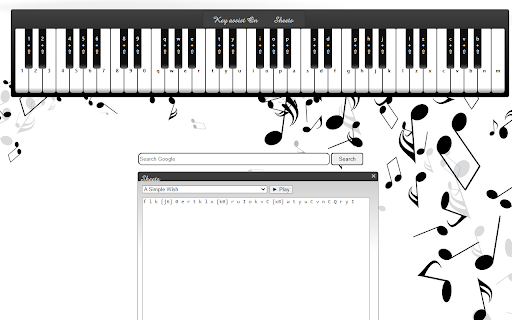
New tab with piano music. Play music based on the user's typing Let play piano everytime you searching. you write your search, you write you melody. Feature: Play piano for each key press. Play piano with example sheet Enjoin! If you get any error. Please let me know via email: linhnn.developer@gmail.com

ZumaPiano: AI Piano Transcription & Lessons
ZumaPiano uses AI to transcribe any piano audio on the internet into an interactive waterfall-style lesson. Whether the music is from YouTube, a website playing piano audio, your own recordings, or a MIDI upload, ZumaPiano transcribes it and converts it into notes you can slow down, loop, and practice with left or right hand separately. - Transcribes piano audio from YouTube into practice-ready waterfall lessons - Records and transcribes piano from any website that can play audio, not just YouTube - Upload MIDI files for instant, accurate transcription into a visual lesson - Waterfall note display for intuitive visual learning - Slow down or speed up the transcription playback - Loop challenging parts for focused repetition - Practice left hand, right hand, or both hands together - Toggle note names on or off depending on your learning preference - Control playback using voice commands (Play, Pause, Faster, Slower, Back, Forward) - Save unlimited songs in your personal library with Premium - Edit song titles, images, and information - Group songs into playlists for structured practice - Multi-language interface for learners worldwide ZumaPiano transcribes piano audio from: - YouTube - Spotify (clean piano tracks) - SoundCloud piano covers - Piano tutorial websites - Blogs and pages with embedded piano audio - Private teaching portals and shared video files - Any webpage capable of playing a piano recording WHO IT IS FOR - Beginners learning their first piano songs - Intermediate players needing slower, clear practice tools - Advanced musicians drilling complex passages - Teachers creating custom lessons for students - Anyone who wants to learn piano songs not available as sheet music or tutorials From any website: 1) Play a piano piece on the webpage. 2) Open the ZumaPiano extension and press Record. 3) After AI transcription, open the generated lesson and practice using waterfalls, tempo control, and looping. From a MIDI file: 1) Open ZumaPiano and select Upload MIDI. 2) Choose your MIDI file. 3) The transcription appears instantly with full practice controls. Free mode includes two songs in your library and core practice tools. Premium unlocks unlimited songs, playlists, advanced features, and priority transcription. Does ZumaPiano only work with YouTube? No. ZumaPiano can transcribe piano audio from any website. Is it suitable for beginners? Yes. Waterfall notes, tempo adjustment, and looping make it ideal for new learners. Does it work on mobile? The Chrome extension works on desktop (Windows, Mac, Linux, ChromeOS). Mobile support is planned. PRIVACY AND SECURITY No login required. ZumaPiano processes only the audio or files you choose. It does not access browsing history or personal data. Install ZumaPiano to transcribe and learn any piano song from anywhere on the internet.

A New Tab, A New Song
This extension uses the Spotify API to recommend a new song from your favourite artist everytime you open a new tab Enjoy a new wallpaper on every Chrome new tab based on a random song cover image of the artist/band of your choice. You can choose any artist found on Spotify by clicking on the button in the top-left corner. If you click on the cover image of the song it will redirect you to Spotify to listen to it.

Piano Prime
An easy-to-use and lite piano app for your browser! Piano Prime is a fun, and very simple piano extension for your browser. This addon is a lite and very easy-to-use app for playing or learning Piano. You can play your favorite song with the built-in keyboard, or mouse. There is also an option to record desired song(s) and replay it at any time. In total, there are 52 keyboard keys but only 20 of them are visible when you install the App for the first time. This number can be changed from the options page. A setting is available to hide the built-in keyboard (top section). Moreover, the sustain-control option makes bits last a bit longer (for a more professional playing). Few features: 1. The App and all the settings are auto-saved to the memory. 2. You can play piano with the keyboard, mouse, or the built-in keyboard at the top. 3. Number of visible keys is adjustable to your desired choice (default is 27). 4. You can hide the keyboard from the options page. 5. There is also a sustain control key to match sounds to your need (default is off). 6. You can record or replay any song(s) from the sidebar settings panel. Note: to report bugs, please fill the bug report form on the addon's homepage (https://mybrowseraddon.com/piano.html).

Coffee Piano
A virtual piano application with MIDI support and chord progression generator. Coffee Piano - Your Portable Piano Practice Partner Experience the art of piano in a uniquely interactive, café-inspired environment with Coffee Piano. Whether you're a beginner or an advanced player, Coffee Piano provides an intuitive and inspiring platform to learn, practice, and compose beautiful music. Realistic Piano Sounds with Touch Sensitivity: Experience authentic grand piano and Rhodes sounds, enhanced with touch-sensitive keys and sustain pedal support for a more immersive and expressive play. Unlimited Chord Progression Generation: Generate unlimited chord progressions, from simple triads to complex 7th and extended chords, including popular combinations and cadences. Advanced Chord Progression Generator: Effortlessly arrange chords with drag-and-drop functionality. Visualize your progressions with detailed mini piano diagrams for each progression, making it especially helpful for beginners. Comprehensive Chord & Scale Library: Explore an extensive library of chords and scales, including inversions, with interactive visuals on the piano to support your musical journey. Recording, Playback & Download: Capture your practice sessions for review, and save your chord progressions in text format, perfect for sharing or later reference. 12 Customizable Accompaniment Rhythms: Enhance your practice with rhythms across genres like jazz, lo-fi, rock, and electronic, designed to complement your style and boost creativity. Scale Degree Visualization: Visualize scale degrees in the chosen key across all levels of chord progressions to enhance your understanding of music theory. Customizable Background Colors: Create a cozy practice atmosphere by customizing your Coffee Piano background with colors that suit your vibe. Choice of Key and Number of Bars for Chord Progression: Select the key and the number of bars to tailor your chord progressions to your preferences. Drag-and-Drop Functionality: Easily rearrange your chord progressions with intuitive drag-and-drop features. Access to a Full Chord Library: Browse through a complete range of chords, from basic to extended, with inversions available for a richer musical palette. Visualization of Complete Range of Scales: Explore and visualize various scales on the piano to support your composition and improvisation efforts. Mini Piano Diagrams for Progressions: Utilize mini piano diagrams to understand chord positions and progressions better. Copy Feature for Quick Saving or Sharing: Quickly copy your generated progressions for easy saving or sharing with others. Customizable Themes: Tailor your piano theme to match your personal style and preferences. Designed for All Levels: Coffee Piano is suitable for beginners and experienced musicians alike, providing tools to foster creativity and exploration. Whether you're practicing, composing, or simply unwinding with music, Coffee Piano is designed to be your personal, portable music studio, fostering creativity and exploration in your musical journey.
