
jnegkegcgpgfomoolnjjkmkippoellod
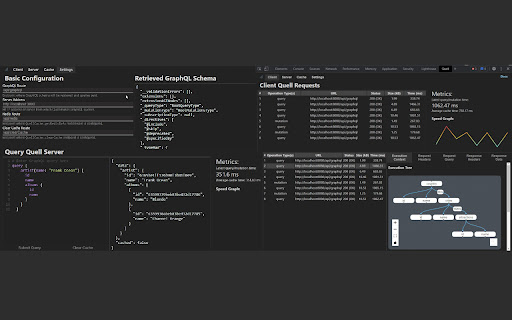
Developer tool for the Quell JavaScript library: https://quell.dev Quell is an open source, lightweight JavaScript library providing a client- and server-side caching solution and cache invalidation for GraphQL. The Quell Developer Tool is designed to enable developers to easily monitor Quell's client- and server-side caching performance, as well as inspect the server-side (Redis-based) cache, and it includes an all-purpose GraphQL network monitor.

Web Component DevTools
Developer tooling for Web Components and Web Component Libraries Developer tooling for Web Components and Web Component Libraries Web Component DevTools is aimed at all developers working with Web Components. The tooling provided creates a new Chrome Devtools panel, which allows a quick look at the custom elements on the current page, and enables modification of attributes and properties of said components. Web Component DevTools utilizes the Custom Elements Manifest (https://github.com/webcomponents/custom-elements-manifest) to analyze the Web Components. Web Component DevTools provides advanced features to the developer, straight from the browser's UI to, for example: - Listing custom elements on the page, and accessible iframes inside the page - Filtering custom elements on the list - Inspecting and modifying the attributes of custom elements - Inspecting and modifying the properties (even objects and arrays) of custom elements - Observing dispatched events - Calling functions of the custom element, and logging the return values - View the source code of web components on page - Interact directly with web components through the console In the process of developing Web Components, wether it be with a library like Lit, or without any kind of library, there comes situtations in which you might want to have a bit more control over your components than what the regular browser devtools gives you. You might for example want to: Toggle the Attributes of the element Toggle the Properties of the element Monitor when events get dispatched from the element Call functions And when you're working with Web Components, Shadow DOM usually is present, making it fairly difficult to find the path to the element. And even if you got the path, having to write document.querySelector("my-selector-string > element-name").setAttribute("my-attr", "foo") every time you want to modify a value is quite cumbersome. For this use case the Web Components DevTools were created: To enable the developer to easily modify the attributes, properties and therefore state of their element straight from the devtools window with the click of a button. Any issues you run into while using the DevTools should be submitted to the GitHub Repository (https://github.com/Matsuuu/web-component-devtools/issues).

Preact Developer Tools
Adds debugging tools for Preact to Chrome Debugging tools for Preact. This extension allows you to inspect the component hierarchy and change properties on the fly.

Web Developer Tool for Chrome
Web developer toolbox for your browser. 1. Install and pin📌 the extension to Chrome. 2. Get help which is only a click away whenever you need it. 3. Use this flexible, customizable add-on to keep creating wonderful projects. 🧑💻 1. Edit CSS function. 2. Responsive Layouts and Window Resize options. 3. Provides bug report and fix bugs. 🐞 4. Works on Chrome, Firefox, and Opera. 5. Other features include: Clear Session Cookies, Display mage File Sizes, Display Topographic Information. A toolkit for web developers 🧑💻 to not make them do less necessary work and keep their focus on only great things.

IT Tools
Handy online tools for developers! IT-Tools: The Ultimate Multi-Functional Swiss Army Knife for Top Developers – Privacy & Security Guaranteed! In the world of development, every efficient developer needs a set of reliable tools. IT-Tools integrates 80+ powerful and practical utilities, covering coding, debugging, data processing, network testing, and security encryption. It provides an all-in-one solution for daily development tasks. Most importantly, we prioritize data privacy, ensuring a worry-free experience! 🚀 Key Features 🔹 Web Development: URL parser, HTML entity encoder/decoder, Markdown editor, JWT decoder, JSON difference checker, and more to boost both frontend and backend efficiency. 🔹 Network Tools: IP address lookup, MAC address query, IPv4 subnet calculator—ideal for sysadmins and network engineers. 🔹 Development Utilities: Git cheat sheet, Crontab generator, JSON/SQL formatter—streamline your workflow. 🔹 Security & Encryption: RSA key pair generator, hash encryption, Bcrypt, HMAC generator—keeping your data secure. 🔹 Data Conversion: JSON ↔ YAML ↔ TOML conversion, Base64 encoding/decoding, case converter, numeral system converter—making data manipulation seamless. 🔒 Privacy & Security Protection ✅ Local Execution: All operations run entirely within your browser, with no data uploaded to any server, ensuring 100% privacy protection. ✅ No Data Storage: We do not store or track any user input, eliminating any risk of data leaks. ✅ Open-Source & Transparent: Our code is publicly available, allowing developers to verify its security at any time. ✅ No Ads, No Tracking: We focus on delivering pure functionality without any ads, trackers, or unnecessary distractions. Whether you’re a developer, system administrator, data analyst, or cybersecurity expert, IT-Tools is the secret weapon for boosting your productivity! 🔥 Try it now and make your development work faster, smarter, and more secure!
