
jmmenfejglicbebkdmdmihfjamnmhelp
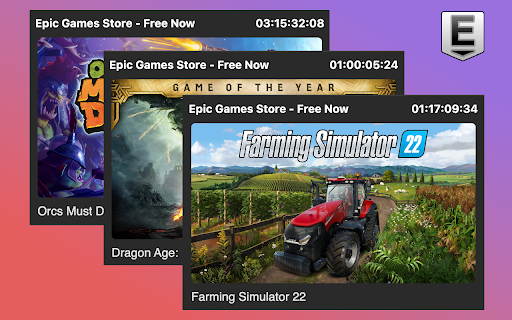


Reminds you to claim the daily or weekly free games from Epic Games Store. === Features === - Clicking the extension displays the current free games available - Automatically notifies you when new games are released via Chrome Notifications - Clicking on the notification will create new tabs of the new free games' store pages - This extension will have a green badge with the word "FREE" when new free games are available === For a better experience === - Pin this extension to easily see the green badge reminder === How it works === This extension calls the official free games listing API from Epic Games Store at "https://store-site-backend-static-ipv4.ak.epicgames.com/freeGamesPromotions". It returns JSON data with current and future free games information such as the store URL, images and titles. === Privacy === Your data is not collected. === Update log === v1.0.10 Free add-ons are now linked directly to the add-on URLs instead of the base games v1.0.9 Fixed game thumbnails not displaying correctly v1.0.8 Fixed promotion start and end date issues (hopefully) v1.0.7 Fixed free games promotion end date display issue v1.0.6 Fixed API parsing issue v1.0.5 Fixed bundles not showing up as free games v1.0.4 Fixed correctly showing badge text if the user restarts browser without clicking on this extension v1.0.3 Changed game images to lower quality and resolution to reduce load times v1.0.2 Fixed showing a game that's discounted but not free v1.0.1 Added missing icon v1.0.0 Initial release

Unblocked Games — New Tab
Unblocked Games in your favorite browser. Play, explore, relax! Unblocked Games extension will change your new tab page to a powerful and functional game catalog that you can customize. It has tons of games available, weather widget, quick links, bookmarks, relaxing music and much more! Please read carefully: By clicking "add to Chrome", I accept and agree to installing the Unblocked Games — New Tab extension and setting Chrome New Tab to that provided by the service, the Privacy Policy https://gamestabs.com/privacy/ and Terms of Use https://gamestabs.com/terms/ You can uninstall app any time if you don't like it. Settings: - choose one of 15 beautiful cursors; - set any “.png“ or “.jpg“ image as your wallpaper; - you can turn widgets on and off; - select any games for your new tab page; - change measurement units and time format; - colored wallpapers; - night mode (dark theme); - edit your quick links.

Epic Games Library Viewer
View a list of your purchased Epic Games games with search option. Description: Epic Games Library Viewer is a powerful Chrome extension that allows you to easily browse and search your Epic Games library directly from your browser. No need to navigate through multiple Epic Games Store pages to find your purchased games - our extension provides instant access to your entire collection in a clean, user-friendly interface. Key Features: Complete Library Access: View all your purchased Epic Games in one place Powerful Search: Quickly find any game in your collection with real-time search Multiple View Options: Toggle between grid and list views to browse your library Sorting Options: Sort your games by purchase date or alphabetically Game Details: See game covers and publisher information at a glance Direct Links: Open any game's store page with a single click Refresh Functionality: Keep your library up-to-date with the refresh button Responsive Design: Works perfectly on any screen size How It Works: After installation, the extension connects securely to your Epic Games account and retrieves a list of all your purchased games. The extension runs locally in your browser, providing a fast and responsive experience without affecting your Epic Games account's security. Who Is This For? Epic Games users with large game libraries Gamers who frequently purchase games during Epic's free game promotions Anyone who wants faster access to their Epic Games collection Privacy and Permissions: This extension only requires minimal permissions to function: Access to Epic Games websites to fetch your library data Local storage to save your preferences and cached game information Active tab permissions to interact with Epic Games web pages Your game library data is stored locally on your device and is never shared with third parties. Installation: Click "Add to Chrome" Open the extension when logged into your Epic Games account Your game library will be automatically displayed Use the search, sort, and view options to customize your experience Enhance your Epic Games experience with this must-have extension for any Epic Games Store user!

Games
An excellent addition to the built-in browser Dinosaur Game (aka Chrome Dino). Always at your fingertips. They'll entertain you, but won't take up a lot of your time. No Internet connection required. No need to wait for loading. Just launch and play. There are both immortal classics and more modern games of various genres: arcades, puzzles, platformers, shooters, card games, etc. This extension is available free of charge, provided that it is periodically activated using a key, which you can always get (free of charge) on our website. You can also purchase a premium subscription.

Fortnite Unblocked
Fortnite, developed by Epic Games, stands as an iconic and revolutionary online multiplayer battle royale game that has taken the gaming world by storm. Set in a vibrant and ever-evolving virtual world, Fortnite plunges players into an action-packed environment where survival skills, strategy, and creativity blend seamlessly. Upon entering the game, players find themselves on a visually stunning island, where up to 100 participants engage in a last-person-standing battle. The game's premise revolves around gathering resources, building structures, and eliminating opponents, all while navigating a constantly shrinking play zone. The heart of Fortnite lies in its versatility and engaging gameplay modes. The main mode, "Battle Royale," challenges players to scavenge for weapons, materials, and power-ups scattered across the island. As the match progresses, the tension builds, pushing players closer together in intense firefights until only one remains victorious. What sets Fortnite apart is its innovative building mechanic, allowing players to construct various structures—ramps, walls, forts—on the fly using gathered materials. This element adds a unique strategic layer, offering defensive advantages, vantage points, and creative avenues for gameplay. The game's vibrant graphics and distinctive art style, characterized by quirky characters and vivid landscapes, create an immersive experience that appeals to players of all ages. The constantly evolving map, updated regularly with new areas and challenges, keeps the gameplay fresh and exciting. Fortnite's social aspect is another highlight, encouraging teamwork and communication among players. Whether teaming up with friends or connecting with others through cross-platform play, collaboration and coordination are essential for achieving victory. With its engaging gameplay, constant updates, and a vibrant community, Fortnite continues to captivate gamers globally, solidifying its place as a pioneering force in the gaming industry.
