
jmdmoiflcdfmpemlhjdlfomobdcdmfai
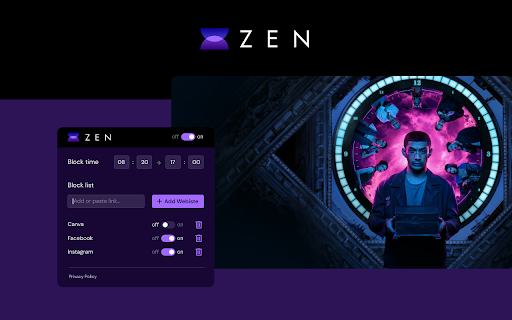
"Zen - Focus on Work & Block Distractions" 🌟 offers a unique opportunity for effective time management during work or study. 📚 It provides a distraction-free environment, allowing users to fully concentrate on their goals. 🎯 The extension allows blocking access to selected websites for a specified time to prevent unnecessary time waste. ⏳ Notably, it already includes a default list of the most popular websites, but users have the option to add any URLs they wish to block. 🚫🌐 The timer feature enables users to set a time interval during which the extension automatically activates and deactivates, adapting to their work schedule. ⏰ Additionally, the keyword option allows blocking all websites containing a specific word or phrase, providing an extra tool for content access control. 🔑🔒 "Zen" is an invaluable tool for those who want to maximize productivity and focus on essential tasks by eliminating unnecessary distractions. 💪💡 With this extension, everyone can create optimal working or learning conditions, enhancing efficiency and achieving their goals. 🎉🏆 ❗**Disclaimer: All product and company names are trademarks or registered trademarks of their respective owners. This extension is not affiliated with or endorsed by them or any third-party companies

StayFocusd – Website Blocker & Focus Timer & Shorts Blocker
Boost your productivity by limiting the amount of time you spend on time-wasting websites. You sit down at the computer, and you swear you'll be productive. Next thing you know, it's twelve hours later. You've checked your email, updated your Facebook status, blown through 200 pages of Reddit, read every article in your Twitter feed, looked up your favorite band on Wikipedia, vanity googled yourself, cyber-stalked your ex, browsed through all your high-school crushes' Instagram feeds, and lost a week's pay playing online poker. What you haven't done is WORK. StayFocusd, by Sensor Tower, is a productivity extension for Google Chrome that helps you stay focused on work by restricting the amount of time you can spend on time-wasting websites. It provides analytics to help you understand and control your internet usage, ensuring you remain productive throughout the day. 📊 Website usage history: Get statistics of your daily website usage history. 🚫 Configurable blocking: Block entire sites, specific subdomains, specific paths, specific pages, or even in-page content (videos, images, forms, etc). ☢️ The Nuclear Option: This powerful feature allows you to block access to websites for the number of hours you specify on the days you choose. Once activated, it cannot be canceled, ensuring you remain focused and productive. 📱Require Challenge: To change any settings, you must complete a challenging task. This reduces the temptation to alter settings, helping you stick to your productivity goals. 🗓️ Active Days/Hours: Customize the days and hours during which StayFocusd will restrict your access to distracting websites. This ensures that your productivity is maintained during critical work periods. ▶️ In App Blocking: Block all distracting components on YouTube and other major social media platforms. Hide shorts, comments, recommended videos, and more. 🤖 Gen AI Analytics: Track and analyze your usage of AI chat platforms directly from the StayFocusd. 🔒 Privacy protection: StayFocusd does not collect personal data from the web pages you visit. 🔗 Sync Usage Limits across devices: Connect Android devices and other browsers to view website and mobile app usage and limits in one place. ✦ YOU ARE IMPORTANT We value your feedback! Please rate us 5 stars on the Chrome Web Store to help us grow. Problems? Questions? Suggestions? Effusive praise? Email support@stayfocusd.com PRIVACY NOTICE: When you install StayFocusd, it will ask you to grant a number of permissions, including “Read and change all your data on the websites you visit.” This permission is required in order for StayFocusd to run on any site which you may visit—without this permission, StayFocusd would not be able to block websites. While this permission technically grants StayFocusd the ability to read and change data, we will never collect personal data from the web page content that you are browsing.

Focus Mode Pro - Block Distractions | Zovo
Block distracting websites and boost productivity with focus timers. Built-in Pomodoro timer. Whitelist your work sites. Struggling to stay focused while browsing? Between social media, news feeds, and endless tabs, your most productive hours slip away. Focus Mode puts you back in control -- block distractions instantly and build better browsing habits. - Smart Website Blocking -- Add distracting sites to your blocklist with one click, or toggle pre-built lists for Social Media, News, Entertainment, Gaming, and Shopping. During a focus session, blocked sites show a motivational page with an inspirational quote instead. - Pomodoro Focus Timer -- Start a Quick Focus session right from the toolbar. Work in focused intervals with automatic short and long break reminders. Track your remaining time on the blocked page so you always know when your next break is coming. - Nuclear Mode -- Lock your blocklist for a set duration. Once activated, blocking cannot be turned off until the timer expires. No exceptions, no override. Use keyboard shortcut Alt+Shift+N to activate instantly. - Blocking Schedule -- Set recurring schedules to automatically block sites on specific days and times. Define your start time, end time, and active days -- Focus Mode handles the rest without you thinking about it. - Focus Score & Streaks -- Track your daily Focus Score, day streaks, focus time, blocked attempts, and top distractions. See exactly which sites tempt you most and watch your habits improve over time. - Ambient Sound -- Play calming background audio during focus sessions to help you concentrate. Choose your sound type and adjust the volume to match your environment. - Notification Muting -- Suppress browser notifications during focus sessions so nothing breaks your flow. - Quick Toggle -- Start or stop Focus Mode with one click from the popup, or use the keyboard shortcut Alt+Shift+F. No complicated setup required. 1. Install Focus Mode -- it's ready to use in seconds with zero configuration 2. Add distracting websites to your blocklist or enable pre-built lists (Social Media, News, Entertainment, Gaming, Shopping) 3. Hit Quick Focus to start a Pomodoro session, or set a recurring schedule for hands-free blocking 4. Blocked sites show an inspirational quote and your session stats -- hit "Return to Work" to get back on track 5. Check your Focus Score, streaks, and top distractions in the Stats tab WHO IT'S FOR Perfect for students studying for exams, remote workers fighting tab overload, freelancers billing by the hour, developers in deep work, and anyone who wants to reclaim their attention from the internet. Focus Mode works entirely on your device. All data stays local -- your browsing activity, blocklists, and productivity stats never leave your browser. No accounts required, no tracking, no data collection. The extension uses declarativeNetRequest to redirect blocked sites and storage to save your settings. That's it. Install Focus Mode now -- your focused self will thank you.

Tomato Timeout - ADHD Focus Timer + Site Blocking™
Boost focus with Pomodoro focus timer & block distracting websites during work. Unblock during breaks. Customizable Tomato Timeout – Pomodoro Timer & Website Blocker for Chrome Tomato Timeout is a powerful Pomodoro timer Chrome extension and website blocker designed to help you stay focused, avoid distractions, and get more work done. If social media, news, or entertainment websites constantly interrupt your work, Tomato Timeout helps you stay disciplined by blocking distracting websites while you work and allowing them again during breaks. Perfect for students, developers, remote workers, and anyone who wants to improve focus and productivity. Pomodoro Timer for Deep Focus Tomato Timeout uses the proven Pomodoro Technique — a productivity method that breaks work into focused intervals followed by short breaks. This structure helps you maintain concentration while avoiding burnout. You can fully customize work and break durations to fit your personal workflow. Website Blocker for Distraction-Free Work During work sessions, these websites are automatically blocked, helping you stay focused on important tasks. When your break begins, the websites are automatically unblocked, so you can relax and browse freely. Enable Strict Mode when you need maximum discipline. Strict Mode prevents you from: • Pausing the timer during a work session • Editing the block list while a session is active This removes the temptation to bypass the blocker and keeps your focus intact. Instead of blocking certain sites, you can enable Whitelist Mode. This is perfect for deep work, studying, and exam preparation. Customizable Pomodoro Timer Adjust work sessions, short breaks, and long breaks. Notifications & Alerts Get visual and sound alerts when sessions start or end. Simple & Lightweight Clean interface designed for fast setup and daily use. Perfect For • Students studying online • Developers and programmers • Remote workers • Writers and researchers • Anyone trying to avoid digital distractions ✔ Improve focus and concentration ✔ Block distracting websites automatically ✔ Build productive work habits ✔ Use Pomodoro sessions to manage time effectively ✔ Stay disciplined with Strict Mode ✔ Enable Whitelist Mode for maximum focus Take control of your time and eliminate distractions. Install Tomato Timeout – Pomodoro Timer & Website Blocker today and start focusing on what matters most.

Intentional - Block Distracting Websites
Block distracting websites and set schedules to stay focused. Take control of your browsing habits and boost your productivity. Save 10 hours weekly by eliminating digital distractions. According to the GWI study, the typical working-age internet user now spends more than 2 hours per day using social platforms*. Intentional helps you reclaim your focus and break free from mindless scrolling on social media (YouTube, Instagram, TikTok), and other distracting websites. - One-Click Website Blocking: Instantly block any distracting website - Focus Lock: add a 10-minute pause before bypassing blocks - Deep Clean for YouTube: remove recommendations, Shorts, comments, and other distracting sections without blocking the whole site - Focus Schedules: Set specific times when sites are accessible 🎯 Perfect For: - Professionals seeking deep work without digital interruptions - People with ADHD who need extra focus support - Digital minimalists practicing intentional technology use - Students needing distraction-free study environments - Unlimited website blocking - Unlimited focus schedules - Deep Clean for YouTube - Focus Lock delayed unlocks - Priority support Help support the development of the extension by upgrading to Pro! 1. Install the extension 2. Select websites to block or create a schedule 3. Enjoy distraction-free browsing and increased productivity Our Story: Created by a software engineer who struggled with digital distractions while building a startup. After trying every available solution and finding them lacking, Intentional was born. Compared to Alternatives: Our app is similar to Cold Turkey, Freedom, or StayFocusd, but it combines simplicity with powerful customization. More effective than basic ad blockers or YouTube distraction removers like DF Tube (Distraction Free for YouTube™), Unhook, or Social Focus App. Your browsing data and blocked-site settings stay on your device. We do not sell your personal information. Intentional uses minimal permissions and may collect limited product analytics and diagnostics to improve reliability and understand feature usage. Affiliate disclosure: Intentional may show optional affiliate recommendations on blocked pages. We may earn a commission if you click and sign up, at no extra cost to you. We do not auto-open affiliate links or modify third-party pages. We read every message! Share your thoughts: By using this extension, you agree to our Terms of Service and Privacy Policy. Intentional is not created by, affiliated with, or supported by Google LLC, Meta Platforms, Inc., or ByteDance Ltd.
