
jmdmoafjodgoahkdnchahnhfjjodhnef
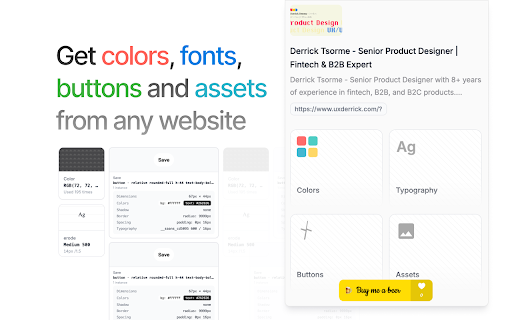

Transform any website into a complete design system in seconds. Component.lol is your AI-powered design intelligence tool that instantly extracts, analyzes, and documents design tokens, components, and patterns from any web interface. • Instantly decode any website's design language • Save hours of manual design documentation • Build consistent design systems faster • Perfect for both designers and developers • Zero-configuration setup ### 🎨 Advanced Design Token Extraction - Complete color system analysis with relationship mapping - Smart gradient detection and pattern recognition - Automatic light/dark theme detection - Export to CSS, Tailwind, & more ### 📐 Intelligent Button Analysis - Automatic Button component detection and classification - Comprehensive spacing and layout system extraction ### 🔤 Typography Intelligence - Full font stack analysis and alternatives - Dynamic type scale detection - Responsive typography mapping ### 🖼️ Smart Asset Management - Automatic icon and SVG detection - Image optimization recommendations - Asset usage analytics ## 🎯 Perfect For - Design System Engineers - Frontend Developers - UI/UX Designers - Product Teams - Design Ops Professionals - Web Accessibility Specialists ## 🚀 Quick Start Guide 1. Install Components.lol from the Chrome Web Store 2. Click the toolbar icon on any website 3. Get instant design system analysis 4. Export tokens, components, and documentation Unlock the DNA of any website's design system. Start analyzing with Components.lol today. Made with 💜 by designers, for designers. Join thousands of design professionals who trust Components.lol for their design system needs.

Snable: UI Inspector & CSS Scanner
Analyze any web page that catches your eye! Get a detailed overview of colors, fonts, and visual elements for design inspiration. SNABLE: YOUR PERSONAL UI DESIGN ANALYZER Snable provides professional UI analysis directly in your browser, revolutionizing how you explore web design. This Chrome extension meticulously deconstructs any website, revealing its core visual elements for your understanding and inspiration, serving as the essential companion for the Snable Figma Plugin. ⭐ HIGHLIGHTS — Instant analysis of a website's visual structure — Extraction and organization of color palettes and typography — Comprehensive design insights at your fingertips — Ability to favorite pages for future reference — Directly links with the Snable Figma Plugin for design asset export ⚡ TOP FEATURES — Real-time color and font style analysis — Visual hierarchy insights — Clean, user-friendly reporting — Easy page bookmarking — Figma plugin integration for seamless data flow 👥 IDEAL FOR — UI/UX Designers (inspiration) — Web Developers (pattern analysis) — Design Students (real-world learning) — Brand Managers (consistency checks) — Digital Artists (web aesthetics) — Anyone exploring design principles ℹ️ GET STARTED Install Snable Chrome Extension, then simply click the extension icon on any webpage to instantly uncover its design secrets. No setup required – professional design insights are just one click away! Also check the Snable Figma Plugin for a better experience! ⭐ Love Snable? We'd appreciate your review! 🌐 For updates & more → snable.bozzhik.com 📧 Questions or suggestions? Reach out → bozzhik@gmail.com 💬 Join our community → snable.bozzhik.com/socials

Panda Helper
Install Panda Helper to have a quick access for our websites: - Flat UI Colors - TheStocks - CollectUI - Panda Extension - Designer Daily Report Extension and many more! Panda Helper also enables webpage embedding so you can browse all content without leaving Panda Network websites. This functionality only works for Panda Network products' websites.

HTML to Framer
Bring your own website into Framer with a few clicks. Simply copy and paste web elements and edit them directly in Framer. Once you have installed the extension, simply hover over any element such as text, images, buttons, or entire layouts. Click to copy, then go to Framer and press ⌘V (or Ctrl V on Windows) to paste. Your elements will be pasted with a clean layer hierarchy, ready to be further edited or published immediately within Framer. Pro tip: Hold Shift to copy multiple items for even greater speed. To select a parent element of a site item, press Esc while hovering over it. Framer is where teams design and publish stunning sites. Try it for free today at framer.com

Infa.ai
New way of Conducting Design System Inventory and Visualizing Design System in use with Infa Infa.ai is a new way of conducting Design System Inventory and visualizing Design System in use. And now with Infa Design System Assistant you can ask any questions about the Design System and find actual places where your components are being used within the products 1. See your Design System in Action See how components and tokens actually show up in your product - Import Options: From Figma, Storybook, and any documentation website via the Infa Agent - Visual & Code Capture: View the real rendering and code snippet of any component 2. Discover, onboard, and connect your system Infa connects your live product to design system resources for instant insights - Discovery Mode: Boost adoption and speed up onboarding by instantly highlighting every component - Deep Context on Each Component: Access Figma, GitHunb repos, Jira tickets, and documentation right from the product 3. Tag & Inspect Variations Mark variations and explore every instance of component across the product - Easily tag new variations: Select any element, tag it as a new variation, and instantly make it available within Infa - Share Links: Showing exactly which page and where on the page the component is located 4. Integrations Go beyond Infa: collaborate visually in FigJam, automate workflows in Coda - FigJam Plugin: Visualize & Trace Back Pull tagged components with screenshots and code snippets directly into FigJam - API: Document with Real Usage Pull usage and sync documentation directly into your design system website 5. Measure Adoption within the Product Adoption by visual real estate and DOM ratio directly in the live product, page by page - See Component Usage Across Pages: Where component is used across pages to identify refactor opportunities Getting Started To begin using the Infa Chrome Extension, sign up on the infa.ai website to receive a link to the extension. Explore community boards or create new ones, and start adding and tagging components directly within your product’s web pages.
