
jmbnbpioejljhgmnnocepocmafnhkfki
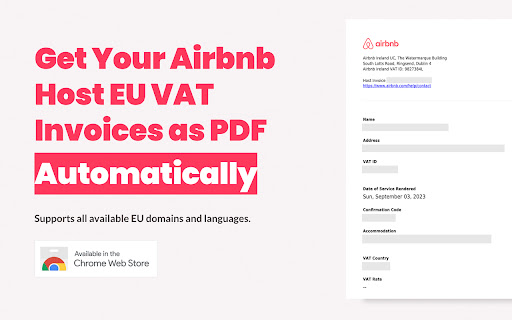
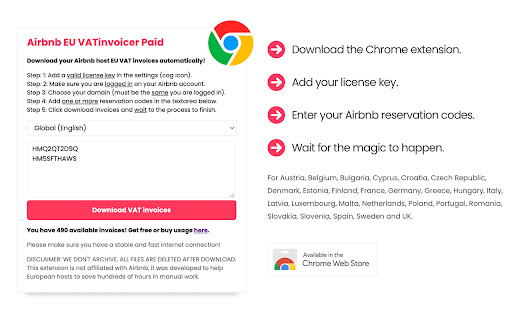
Download your Airbnb host EU VAT invoices automatically. Yes, automatically! Supports all available EU domains and languages. In a nutshell, VAT invoices are required for accounting purposes by European tax law (reverse-charge) but Airbnb does not provide tools for it. Instead it forces hosts to click each reservation, open a web page and print as PDF the VAT invoice. This is absolutelly unnecessary and consumes hundreds of hours of manual work! Register for a FREE trial or BUY a license at: https://vatinvoicer.com Step 1: Enter a valid license key the license settings (cog icon). Step 2: Login on Airbnb, either main account or co-host with full permissions. Step 3: Choose your country (must be the same you are logged in). Step 4: Add one or more reservation codes in the textarea below. Step 5: Click download and wait, don't close the panel or click the tabs! Supports the new invoice format, as well as credit notes and multiple invoices per reservation! This extension is NOT affiliated with Airbnb. It was developed with the sole intention to help all European hosts. Airbnb brand and logo are trademarks of Airbnb, Inc.

Free AI Dictionary - Context Explain & Translate
AI popup dictionary with context-aware definitions & translations for web and PDFs. Highlight text, get instant explanations. Free AI-powered contextual dictionary for Chrome. Highlight any text on a webpage or PDF and get an instant, context-aware definition in a popup. Standard dictionaries give you every possible meaning of a word. This extension reads the surrounding paragraph and gives you the one that fits. - Reads the full paragraph before answering. It knows whether "bank" means a riverbank or a financial institution. - Translates idioms and technical jargon into your native language with the correct meaning. - Works on PDFs. Highlight text, right-click, and select "Explain with AI." - Saves terms and explanations to a personal dashboard you can review later. - Shows the explanation popup right next to your selected text. No tab switching. - Lets you ask follow-up questions in a side panel. "What's an example?" or "Explain it simpler." - Supported languages: English, Spanish, French, German, Portuguese, Italian, Russian, Chinese, Japanese, Korean, Arabic, Hebrew, Hindi, Dutch, Polish, Turkish, Ukrainian, Vietnamese. Who uses it: - Students reading dense papers and textbooks. - Language learners who want to understand meaning, not just get a word swap. - Professionals going through technical or legal documents. How to use: - Webpages: Highlight text, click the icon, read the explanation. - PDFs: Select text, right-click, choose "Explain with AI." - Translate: Hit the translate button to see it in your language. - Save: Bookmark any term to your dashboard. - Chat: Open the side panel to ask more questions. Pricing: - It's 100% free at the moment Privacy: We process the text you highlight and the context around it.None of these saved on our servers, only bookmarks that you want to save. Nothing else is tracked.

Moult-AI-Enterprise
Orchestrate assistants with simplicity! Multi-AI tool with transparent, draggable UI, light/dark mode, multilingual, history. Moult-AI is a powerful and elegant multi-AI orchestrator designed for professionals who want to maximize their productivity with artificial intelligence. Send a single query and instantly receive responses from multiple leading AI models all opened automatically in separate tabs with intelligent prompt injection. Key Features: • Elegant transparent floating interface, fully draggable and resizable • True multi-selection: choose exactly which AIs will respond • Complete search history with timestamps • Automatic light and dark mode support • Multilingual interface (English & French) • Extremely lightweight and privacy-focused, no API keys, no servers, no tracking Moult-AI is ideal for researchers, writers, developers, analysts, and anyone who regularly compares AI responses or needs fast, parallel insights. Enterprise Product Key license available for unlimited use and professional deployment. Streamline your AI workflow. Work smarter with Moult-AI. New Features & Integrations in the V4 • Expanded other AI Model Support: Added integration for 5 other AIs. • Prompt Injectors: Introduced new prompt injection capabilities for enhanced query customization. • PDF Export: Added functionality to save search history as PDF files, accessible via a dedicated save icon. Onboarding Experience: • Implemented an elegant welcome page for first-time installations, including screen dimension verification. Users with insufficient screen real estate are now prompted to uninstall for optimal performance. Multilingual Expansion: • Added support for Greek, Swedish, korean and Italian in the Welcome and Help sections. UI/UX Enhancements: • Refactored the AI selection list (15 models) for improved visual scaling and scrolling behavior. • Smoothed drag-and-drop interactions on the main panel for better fluidity. • Minor font adjustments for improved typography consistency. License Management: • Restructured product key validation logic. • Usage days are now counted continuously from the first activation date, rather than being segmented. Documentation: • Updated help files and added FAQ entries covering the newly supported AI models. Bug Fixes & Technical Corrections • Process Management: Fixed a critical issue where disabling the extension contextually did not terminate background processes. The UI bubble and panels now correctly disappear across all tabs when disabled, ensuring complete memory cleanup. • Context Menu: Resolved a bug where the "Disable Moult AI" option in the right-click menu incorrectly displayed the status or failed to hide the bubble. • Corrected the prompt injection mechanism an AI.

Cat Pomodoro Timer — Pawmodoro Focus & Productivity
A simple Pomodoro timer with a cute animated cat, focus sounds, and clean minimal UI. 🐾 Pawmodoro — A cozy Pomodoro timer with a cat who refuses to let you burn out Pawmodoro is a simple, calm Pomodoro timer designed to help you stay focused — without pressure, clutter, or overwhelm. No complicated dashboards. No endless settings. Just a clean workspace… and a tiny cat supervising your productivity like it’s her full-time job. And yes, she will judge you (gently) if you skip breaks. ✨ What you can do: ⏱️ Flexible timer Set work and break sessions from 1 to 60 minutes 🔔 Custom alarm sound Upload your own MP3 for session notifications 🎨 Themes Switch between multiple color themes to match your mood 🐱 Cat companion Different visuals for focus and break states 🎯 Distraction-free UI Minimal, cozy design that helps you stay on track 🌙 Coming next Pawmodoro is growing — slowly, politely, and with a bit of cat attitude. ✨ Pawmodoro Pro (optional) Premium themes and additional features The core timer will always stay simple and free. Have ideas or suggestions? I’d love to hear from you. You can reach out via LinkedIn or email (see Privacy Policy).

Music Discovery: Find New Indie Songs & Hidden Gems
Discover fresh indie, electronic & alternative tracks from the last 24 hours. Find hidden gems from global forums instantly. Discover the best new music posted across the web in the last 24 hours. Skip the mainstream charts and find hidden gems from global music forums instantly. With inline play and a curated daily feed, you can listen to fresh, unfamiliar songs from Indie, Electronic, and Alternative genres before they go viral. Your ultimate tool for music discovery and finding your next favorite track.
