
jlhmomandpgagmphfnoglhikpedchjoa

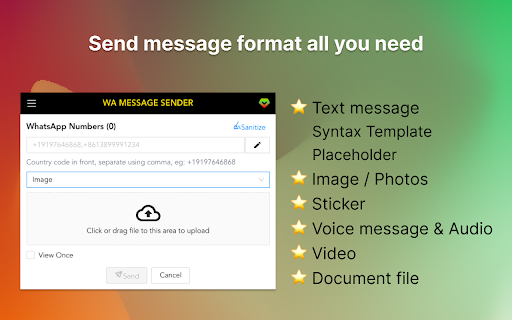
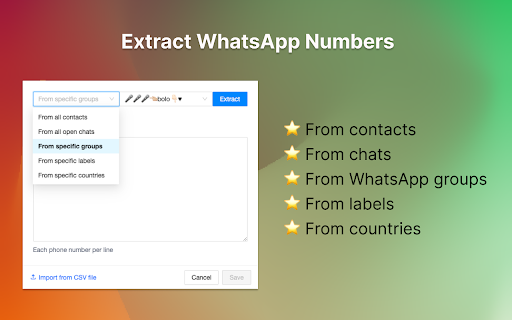
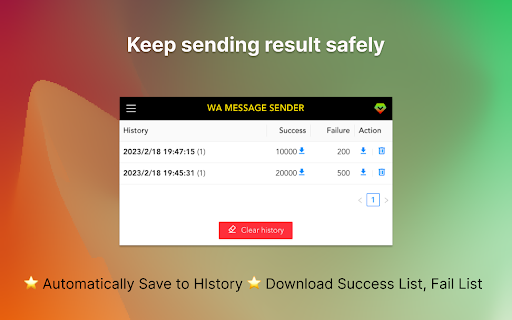
The powerful WhatsApp bulk message sender, Send text messages, images, and voice messages without saving numbers. WA Message Sender (aka WA Message Bot🚀) is the best WhatsApp Marketing Software & Automation Tool. Use WA Message Sender to connect with your customers by sending bulk messages. Grow your business with WA Message Sender has never been easier. # v2.3.2 change log - I apologize that the previous version failed to resolve the message sending issue; I confirm that this version has fixed the problem. # v2.2.11 change log - Fix the send file message issue. - Fix send message stuck issue. # v2.2.6 change log - Fixed the send image, audio, and file message issue. # v2.2.3 change log - Fixed the extract phone number issue. # v2.2.1 change log - Fixed the send audio and video message issue. # v1.2.7 change log - Fixed the send audio and video message issue. # v1.2.4 Change log - Fixed the load meta data issue. ✓ Auto Mass Send WhatsApp Messages without save numbers. ✓ One click to Send bulk, customized, WA messages automatically. ✓ Send Text message, image, voice message, video, audio, Document file. ✓ Send View once image and video message. ✓ Extract group members, all contacts, all chats and specifiy country. ✓ Personalized messages with placeholders & spinx syntax template. ✓ Message Template ✓ Automatically save sending result to history, download success and fail list. WA Message Sender is the ultimate WA Bulk Message Sender, WAppSenderPro, WAPlus Sender, WA Message bot. Just send WhatsApp messages to all contacts for free and start saving time now! Kindly do not use for SPAMMING which is WhatsApp™ strictly prohibited. https://wasender.whatsabot.com/#faq If you have any questions, please keep in touch via help@whatsabot.com. All data is processed in your local computer, never passing through our web server, and no one knows what you exported. WhatsApp™ is a trademark of WhatsApp Inc. WASender is not affiliated with, endorsed, sponsored, or otherwise related to WhatsApp, Inc. or any of its affiliates or subsidiaries.

WA Web Plus – WhatsApp Web Tools for Privacy & Deleted Messages
Blur chats & media for privacy, view deleted messages, download status, track online activity on WhatsApp Web. WA Web Plus — Privacy & Productivity for WhatsApp Web Protect your WhatsApp Web privacy in public spaces. Blur chats, hide sensitive content, and customize your workspace — all running locally in your browser. ✓ Updated for the latest WhatsApp Web (May 2026) ✓ Working blur — verified on the current WhatsApp Web release ✓ Active development with fast bug fixes ✓ Lightweight and privacy-focused ✓ Available in 8 languages • Blur messages, media, profile pictures, and contact names — reveal on hover • Instant privacy mode for public or shared spaces • Auto-blur when idle so your screen stays protected when you step away • Customize blur intensity for different content types • Lock screen with custom PIN • Hide text input while typing Open WhatsApp Web and your chats are instantly protected. • Quick Chat — message any number without saving as contact • Status Download — save images and videos from Status updates • Translation — translate messages instantly in 12+ languages • Pin unlimited chats • Mark all chats as read in one click • Export contacts and group members to CSV • Click-to-Chat link & QR code generator • Customize your chat background with wallpapers, gradients, and colors • 16 built-in wallpapers included • Access recalled (deleted) messages locally in your browser • See online presence directly from your chat list • Hide read receipts — read messages without sending blue ticks • Hide typing & recording status • View statuses without sending a "seen" notification • Invisible Mode — control your online visibility • View profile information such as country, local time, and currency from phone numbers • Alt + X — instantly blur the entire page • Cmd + Shift + L / Ctrl + Shift + L — quick lock screen • Your messages stay 100% on your device • No account required, no data uploaded 1. Click "Add to Chrome" 2. Open WhatsApp Web 3. Privacy features activate automatically 4. Customize settings anytime from the extension toolbar icon Not affiliated with WhatsApp Inc. or Meta. WhatsApp is a trademark of Meta Platforms, Inc.

WA Video Download: Video, Image & Audio Saver - WASBB.COM
Batch download WhatsApp Image, Video, Voice, Audio, Sticker, Document with ease using WhatsApp Media Downloader. 🌟WhatsApp Video Download: Video, Image & Audio Saver - WASBB.COM: Your All-in-One Media Solution! 🌟 Hey there! Looking for a handy tool to grab all those awesome media files from WhatsApp? Let me walk you through the WhatsApp Media Downloader, a super intuitive extension that makes downloading media a breeze. Whether it’s photos, videos, or documents, this tool has got you covered. Let’s dive into what it does and how it works—based purely on its full functionality for everyone! 😊 📸🎥📄 What Media Files Can You Download? 📸🎥📄 This tool is your ticket to snagging all types of media from WhatsApp chats and groups. Here’s the lineup of what you can download: 🔹 Images: Family pics, memes, or anything visual you want to keep. 📷 🔹 Videos: Funny clips, tutorials, or heartfelt moments shared in groups. 🎬 🔹 Voice: Voice notes from friends or key meeting recordings. 🎙️ 🔹 Audio: Songs, soundbites, or audio messages you’d love to save. 🎵 🔹 Stickers: Those quirky, fun stickers that make chats pop! 😜 🔹 Documents: PDFs, Word files, or any important docs shared via WhatsApp. 📑 With just a few clicks, you can grab hundreds of these files at once—no manual saving required! 🚀 ⚙️ How Does It Work? The Interface Unveiled! ⚙️ The WhatsApp Media Downloader interface is clean, simple, and packed with options to make your life easier. Picture this: 🔹 Top Bar: The title "WhatsApp Video Download: Video, Image & Audio Saver" sits proudly at the top, so you know exactly what you’re working with. 🔹 User/Group Selection: Pick the chat or group you want to download from—super straightforward with a field displaying the name (e.g., "User Group Name"). 🔍 🔹 Media Type Choices: A handy section lets you check boxes for what you want—Images, Videos, Documents, Audio, Voice, or Stickers. Mix and match as you like! ✅ 🔹 Time Range: Set specific dates (e.g., "2025/01/02" to "2025/02/02") to download only the media from that timeframe. Calendar icons make it a snap to adjust. 🗓️ 🔹 Download Button: One big, bold "Download" button kicks things off, complete with a downward arrow to signal action. ⬇️ Once it’s done, you’ll see a cheerful message like "Media Files Exported Successfully-288!" with options to download them or head back home. Stars and sparkles celebrate your success! ✨ 📲 Why It’s Perfect for Downloading Media 📲 This tool shines because it’s built for convenience and control. Want to back up every image from a family group? Check "Images" and hit download. Need a specific video from last week? Set the date and grab it. It’s fast, flexible, and lets you batch-download everything—Images, Videos, Voice, Audio, Stickers, Documents—in one go. No fuss, no mess! 😄 The interface even includes a toolbar with tabs for each media type (Image, Video, etc.), so you can switch focus effortlessly. Plus, it works seamlessly whether you’re on WhatsApp Web or syncing from your phone. 🌐 🚀 Ready to Get Started? 🚀 The WhatsApp Media Downloader is all about making your WhatsApp media yours to keep. From precious memories to work essentials, it downloads Images, Videos, Voice, Audio, Stickers, and Documents with ease. The clean design, date filters, and media type options mean you’re always in charge. So, why wait? Pop it into your browser, open WhatsApp, and start downloading your media today! Your files are just a click away. 😊👇 This is an independent tool with no official association with WhatsApp LLC.

WA Audio to Text | WPPME.COM
Transcribe WhatsApp voice messages to text easily – save time with fast, accurate, and automatic transcription. 🎧✏️ Convert WhatsApp Voice Messages to Text – Simple and Practical. Struggling with long voice messages you don’t have time to listen to? This extension helps you instantly transcribe WhatsApp Web audio messages into text, making your conversations more accessible and manageable. [ Key Features ] - 🎙️ Auto Transcription: Automatically turn voice messages into text the moment they arrive. - 🖱️ Click-to-Transcribe: Want control? Convert specific messages into text with a simple click. - 🌍 Language Support: Easily handle voice messages in multiple languages for global communication. - ✔️ Reliable Accuracy: Uses advanced technology to ensure clear and dependable transcriptions. - 🔗 Built-In Functionality: Runs smoothly within WhatsApp Web – no extra tools or downloads needed. [ Who Is It For? ] - 💼 Office Workers: Quietly check voice messages during meetings or work without causing distractions. - 📖 Learners: Turn voice notes into text for easier organization and studying. - 🚀 Busy Individuals: Stay on top of your WhatsApp conversations while juggling other tasks. - 🌐 Inclusive Users: Perfect for those who need accessible communication, including individuals with hearing challenges. [ Use Cases ] - 🔊 Noisy Environments: Struggling to hear a voice message? Convert it to text for clarity. - 🤐 Silent Spaces: Read voice messages discreetly without playing audio aloud. - 🗃️ Easy Archiving: Save transcriptions to keep important messages organized and accessible. - 🌏 Learning Languages: Use transcribed messages to practice and enhance your language skills. This tool is independent and not affiliated with WhatsApp LLC. The tool complies with legal standards and respects all applicable terms of service.

WA Contacts Extractor - wabulk.net
Export ,extract and backup your WhatsApp contacts by various dimensions such as Contacts, Chats, Groups, Labels, and Countries. This powerful and user-friendly tool lets you extract and export all your WhatsApp contacts, including unknown phone numbers, with just a few clicks. With this extension, you can keep your data secure and choose from popular formats like CSV, Excel, JSON, or VCard to export your contacts. Our tool is perfect for anyone who needs to backup and manage their WhatsApp contacts. Whether you need to export contacts for future use, organize your chat history, or backup your contacts in case of data loss or device transfer, our Export WhatsApp Contacts provides a simple and efficient solution. Features: ✅ Easily extract and export all your WA contacts with just a few clicks ✅ Extract contacts from groups and chats to organize your contacts ✅ Filter contacts by country for targeted outreach or analysis ✅ Save contacts from labeled chats for easy reference and management ✅ Export data to popular formats like XLS, CSV, JSON, or VCard for secure backup and use in other applications. Why use our Export WhatsApp Contacts? ✅ Save time: Quickly extract and export all your WA contacts with just a few clicks. ✅ Keep data secure: Choose from multiple export formats to ensure your data remains safe and confidential. ✅ Get organized: Categorize your contacts by groups, chats, labels, countries, and more for complete control over your data. ✅ Never lose contacts again: Easily backup and export your WA contacts for quick access when you need it. Please note that our Export WA Contacts does not collect any personal data or violate any terms of service. It only extracts and exports WA contacts that are already stored on your device. # Home Page https://export-wa-contacts.wabulk.net/ This extension is an unofficial enhacement for WhatsApp™ Web and is not related in any way to WhatsApp LLC.
