
jlgjopfebbpmjmbjblbgkjiiolpognjb
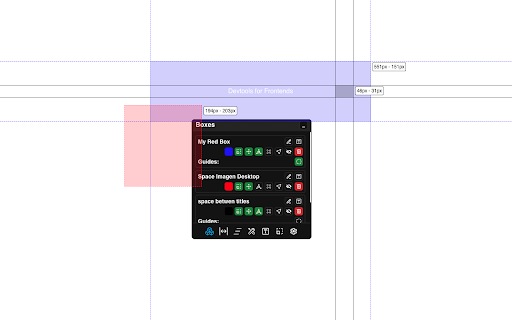


Extension for frontend developers, make more pretty the frontend Devtools for Frontends Make the development of a web page, app, or web tool much easier, get the possibility to have tools to make your development much easier and perfect. Once the extension is installed, will find a handy panel where you will have all the tools ready to use. - Resizable boxes - Parallel lines to mark boundaries - Text formatter - Tools for Resize and Scroll events - A buttons for many extra tools - A css editor for provisional styles Try this tool and perfect your development.

Scout AI
Enhance your web browsing experience by navigating through any article's content with the click of a button Scout AI is a powerful Chrome extension designed to enhance your web browsing experience by providing a convenient way to explore and navigate through any article online. Whether you're conducting research, studying, or just browsing your favorite websites, Scout AI offers an intuitive tool to organize and access content with ease. Article Outline Exploration: Scout AI intelligently identifies and extracts the sections present on a webpage, creating a user-friendly outline for quick reference. Intuitive Interface: The extension presents a sleek and user-friendly interface, allowing you to effortlessly view the article outline in a neatly organized list. Instant Access: Click on any heading in the outline, and Scout AI will smoothly scroll to the corresponding section on the webpage, saving you time and effort.

Nest — Smart Tab Manager with Groups, Snooze, Sessions & Notes
Organize tabs into groups, snooze distractions, save sessions, and keep notes tied to any page. The AI tab manager for people who keep 40+ tabs open and refuse to lose any of them. Nest auto-groups your tabs into clean, color-coded Chrome tab groups in one click, snoozes distractions until you actually need them, saves your entire workspace as a session you can restore tomorrow, and lets you attach notes to any page. Free forever. No account required. Your tabs stay on your device. ✦ AI AUTO-GROUP TABS One click sorts your open tabs into color-coded Chrome tab groups by topic, project, or domain. Or type plain English: ▸ "Group all my Figma and Notion tabs" ▸ "Split work from personal" ▸ "Group everything by domain" Built on Chrome's native tab groups API — works everywhere Chrome groups work. ✦ DOMAIN RULES Pin any domain to a category once and forget it. Every github.com tab goes to Dev. Every figma.com tab goes to Design. Rules apply automatically as you open new tabs. ✦ SNOOZE TABS Don't close it. Don't bookmark it. Snooze it. For an hour, until tomorrow morning, next Monday, or a custom minute. Snoozed tabs leave your window and come back exactly when you scheduled them — surviving restarts, crashes, and Chrome updates. ✦ SAVE & RESTORE SESSIONS (WORKSPACES) Capture your entire browser workspace — tabs, windows, tab groups, and window order — and restore it in one click. Perfect for switching between clients, projects, research threads, or Monday-morning vs. Friday-afternoon without losing context. ✦ NOTES ON ANY TAB Attach notes to any page so context doesn't get lost. Research, reminders, pricing comparisons, project thinking — it stays with the tab, not in another app. ✦ TALK TO YOUR TABS (optional) Manage tabs in plain English. Free Nest account required for this feature only. ▸ "Snooze everything except Slack until 3pm" ▸ "Close every Twitter tab" ▸ "Bring back yesterday's research session" ▸ "Search for pricing across every open tab" ▸ One-click AI organization into Chrome tab groups — no setup, no rules to write ▸ Snooze tabs to the exact minute you want them back ▸ Full session backup and restore — tabs, groups, and window order ▸ Domain rules: pin any site to a category forever ▸ Multi-window awareness so you always know which window a tab lives in ▸ Sync sessions across devices (optional, free) ▸ Notes that stay with the page ▸ Auto-color tab groups by category ▸ Lightweight Manifest V3 — sleeps when idle, doesn't slow Chrome ▸ Works on Chrome, Edge, Brave, and Arc ★ BUILT FOR ✓ Knowledge workers juggling 3+ projects at once ✓ Researchers and students with 50+ source tabs ✓ Writers and creators collecting references ✓ Founders, operators, and developers who live in the browser ✓ Anyone with tab-clutter anxiety Nest is privacy-first by design: ▸ Tab titles and URLs only by default. Page content never leaves your device unless you opt in per session. ▸ Local-first. Your tabs, sessions, and notes live on your device. ▸ Optional sync across devices, free and opt-in. ▸ No selling user data. No ads. No third-party trackers. No analytics on your tabs. ▸ Export all your data to JSON anytime. Uninstall removes everything. ▸ Manifest V3, built for modern Chrome. ▸ Domain Rules: pin any domain to a category and have every future tab from that site routed there automatically ▸ Multi-window awareness: tabs in other windows get a small letter badge so you always know where they live ▸ Snooze straight from any category in Organize — no need to switch views ▸ Category headers now show live tab counts, color dots, and "X new today" insights ▸ Auto-snooze: new tabs that open into a currently-snoozed category snooze themselves automatically ▸ Cleaner, minimalist scrollbar with soft fade gradients instead of a hard scrollbar ▸ Unified search across Organize, Snooze, Notes, and Backup ▸ Faster, more reliable sync between devices ▸ Numerous reliability fixes and security hardening Q: Is it really free? A: Yes. Auto-group, snooze, sessions, notes, and domain rules are free forever with no account. A free Nest account unlocks the optional Talk-to-Your-Tabs chat. Q: Does it work offline? A: Yes. Grouping, snoozing, sessions, notes, and rules work fully offline. Only the optional chat needs a connection. Q: Does it work with my existing Chrome tab groups? A: Yes. Nest uses Chrome's native tab groups, so anything you've already set up stays put. 1. Install Nest (10 seconds) 2. Click the Nest icon 3. Click "Auto-Group" Free to install. Works on Chrome, Edge, Brave, and Arc. Questions? hello@nestextended.com The AI tab manager for people who live in the browser. Install Nest.

Debug Master: Debugging with ease
Simplify console errors with clear explanations for web dev. Debug Master is an innovative chrome extension that utilizes AI technology to provide detailed explanations for complex error messages. With just a simple copy and paste, users can easily understand what went wrong and how to fix it. Debug Master makes it easy for developers to quickly and efficiently solve programming issues, saving valuable time and frustration. Say goodbye to spending hours trying to decipher confusing error messages, and hello to faster debugging with Debug Master. The extension help developers save valuable time and increase their productivity, allowing them to focus on developing new features and improving their website. Additionally, the extension's ability to understand and explain various types of errors means that it can be used across different programming languages and frameworks, making it a versatile tool for any web developer. With Debug Master, web developers can more efficiently and effectively debug their code, leading to faster and more successful web development projects.

Reddix - Reddit bookmarks
Search your saved and upvoted Reddit posts and organize them using tags Reddix helps you manage and search your Reddit saved and upvoted content. Features: - Save and organize your Reddit posts and comments in your browser's local storage. - Search, sort and organize saved content using tags. - Dark and light themes. - View your content in a toolbar pop-up window or on a separate page. - Import or export your data. Please note that Reddit limits the number of posts you can fetch to 1,000. If you want to view more, please refer to the extensions help page for instructions on how to manually import all your content. Source code: https://github.com/flytaly/reddix-extension Changelog V0.10.0 - Reversed the order of the elements before saving so that the newly saved elements remain at the top of the list - Sorting by ID is set by default - Fix: saved search parameters are now applied correctly when opening the search - Fix: fixed incorrect auto-update settings
