
jlfolgnhjeibddjpcodabefpkggodigc
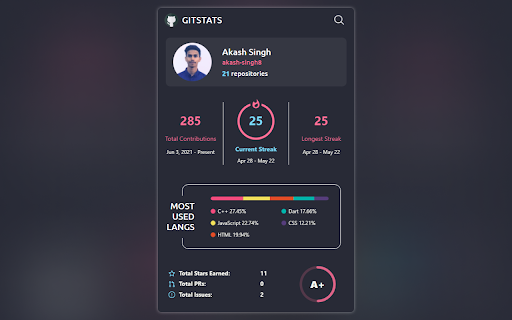
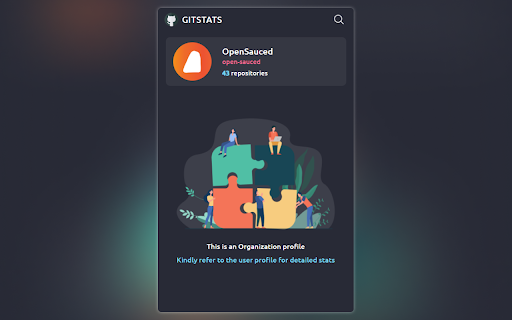

Displays brief GitHub stats for a user. Introducing a powerful and convenient tool for all GitHub users, a chrome extension that allows you to easily view a user's GitHub statistics right from their profile or by searching for their username. With this extension, you can quickly access valuable insights about a user's GitHub activity, making it an essential tool for developers and enthusiasts. Some of the features of GITSTATS include: - Seamless integration: Access GITSTATS with a single click from any user's GitHub profile or by searching for a specific user. - Comprehensive statistics: Get detailed information about a user's GitHub activity, including their repository count, total stars received etc. - Contribution insights: Gain insights into a user's contributions, such as the number of commits, pull requests, and issues they have made - User-friendly interface: Enjoy a clean and intuitive interface that presents the information in a visually appealing and easy-to-understand format GITSTATS is a free and open-source extension that is available to download from the Chrome Web Store. - Save time by quickly accessing the information you need about a user's GitHub activity - Make better decisions about who to collaborate with or hire - Stay up-to-date on the latest developments in your field - Learn from other developers by analyzing their code GITSTATS is a powerful tool that can help you improve your GitHub experience. If you are a developer or enthusiast, I encourage you to try it out.

StarterCSS
Rapidly implement CSS layouts, effects, and designs without parsing through online docs StarterCSS is a beginner-friendly version of devtools that cuts out time spent Googling for CSS docs and tutorials. StarterCSS provides a dashboard to implement, experiment with, and visualize CSS features at just a few clicks. The dashboard is directly embedded as a devtool panel (alongside the "Styles" and "Computed" panels) for quick access. Simply inspect an element and quickly make changes to it in the StarterCSS panel. With StarterCSS, you can: ✅ Add and customize layouts like flexboxes and grids, in addition to various visual attributes, in seconds ✅ Visualize and test CSS code in isolated environments ✅ Encounter fewer context switches from needing to look up CSS docs ✅ Export created designs/layouts into CSS for copying into your local code editor To access the extension, go to the "Elements" Tab in Chrome Devtools (Right Click > "Inspect" or Command+Shift+C). You should see a separate row with tabs like "Styles", "Computed", and "Layout". StarterCSS will be another panel here; if you've just downloaded the extension, you may have to click the ">>" (see more) icon to see all panels. If you'd like to leave feedback, visit bit.ly/startercss-feedback.

TestFiltering+
TestFiltering+ automatically monitors your internet connection to ensure your filter is correctly blocking illegal/harmful content We work with specific partners to host test URL's on various lists and have test pages hosted where they will be blocked. This service was setup in response to the introduction of statutory guidance for schools in the UK about appropriate levels of filtering and monitoring of school internet connections. The UK Safer Internet Centre first published its filtering and monitoring definitions in 2016 to help both schools and providers understand what should be considered as ‘appropriate’.

GitHub Repo Stats
A dynamic Chrome Extension to fetch the Github Repo Stats. A chrome extension build to fetch the stats of the GitHub Repository, excluding the forked repos. On adding this chrome extension, user will be asked to enter the user-name of the GitHub, and the tool will fetch the stats of the repos of that user, on the basis of descending order sorting of number of stars and forks on the repos of the user. Along with this, user profile picture will also be visible. Apart from this, user will be able to navigate the GitHub account, and can open any repos whose stats are being shown.

GitHub Repo Code Stats
Elevate your GitHub browsing experience with the Github Repo Code Stats Chrome extension! When you're viewing a… Elevate your GitHub browsing experience with the Github Repo Code Stats Chrome extension! When you're viewing a GitHub repository, this extension allows you to: Instantly View Code Statistics: By clicking the extension icon, fetch and display detailed code statistics of the repository you're browsing. Visualize Data with Interactive Bar Charts: See a clear and concise bar chart showing the number of lines of code per programming language used in the project. Adjustable Chart Size: Customize the size of the chart to fit your screen or preference for optimal readability. User-Friendly Loading Indicator: Experience smooth data retrieval with a loading indicator that keeps you informed while the statistics are being fetched. Why should you install it? Gain Quick Insights: Understand the composition and complexity of repositories at a glance without digging through code files. Enhance Productivity: Save time by getting immediate visual summaries of codebases, aiding in faster decision-making. Improve Learning: Ideal for developers who want to study how different languages are utilized across projects. Seamless Integration: Works effortlessly within your GitHub workflow without the need to leave the page or use external tools. Get Started Now! Install the Github Repo Code Stats Chrome extension today to transform the way you explore and analyze GitHub repositories. Make informed decisions and accelerate your development process with this essential tool.
