
jlfbpagfboihbekbmkgajgemnlgnmacp
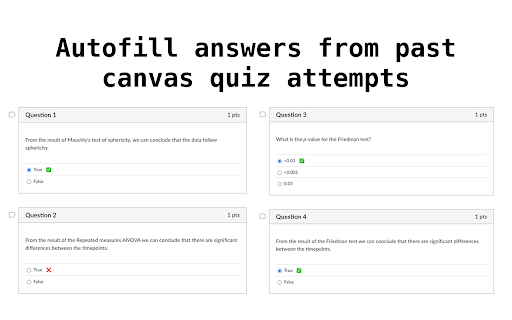


RePop auto-fills your past canvasquiz answers so you don’t have to Tired of retaking quizzes on Canvas and manually re-entering answers you've already submitted? RePop has you covered. RePop is a smart Chrome extension that automatically detects and re-fills answers from your previous Canvas quizzes — saving you time, effort, and frustration. Whether you’re reviewing for a retake or just double-checking your work, RePop makes the process seamless.

Canvas Quiz Solver
Solves Canvas Quizzes for you. Features: - Instant answers for your Canvas quiz questions - Seamlessly integrates with Canvas quiz interface - Adds a convenient "Get Answer" button to each question Note: Only works for quiz in Canvas, no support for external or third party quiz tools. How It Works: - Install the extension - Open your Canvas quiz - Click "Get Answer" next to any question for the answer. Canvas Quiz Solver has been developed to help you get right answers for every quiz questions on your exams and quiz. By just clicking a get answer button, you can get the correct answers to your quiz questions of any course hosted on canvas. Shows you right answers Subscription: $4.99/month for unlimited access This tool is powered by AI and is designed to supplement your learning, not replace active studying. Answers may not always be 100% accurate, especially for course-specific content - Not intended for cheating or academic dishonesty

CanvasSolver
Get answers & explanations to your Canvas Quizzes, Homeworks and Tests with a single click. Get answers & explanations to your Canvas Quizzes, Homeworks and Tests with a single click. 🧙♂️ The AI-powered learning assistant for Canvas. 🔥 FREE 48-HOUR TRIAL AVAILABLE NOW! 🔥 Why Smart Canvas Assistant? 📚 Enhance Your Learning Experience Instant answers and detailed explanations for better comprehension Deepen your understanding of complex topics and concepts Improve academic performance through guided learning ⏱️ Maximize Your Efficiency Save valuable study time with immediate assistance Focus on understanding rather than just finding answers Complete assignments more efficiently with AI-powered guidance Works directly within your university's Canvas platform Adds helpful AI buttons to quiz questions for instant support No need to switch between applications or lose focus Access integrated AI chat for homework help and concept clarification Summarize and rewrite content with a single click Brainstorm ideas and improve your writing skills Your academic data remains 100% private and secure All personal information is fully encrypted Designed with student privacy as a top priority 🚀 Powered by Advanced AI Technology Our extension leverages cutting-edge AI 3.0 to provide accurate, relevant, and helpful academic assistance whenever you need it. Install Smart Canvas Assistant today and transform how you approach your academic assignments!

Canvas Hack
Cheat on quizzes easily, and maintain a low-profile on all Canvas tests. Introducing the Canvas Hack, an extension which allows any student to side-step canvas cheating detection. It prevents your teacher or professor from detecting tab switching, window switching, or any similar actions during Canvas quizzes and tests. You can also save your correct answers in quizzes with multiple attempts, allowing you to retake tests with ease. This extension has been rigorously tested to make sure that you are 100% cloaked on Canvas while this extension is activated. Join 2,000+ students acing their tests effortlessly with the CanvasHack! All CanvasHack features/hacks: - Tab Detection Bypass: Prevents Canvas from detecting when you leave the testing tab. - Undetectable Activity: Makes all actions on Canvas appear normal, even when cheating. - Split Screen Bypass: Allows for split-screen usage without detection. - Automatic Activation: The CanvasHack is able to be used right after activation, no waiting around! - Save Feature: Saves correct answers from previous quiz attempts for reuse on later retakes. - Kiosk Mode: Mimics the Canvas kiosk app within the browser, for students who need to spoof the app and cheat undetected. - Extensive Testing: Successfully tested by over 80 college and high school students, plus 7,000 beta testers and not a SINGLE report of the CanvasHack not working. - Cross-Domain Support: Works on ALL Canvas website domains/urls, all college urls, including non- .instructure.com ones. Everything above is activated directly upon installing the extension and purchasing the cheap subscription or one time payment✌️(for more details visit the CanvasHack website listed below ↘️) Learn more about the extension at: https://canvashack.com/ In order to book a call to test the CanvasHack before purchasing, join the discord server linked below, you'll able to see the tool working 1-on-1! If you have any questions/issues feel free to contact the development team through discord -> (https://discord.gg/eEWFw9th8D) Full YouTube Video Demo with Teacher & Student POV. Displays results cheating with & without the CanvasHack activated: https://www.youtube.com/watch?v=IX1TamSlnj8 Disclaimer: Canvas Hack is an unofficial tool and is not endorsed by or affiliated with any educational institution, including Canvas™. All trademarks belong to their respective owners. Canvas™ is a trademark of Instucture® Inc.

Canvas Toolkit
Improvements for Canvas that give you more information and easier access to grades and assignments. Get quick access to grades and upcoming assignments on your dashboard, view additional information on assignment and quiz pages, view the overall class average for a course, and see if you'll be able to update or delete your discussion posts before you post them.
