
jldjlnajbbkbmebhgfpcgghpbfpfakni
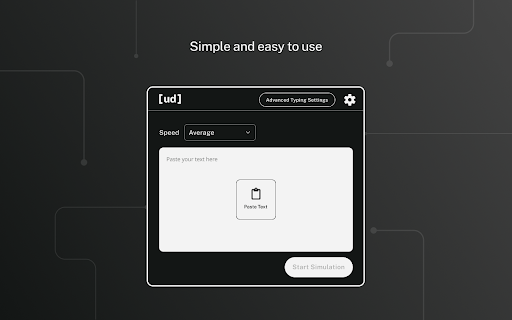
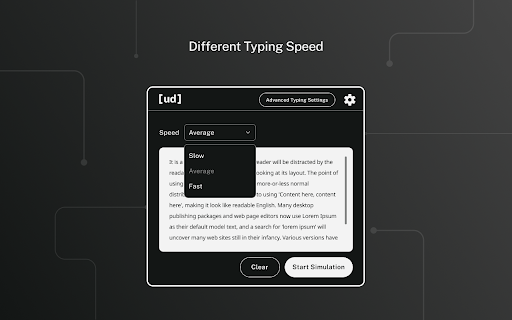
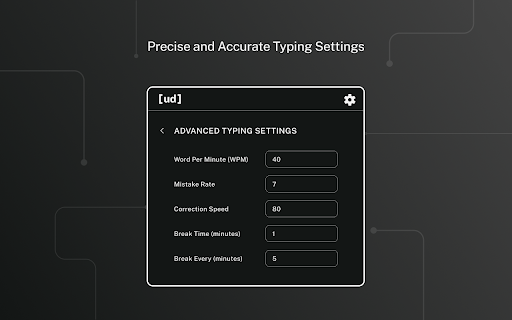

🌟 Undetectable AI Human Typer Tool for Google Docs - Chrome Extension 🌟 🚀 Revolutionize Your Work with AI-Powered Typing… 🌟 Undetectable AI Human Typer Tool for Google Docs - Chrome Extension 🌟 🚀 Revolutionize Your Work with AI-Powered Typing Elevate your typing experience with our 🤖 AI Human Typer Tool, a Chrome extension designed to simulate human-like typing effortlessly in Google Docs and other platforms. Discover how our innovative technology can transform your document preparation process! 🔑 Key Reasons to Choose Our Tool - ⏰ Time-Saving Efficiency: Automatically type out pre-written or copied content, freeing up your time for other important tasks. - 🛡️ Plagiarism Protection: Safeguard your unique work from false plagiarism accusations, crucial for students and academics. - 🎯 Precision and Accuracy: Our software replicates human typing nuances, ensuring copied texts in Google Docs appear as if manually typed. - 👍 User-Friendly Interface: A simple, intuitive tool ideal for professionals seeking efficient document preparation. - 🤑 Free for Undetectable AI Subscribers: Users with an Undetectable AI subscription receive complimentary access! 👉 How It Works - 🤯 AI Humanizer (Optional): Add authenticity to your content with our stealth writing tool. - ✂️ Copy & Paste Functionality: Paste your text into our extension and watch it type out in Google Docs or other platforms. - 💡 Undetectable Typing: Enjoy human-like automated typing that bypasses AI writing detectors. 🌈 Advanced Features - 🔐 Proprietary Technology: Mimic human typing, complete with errors and natural breaks. - 🚫 AI Writing Detection Bypass: Ideal for maintaining the originality of your work. - 📝 Natural Typing Patterns: Generate organic revision histories in Google Docs. - 🔄 Regular Updates: Stay ahead with the latest updates in typing technology. **🎯 Ideal For** - Busy professionals, freelance writers, and anyone needing efficient document preparation. - Bypassing writing reports and extensions like GPTzero, Originality.ai, and Draftback. - Creating natural revision histories in Google Docs. **💲 Pricing** - **🆓 Free for Undetectable AI Subscribers:** Enjoy full typing automation as part of your subscription. - **💰 Unlimited Monthly Plan:** Just $5/Month for non-subscribers. Opt for our flexible subscription and access all features, including plagiarism avoidance technology and error-simulating typing patterns. *📜 Disclaimer: This tool is not intended for academic misconduct. By using this tool, you agree to adhere to ethical standards.*

Type GPT: Auto-Typer for Google Docs and more. Type like a Human
Let AI type for you: realistic typing simulation with typos and natural delays Transform your writing workflow with Type GPT, the intelligent auto-typing extension that simulates realistic human typing patterns. Perfect for students, creators, writers, and anyone who wants to seamlessly integrate AI-generated text into their documents. - Human-like typing simulation - Includes natural typing delays, realistic pauses, and even intentional typos for authentic appearance - Smart delay controls - Customize typing speed, thinking pauses, and typo frequency to match your natural writing style - Multi-platform support - Works seamlessly with Google Docs, Gmail, and other web-based text editors - Paragraph preservation - Maintains proper formatting and line breaks from your original text

Human Typing Simulator
Human Typing Simulator Chrome Extension lets you paste text in any text field with natural, human-like typing behaviour. Avoid bot detection and improve productivity with realistic typing simulation.

Auto Typer
Auto Typer types text automatically. Works on websites and Google Docs via AutoHotkey. Auto Typer is a productivity extension that allows you to paste text into the extension and automatically type it into any editable field, including documents, text areas, and input fields. The extension types character by character when you press the assigned hotkey (default: Ctrl + Shift + T), and you can set a delay between characters to control typing speed. This saves time and effort when writing long text, and it types as if you are manually typing, preserving formatting in most web editors.

AutoTyper
This extension automatically types on nitrotype.com. NitroType AutoTyper Extension A powerful Chrome extension designed to automate and enhance your racing experience on nitrotype.com with advanced features including real-time race visualization, tier-based WPM management, and intelligent auto-racing capabilities. Key Features ------------ Live Race Visualization - Real-time race tracking with dynamic progress bars - Racer positions with car emojis and color-coded lanes - Live stats display: WPM, accuracy, typed characters - Auto-show/hide functionality with persistent state - Race text preview with typing progress indicator Smart Auto-Racing - Customizable WPM range: Select multiple speeds for randomization - Accuracy control: Set target accuracy (90-100%) - Auto-mode: Continuous racing with auto-join - Session persistence: Resumes after page refresh - Race counter: Track completed races in real-time - Progress indicator: Live typing progress percentage Configure Racing Settings 1. Select WPM Speeds: Choose one or more WPM multipliers (e.g., 8x, 9x) Locked speeds (🔒) require tier upgrade Extension randomly picks from selected speeds 2. Set Accuracy: Select target accuracy range (90-100%) Extension randomizes within selected values 1. Click "Start Auto Mode" 2. Extension automatically: Joins races Types with selected WPM/accuracy Completes races Re-joins next race 3. Monitor Progress: Header shows: Tier, WPM, Race count, Progress Race visualization popup displays live race data Race Visualization Popup Auto-opens when racers join the race Shows live data: All racers with progress bars WPM and accuracy for each racer Your position highlighted in gold Race text with typing cursor Final ranking with medals when race ends Toggle button (🏁) to show/hide popup 1. Click "Stop" 2. Extension stops auto-joining races 3. Current race completes normally After approximately 45-50 races, NitroType requires captcha verification Extension automatically reloads at 45 races to prevent errors Manually solve captcha when prompted to continue racing Settings are saved automatically to localStorage Race state persists across page reloads Panel visibility remembered between sessions Start with lower WPM speeds (6x-8x) for Tier 2 Use varied accuracy (96-99%) for natural appearance Monitor the race counter to anticipate captcha Check race visualization to track performance Tier upgrade system (currently locked) Race statistics and analytics Advanced accuracy patterns More customization options
