
jlbompidiohdlmfegemphbamnglbpajj
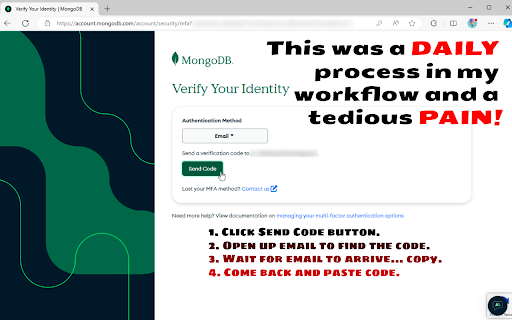


Autofill your MFA codes Product Details: Chrome Extension MFA (Multi-Factor Authentication Assistant) Overview The Browser Extension MFA (Multi-Factor Authentication Assistant) is designed to streamline the often-tedious process of multi-factor authentication. It retrieves the MFA code sent to your email and automatically fills in your authentication form, saving you from the hassle of manually handling the following steps: Clicking the "Send Code" button. Opening your email to find the code. Waiting for the email to arrive and copying the code. Returning to paste the code into the form. Maybe that doesn't sound like much, but I was getting hugely tired of developing into the evening while logged into MongoDB's Atlas UI and then starting the next morning only to find that I yet again needed to re-authenticate (which wouldn't be a problem if it weren't for the extra requirement of MFA...) One day I really dug into the settings searching for the toggle switch that would extend time login timeout but ultimately was unable to find any such life saver... I guess the joke will be on me if I find out that the setting does in fact exist. Regardless, this was a fun little project, so there's that. Key Features Automated MFA Code Retrieval: The extension uses OAuth (read-only access) to your specified Gmail address to fetch MFA codes. This ensures that the retrieval process is secure and seamless. Email Forwarding Compatibility: You can set up email forwarding to a less privileged email account if it suits your security needs better. Client-Side Operation: All operations are performed by default on the client side, with no backend server involvement, ensuring that your authentication credentials remain secure and private. Short-Term Authentication: The extension maintains authentication with Google for up to an hour (yes, yes, I know... what's the point right... well actually it is still easier because autofill of passwords is already being done, so now it's just extra clicks, but see the next point...). Long-Term Authentication (Optional): For those requiring longer offline access, a Cloudflare Worker is used to obtain a refresh token from Google, minimizing the need for frequent re-authentication and maintaining your development workflow with less interactivity. Open Source: The code for this extension is open source, providing transparency and allowing you to verify the security of the extension. As well, it's my hope that others have different workflows but with the same shared pain-point because adding additional code for those should be a breeze. How It Works Setup: Install the Chrome Extension MFA (Multi-Factor Authentication Assistant) from the Chrome Web Store, Edge-Addons, Firefox, or via GitHub releases (side-loaded). OAuth Authentication: Authorize the extension to access your Gmail account using OAuth. This access is read-only and only used to retrieve MFA codes. Email Forwarding (Optional): If desired, set up email forwarding from your primary MFA email account to another less privileged email account for added security. Automatic Code Retrieval: When an MFA code is sent to your email, the extension automatically retrieves it and fills in the authentication form for you. Session Maintenance: The extension maintains authentication with Google for up to an hour. For longer periods, you can use the refresh token option with a Cloudflare Worker. Security Client-Side Operation: The extension operates entirely on the client side, with no backend server processing your authentication credentials. Read-Only OAuth Access: The extension uses read-only access to your Gmail account, ensuring that it cannot alter or delete any emails. Transparency: As an open-source project, the extension's code is available for review, allowing you to inspect and verify its security measures. Benefits Time-Saving: Eliminates the need to manually retrieve and enter MFA codes, saving you valuable time and reducing the risk of errors. Increased Productivity: Streamlines your workflow, especially useful for developers and professionals who frequently need to authenticate. Enhanced Security: By automating the process and reducing manual handling, it minimizes the risk of exposing your MFA codes to potential threats. Getting Started Install the Extension: Download and install the Browser Extension MFA (Multi-Factor Authentication Assistant) from the Chrome Web Store, Edge-Addons, Firefox, or via GitHub releases (side-loaded). Configure Email Forwarding (Optional): If desired, set up email forwarding to another account. Authorize Gmail Access: Follow the prompts to authorize the extension to access your Gmail account via OAuth. Enjoy Seamless MFA: Let the extension handle the retrieval and input of MFA codes, enhancing your security and productivity. Support and Feedback For support, feedback, or to contribute to the project, visit our GitHub repository. Your input is valuable and helps us improve the extension for everyone. Conclusion The MFA (Multi-Factor Authentication Assistant) browser extension is a powerful tool designed to make multi-factor authentication effortless. With automated code retrieval, client-side operation, and optional long-term authentication, it enhances your security while saving you time. As an open-source project, it provides transparency and security you can trust. Install it today and experience the convenience and peace of mind it offers.

2FacTrac: One-Click Copy 2-Factor Authentication Email Codes and Links
Automatically finds verification codes and links from recent Gmail emails to simplify the authentication process. Get verification codes and links from your Gmail instantly, right in your browser. 2FacTrac automatically finds verification codes and links sent to your Gmail inbox, making two-factor authentication and account verification seamless. Key Features: • Instant Code Access: Automatically extracts verification codes from recent emails • Smart Link Detection: Finds verification links that match your current website • One-Click Copy: Copy verification codes with a single click • Direct Link Access: Open verification links directly from the extension • Domain Matching: Prioritizes links from the website you're currently visiting for security How It Works: When you need a verification code or link, simply click the extension icon. 2FacTrac checks your recent emails, extracts verification codes and domain-matching links, and displays them in a clean interface. No more switching between tabs or apps during sign-up or login processes! Privacy First: • Only accesses your Gmail with explicit permission • Only looks at recent emails (last 5 minutes) • Does not store your codes, links, or email content • Does not share any data with third parties • Only shows links that match the website you're currently on 2FacTrac makes two-factor authentication and account verification faster, easier, and more secure by bringing verification information directly to your browsing experience.

2FA Authenticator
This extension generates 2FA authentication codes in your browser. 2FA Authenticator is an alternative Chrome extension to Google Authenticator. You no longer need to use your phone to authenticate. This extension provides you with 2-step verification codes directly in your browser. Features: - OTP code verification in your browser - One-click verification code autocompletion - Scan QR codes from the page - Display QR codes for quick scanning - Upload QR code images - Backup your accounts in Google Drive - Open source

Free Password Manager & Authenticator & SSO
The free password manager extension comes with autofill & autologin including websites that support the Authenticator format. SAASPASS is a free Password Manager & Authenticator 2FA code generator with autofill & autologin capabilities. It is built with Security & Usability in mind. The SAASPASS password manager extension can autofill both your passwords AND authenticator codes enabling a smooth seamless experience and single sign-on SSO. There is NO need for a separate desktop password manager application with the SAASPASS browser extension. The password manager browser extension plugin is protected by two-factor authentication by default and includes passwordless 2FA like scanning an encrypted barcode and push login approval. The password keeper browser extension plugin is both phishing-proof and prevents man-in-the-middle attacks. The SAASPASS mobile app is available on the Apple App Store and Google Play. The iPhone and iPad version is available here: https://apps.apple.com/us/app/saaspass-authenticator-2fa-mfa/id849132027 The Android version is available here: https://play.google.com/store/apps/details?id=com.solidpass.saaspass&hl=en&gl=US You can access everything with copy/paste capabilities also from the SAASPASS web portal at: https://www.saaspass.com/sd/#/login The web portal is protected by multi-factor authentication by default, and includes passwordless MFA like scanning an encrypted barcode and push login approval. The SAASPASS Password Manager comes with over 100 thousand pre-configured websites and mobile apps There is the Authenticator 2FA code generator for websites and mobile apps The SAASPASS Security Scan identifies websites and apps that have Authenticator 2FA support, and also identifies Duplicate and Weak passwords The password manager and authenticator code generator has user initiated AutoFill & AutoLogin (prevents hijacking) The password manager addon is secured with passwordless 2FA There is SSL Detection and the browser extension only Autofills HTTPS sites The password manager add-on comes with SSO & Copy to clipboard The Web Portal Access comes with SSO & Copy to clipboard The Web Portal is secured with passwordless 2FA The 2FA on the browser extension is pinned and mitigates against Phishing and Man-in-the-Middle attacks Secure Notes - in this notes and password keeper you can store and vault all sorts of details both offline and optionally synced online with multiple devices There is a Strong Password Generator in the browser extension and mobile app SAASPASS comes with Multiple Device support and Device Management (including device removal) Tablet support (including landscape view and split screen on the iPad) Secure Backup & Restore options with SIM Swap prevention Universal Search is available for both the password manager and authenticator codes in the mobile app, web portal and browser extension Works on all platforms (Microsoft Windows, Apple Mac, Linux, iPhone, iPad, iOS and Android etc.) There is no need for a desktop application to be installed Sharing of Authenticator (TOTP & HOTP) codes supported (available for teams and enterprises) Mobile AutoFill with App Lock protection Password Manager, Authenticator & Secure Notes work with offline and online options Phishing proof logins logins from the password manager browser extension HOTP/TOTP support is adjustable and comes with support of 6,7 and 8 digit codes You can integrate the password manager with 2FA products twilio authy, google authenticator, microsoft authenticator, 1password, dashlane and duo security The mobile app is available in over 30 languages In addition to personal use, companies can also use SAASPASS for: Multi-factor authentication (MFA), Enterprise Password Manager, Single Sign-on (SSO) Shared Access Manager Share passwords Share Authenticator codes (TOTP & HOTP) with teams Share emails & applications Access Control Policies Adaptive Authentication Privileged Access Manager (PAM) Directory Services (including Microsoft Active Directory and LDAP) Endpoint Access Protection (enforce MFA on computers) Reporting & Audit Trail (internal SIEM & export to external SIEMs) Companies can sign up from the www.saaspass.com website. The Identity & Access Management (IAM) of SAASPASS can be used to integrate many business and productivity applications including email and collaboration suites There is pre-built out-of-the box integration to over 100 THOUSAND applications to services like Amazon, Facebook, Dropbox, Gmail, Twitter and Linkedin. Developers can integrate passwordless multi-factor authentication (MFA) services with RESTful API, ready code snippets in multiple languages and SDKs. More details on building two-factor authentication 2FA is available at: For enterprise customers there is support for hard tokens with TOTP, HOTP & FIDO U2F format and USB based Yubico Yubikey OTP. The mobile password manager and authenticator app has app protection that includes: Biometric Authentication TouchID FaceID Pattern Invisible Pattern Scrambled Keypad Fingerprint Authentication and Verification Facial Authentication and Verification You can import services as a CSV file from your Chrome browser or other formats from the SAASPASS web portal for services like Dashlane, Lastpass and 1Password. The 2FA (always required) to unlock your browser extension is phishing-proof and keylogger attacks are mitigated against. There are no static credentials, like a master password to unlock the browser extension, that can be used in a replay attack. Man-in-the-middle attacks are not possible as the 2fa is pinned to the browser. This makes the SAASPASS browser extension arguably have the highest level of security possible with extreme usability. Integrations of the Single Sign-on SSO solution include SAML, OIDC, RDP, VPN, okta, cyberark, onelogin, sailpoint, saviynt, simeio solutions, pingone, beyondtrust, avatier, roboform, avira, my1login, zoho vault, password boss, bitwarden, one identity, enpass, myki, nordpass, passwordstate, logmeonce, zenmate, blur, abine, lastpass, password depot, dropbox passwords, it glue, true key, x beta, norton security, microfocus, silverfort, kee, thycotic, avg, passbolt, total av, passwork, netiq, 1clickvpn, safeincloud, devolutions, steganos, remembear, keepasshelper, commonkey, aws iam, axiad, keepassxc, apple keychain, ping one, duo security, expressvpn, rapidIdentity, touch vpn, identity automation, ambius, kaseya, passly, directory services, metadata directories, Azure AD, Active Directory, LDAP and secure web based form-filling. You can even add passwordless MFA to Identity Providers (IdP) and Identity Governance solutions like idaptive, okta browser plugin, onelogin, ibm tivoli isam esso and oracle. You can set up the team password manager and team single sign-on by signing up in the company sign up. The team password manager can be used for all password sharing needs including making the passwords visible and invisible. The admin can share both the password manager and the authenticator codes (TOTP & HOTP) as well. The password manager & authenticator codes generated can be shared on mobile devices, the web portal and the browser extension. We have a limit of 500 login items in the personal use case for the free password manager and authenticator code generator. This is how we can offer the password manager for free for personal use while we charge companies. The secure notes keeper is stored in an encrypted vault and works offline by default. You can turn it online and have it synced with multiple devices as well. Keep us posted with your suggestions, feedback and ideas for improvements for the password manager and authenticator code generator. We look forward to it and always appreciate it! If you enjoy the service feel free to rate us. This helps us improve the password manager, secure notes keeper, password vault, and the authenticator code generator and our service to you. You can learn about more features about the password safe, encrypted vault, notes keeper and you can get the SAASPASS Free Password Manager & Authenticator for Mozilla Firefox, Google Chrome, Apple Safari, Microsoft Edge and Opera from www.saaspass.com

2! Authenticator
The private, offline 2FA Authenticator. Import accounts from mobile apps and generate TOTP codes securely 2! Authenticator: Secure 2FA in Your Browser Stop reaching for your phone every time you log in. 2! Authenticator brings secure, Time-based One-Time Passwords (TOTP) directly to your desktop browser. Fully compatible with the export features of major mobile authenticator apps, this extension keeps you in your workflow while maintaining top-tier security. 🚀 Why You’ll Love It Stay in the Zone: No need to unlock your phone or wait for insecure SMS codes. Your 2FA codes are just a click away in your toolbar. Bulk Import: Easily migrate your accounts! You can import multiple codes at once by scanning the export QR code from your mobile app. Smart Sorting: The extension detects the website you are currently visiting and automatically suggests the correct code at the top of the list. Universal Compatibility: Works with almost any online service that supports standard 2FA login. Scan: Use your webcam to scan a QR code (supports single accounts or bulk exports). Paste: Copy and paste a QR code image directly from your clipboard. Drag & Drop: Simply drag a QR code image into the extension window. Manual Entry: Type in the secret key provided by your service. 🔒 Privacy First We believe your security is paramount. Offline Operation: All logic is computed locally on your machine. Your codes are never sent over the internet. Zero Data Sharing: We do not share your data with third parties. Permissions: We only ask for permissions strictly necessary to scan codes (Camera/Active Tab) when you initiate the action. 💎 Premium Features (One-Time Fee: $2.99) Unlock the full potential of 2! Authenticator with a lifetime license: AES-GCM Encryption: Lock your vault with a personal password/PIN to prevent unauthorized access. Cloud Backup & Restore: Securely backup your vault to your preferred cloud service or hard drive. Never lose your access again. No Password Recovery: To ensure maximum security, we cannot reset your password/PIN if you lose it. If you forget your encryption PIN, your data cannot be recovered. Webcam Requirement: Importing multiple codes from mobile apps requires a webcam to scan the export QR code. New UI: Completely redesigned for ease of use. Smart Suggestions: Accounts affiliated with your active tab appear at the top. Improved Scanning: Faster webcam and webpage scanning.
