
jlblijoolikopdmpohcppphkidcdhkkf
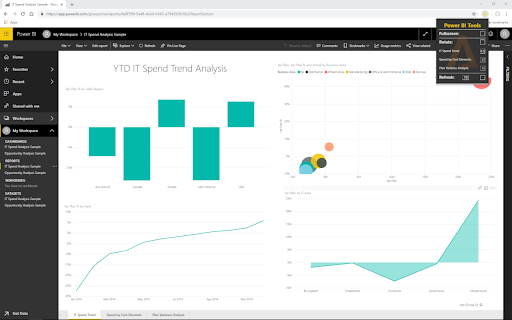


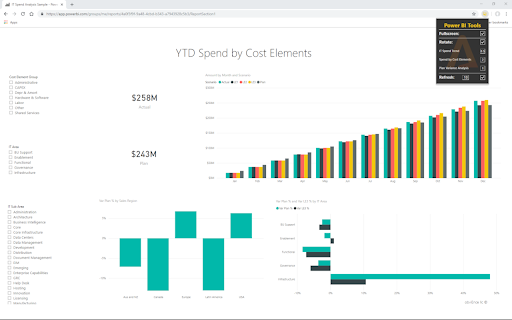
A plugin for Power BI that adds a couple of nifty features to reports that are either lacking or straight up missing. *Now works with the new redesign of Power BI!* You can: -Display a report in fullscreen mode. -Rotate between pages in a report based on a (per page) timer. -Refresh a report automatically. These options will stay active even if you switch to another tab, refresh the browser or even restart the browser. *The refresh option will only work if you are making use of a live dataset*

Tab Rotate
Loop through a set of tabs - ideal for Dashboards or display screens Allows Chrome to automatically cycle through a set of tabs. Ideal for a Dashboard or wall-mounted display. - Configured via a JSON file - Preloads tabs for smoother transitions - Configuration can be loaded from a remote server NOTE: Does not rotate through your currently open tabs Support the project on Patreon: https://www.patreon.com/kevdev

Power BI Slider
Display Power BI dashboards as slideshows on TVs and other screens. Control page rotations, refresh intervals, and more. With Power BI Slider, you can automate the presentation of your Power BI reports on TVs and other screens. All you need is a valid Microsoft Power BI account. The platform offers automation features such as rotating report pages, viewing time for each page, and intervals for checking data updates. The extension will be automatically enabled when you access your report through the Power BI Service (https://app.powerbi.com). By pressing the presentation button in the extension's popup, Power BI Slider will request your permission to access your report. Simply grant access and you will be automatically redirected to the presentation settings screen. If you need to create a presentation using more than one report, the platform even offers an exclusive feature called “Compositions,” which allows you to build your presentation using multiple reports.

BI Data Extractor by Table Capture
Extract data from business intelligence dashboards to Excel (XLSX) or CSV, including compatibility with Power BI. BI dashboards contain a lot of data, but often you can't simply copy/paste that data. The BI Data Extractor by Table Capture allows you to export tables and charts from these reports, views and dashboards to Microsoft Excel (as a .xlsx file), to CSV or to you clipboard. This extension adds export functionality to dashboards on Power BI (compatible with powerbi.com & powerbi.us). Not affiliated with Microsoft. Latest updates: - Internationalization: Chinese, Japanese, Russian, Vietnamese (February 2026) - Internationalization: French, Spanish, Portuguese (March 2025) - Added support for auto-scroll config (September 2024) - Added support for "Power BI for US government" (August 2024)

Coolors to Power BI Theme
Extracts color codes from Coolors palette pages and saves them as Power BI Theme JSON file - Developed by Vahid Doustimajd "Coolors to Power BI Theme" is a powerful extension that helps you to extract a Power BI theme from Coolors.co . With this extension, you can effortlessly extract color hex codes from Coolors palettes and create beautiful Power BI themes in just a few clicks. Here's what you can do with "Coolors to Power BI Theme": 1. Easy Palette Extraction: Browse Coolors.co to discover an endless array of stunning color palettes. When you find one that catches your eye, simply open the palette page. 2. Automatic Theme Generation: With a single click on the extension button, "Coolors to Power BI Theme" instantly downloads a Power BI theme JSON file based on the colors from your selected Coolors palette. 3. Ready to Use: Your Power BI JSON theme file is ready and you can import it into Power BI to check your reports and visualizations in your chosen color palette. 4. Customization Options: The generated theme JSON file is fully customizable, allowing you to fine-tune the color scheme to perfectly match your design preferences. Tailor your Power BI themes with ease and precision. 5. Time-saving Efficiency: Say goodbye to manual color selection and tedious theme creation. "Coolors to Power BI Theme" streamlines the process, saving you valuable time and effort. 6. Availability: The JSON theme file can be used in any report you have and it can be stored for future use Unleash your creativity and enhance your Power BI visualizations with the vibrant color palettes from Coolors.co. Download "Coolors to Power BI Theme" now and transform the way you design and present data in Power BI! In this new version, I have added exciting new functionality to enhance your experience. Now, our extension not only supports Coolors palette pages but also supports the 'Palette Generator' page. This means you can effortlessly extract color codes and create Power BI theme files from both Coolors palette pages and the dedicated creation page. Whether you're browsing existing palettes or designing your own, our extension has got you covered. Upgrade now and enjoy a seamless workflow with our improved compatibility and enhanced features!"
